![[Laser cut and engrave] Laser Engraved Wooden Cutting Board Our First Home Design](https://storage-us.atomm.com/resource/xtool/community/attachment/xtool-community/2ede94c6-64e9-488f-b13a-2dd0dae8597d.jpeg?x-oss-process=image/resize,w_1200,h_900,limit_0/interlace,1/format,webp/auto-orient,1)
Laser Engraved Wooden Cutting Board Our First Home Design
 Instruction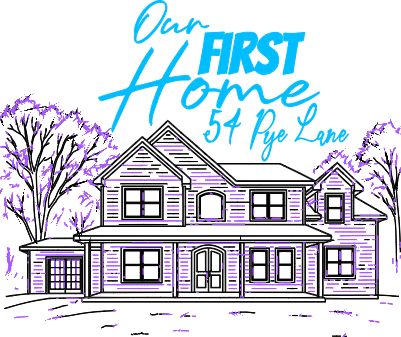


Information
Looking to create a unique housewarming gift for a friend or a coworker, here’s a great idea to start your creative journey.
Instruction
Step1
This project will be for each individual based on the house you would like to capture. The house pictured within this design is an example of what your project could look like. I would recommend finding a front view of the house that you would like to capture and then going to ChatGPT. You may use the prompt below to get the same style image in the template.
“Please provide me a single line drawing of this house to be utilized for a laser engraver? I would like to maintain as much detail as possible. this image exported into a high quality JPG.”
Step2
Once you have received your image, you can upload that image into X tool studio. I use the trace function on the picture which segregated the drawing into two parts based on colors. In the template above purple shows score And blue is engrave .Some of the design I decided to utilize engraving and a portion utilizing the score function to highlight some aspects. You’re more than welcome to play around with these settings to whatever fits your design best. The time of your engraving vary based on the amount of detail, but my trials have averaged from 30 to 45 minutes per cutting board.
I’ve tried out both small and medium lenses and I frequently stick to the medium lens. For settings, the preset edible oil acadia cutting board settings work fine. I would recommend your cutting board with a food grade cutting board oil after your engrave finishes.
Step3

Utilize the mask function based on the shape of board, this will save you time if generated design is a little bit larger than your cutting board. Since my board was circular, I created a circle mask in the diameter of the board. This eliminated any overlap on the edges while engraving and cut out the edge of the design that did not fit onto my cutting board.
The steps for creating a mask are fairly simple. attached a picture from XCS but studio will work as well.