









































Report
![[Laser cut and engrave] Laser Cut Thank You Sign with Green and Black Letters](https://storage-us.atomm.com/resource/xtool/community/attachment/xtool-community/4c1a1d1b-52e9-4dd9-9901-fea5777a68f4.jpeg?x-oss-process=image/resize,w_1200,h_900,limit_0/interlace,1/format,webp/auto-orient,1)
![[Laser cut and engrave] Laser Cut Thank You Sign with Green and Black Letters](data:image/png;base64,iVBORw0KGgoAAAANSUhEUgAAAAoAAAAKCAYAAACNMs+9AAAAAXNSR0IArs4c6QAAABdJREFUKFNjZCASMBKpjmFUId6QIjp4AAppAAuXjCs4AAAAAElFTkSuQmCC)
![[Laser cut and engrave] Laser Cut Thank You Sign with Green and Black Letters](https://storage-us.atomm.com/resource/xtool/community/attachment/xtool-community/4c1a1d1b-52e9-4dd9-9901-fea5777a68f4.jpeg?x-oss-process=image/resize,w_200,h_150,limit_0/interlace,1/format,webp/auto-orient,1)
![[Laser cut and engrave] Laser Cut Thank You Sign with Green and Black Letters](https://storage-us.atomm.com/resource/xtool/community/attachment/xtool-community/7a0e316c-6ab8-460a-a08e-2505b183ebce.jpeg?x-oss-process=image/resize,w_200,h_150,limit_0/interlace,1/format,webp/auto-orient,1)
![[Laser cut and engrave] Laser Cut Thank You Sign with Green and Black Letters](https://storage-us.atomm.com/resource/xtool/community/attachment/xtool-community/02ff20d9-3e72-4782-95ec-7050d67a9faf.jpeg?x-oss-process=image/resize,w_200,h_150,limit_0/interlace,1/format,webp/auto-orient,1)
![[Laser cut and engrave] Laser Cut Thank You Sign with Green and Black Letters](https://storage-us.atomm.com/resource/xtool/community/attachment/xtool-community/5af049c1-236c-4b3e-831c-54c4b9d6e03d.jpeg?x-oss-process=image/resize,w_200,h_150,limit_0/interlace,1/format,webp/auto-orient,1)
![[Laser cut and engrave] Laser Cut Thank You Sign with Green and Black Letters](https://storage-us.atomm.com/resource/xtool/community/attachment/xtool-community/92ea230e-68c5-4fbd-bf97-a1e3b8afc781.jpeg?x-oss-process=image/resize,w_200,h_150,limit_0/interlace,1/format,webp/auto-orient,1)
“Thank You xTool” – A Maker’s Gratitude Sign
 Instruction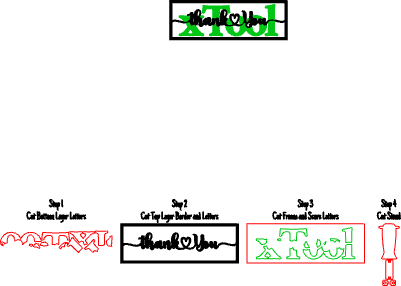
Thank You xTool
.xcs
Application scenario
Laser processing (30min)
Machine & module

xTool P2S
55WCompatibles · 8
Material used

1/8"(3mm) Black Acrylic
1
114
Information
      This project was created as a heartfelt thank-you to xTool for the countless opportunities they’ve provided to help me grow—not just as a maker, but as a small business owner. From offering a platform to showcase and sell my work, to hosting inspiring contests, encouraging collaboration, and trusting me as an official Host and Premium Creator, xTool has played a huge role in turning a hobby into something much more meaningful.

Measuring approximately 11 inches wide by 5 inches high, this sign is crafted from premium xTool acrylic in green, black, and white. The layered design creates strong visual contrast and depth, while the flowing script adds a personal, handcrafted feel. Framed cleanly and finished with precision, it’s a simple but powerful expression of appreciation—made by a maker, for the company that helped fuel the journey.

Sometimes the best projects aren’t about selling or competing—they’re about saying thank you.
Instruction
1
Step1: Quick Build Instructions – “Thank You xTool” Acrylic Sign

Preview

Preview

Preview

Preview
Material & File Setup
- Select your acrylic materials (green, black, and white) and load the project file into xTool Studio. Confirm your material thickness before starting.
Cutting Process
- Follow the cut order outlined in the file:
- Cut the xTool letters from green acrylic
- Cut the outer border from black acrylic
- Cut and score the backer from white acrylic
- Cut and assemble the stand from black acrylic
Assembly
Once all parts are cut:
- Glue the green xTool letters onto the white backer, using the score marks for perfect alignment
- Glue the black border and the “Thank You” script in place
- Allow the assembly to fully dry
Final Steps
- Attach the assembled stand to the back of the sign. Clean up any excess glue or residue, remove protective film if needed, and give it a final polish.
Display
- Find the perfect spot in your shop or crafting area and proudly display your very own THANK YOU to xTool.
Comments


