









































![[Laser cut and engrave] Laser Cut Wooden Countdown Ornament with Santa Face](https://storage-us.atomm.com/resource/xtool/community/attachment/xtool-community/3a3bd942-a946-4c88-8184-5af6132851b6.jpg?x-oss-process=image/resize,w_1200,h_900,limit_0/interlace,1/format,webp/auto-orient,1)
![[Laser cut and engrave] Laser Cut Wooden Countdown Ornament with Santa Face](data:image/png;base64,iVBORw0KGgoAAAANSUhEUgAAAAoAAAAKCAYAAACNMs+9AAAAAXNSR0IArs4c6QAAABdJREFUKFNjZCASMBKpjmFUId6QIjp4AAppAAuXjCs4AAAAAElFTkSuQmCC)
![[Laser cut and engrave] Laser Cut Wooden Countdown Ornament with Santa Face](https://storage-us.atomm.com/resource/xtool/community/attachment/xtool-community/3a3bd942-a946-4c88-8184-5af6132851b6.jpg?x-oss-process=image/resize,w_200,h_150,limit_0/interlace,1/format,webp/auto-orient,1)
![[Laser cut and engrave] Laser Cut Wooden Countdown Ornament with Santa Face](https://storage-us.atomm.com/resource/xtool/community/attachment/xtool-community/af1f69fb-9475-4f58-950c-27cd984071f2.jpg?x-oss-process=image/resize,w_200,h_150,limit_0/interlace,1/format,webp/auto-orient,1)
![[Laser cut and engrave] Laser Cut Wooden Countdown Ornament with Santa Face](https://storage-us.atomm.com/resource/xtool/community/attachment/xtool-community/e36e4388-ef0e-4573-be1a-58fda7aeb47c.JPG?x-oss-process=image/resize,w_200,h_150,limit_0/interlace,1/format,webp/auto-orient,1)
Laser Cut Wooden Countdown Ornament with Santa Face
 2025 Christmas Contest
 Instruction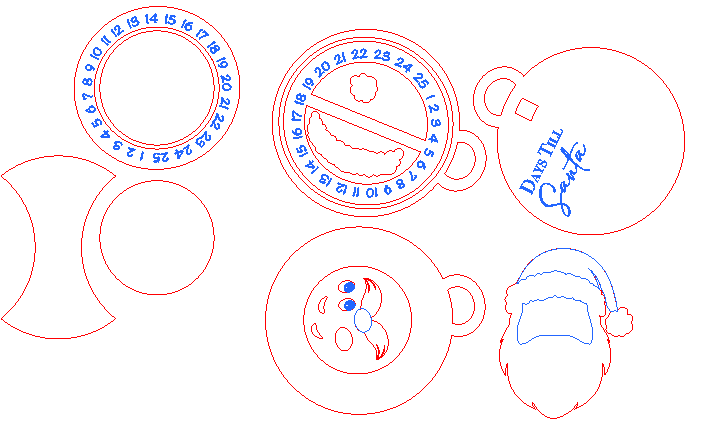


Information
      Many children leave for college and want to continue their holiday countdown to Christmas. A pocket or ornament sized countdown is the perfect size for the dorm.

The Christmas Countdown ornament is a perfect addition to any holiday decor. It can be customized or enlarged to hang as holiday decor.

There are two options for the back of the ornament to create the dial.
Instruction
Step1

My daughter wanted to continue the magic of a Christmas Countdown while away at school. I created a few versions for her to choose from. In Illustrator I created the designs using the various tools. Perfecting to final design where I uploaded the SVS to the Xtool site.
Step2

Paint a 5 inch square of green or chosen background color on 3mm basswood. Cut and engrave the ornament background with the words Days Until Santa or Days Till Santa. Can add a gold shimmer to ornament.
Step3

Cut and engrave remaining pieces on the unpainted 3mm basswood. Paint and add shadow to create dimension.
Step4


Decide which option you want for the countdown. If choosing the left option you can cut one of the center circles out of 1/16th wood.
Left option-glue the 2 circles together. Glue to center of the back irregular shape. Let dry. Place countdown dial on circle. Add glue to center circle and add dial. Align the dial so the countdown ends up in the center of the cutout.
Right option. Glue ornament back to ornament middle. Place countdown dial in center. Take a very small piece of the large circle scrap and glue to bottom of middle circle. Glue whole piece to ornament front.
Step5

Assemble and glue all the Santa pieces together building up the layers from the background.


