









































Report
![[Laser cut and engrave] Laser Cut Wooden Cassette Tape Birthday Card Holder](https://storage-us.atomm.com/resource/xtool/community/attachment/xtool-community/7210f247-1434-4c09-9d83-77794a422d9c.JPG?x-oss-process=image/resize,w_1200,h_900,limit_0/interlace,1/format,webp/auto-orient,1)
![[Laser cut and engrave] Laser Cut Wooden Cassette Tape Birthday Card Holder](data:image/png;base64,iVBORw0KGgoAAAANSUhEUgAAAAoAAAAKCAYAAACNMs+9AAAAAXNSR0IArs4c6QAAABdJREFUKFNjZCASMBKpjmFUId6QIjp4AAppAAuXjCs4AAAAAElFTkSuQmCC)
![[Laser cut and engrave] Laser Cut Wooden Cassette Tape Birthday Card Holder](https://storage-us.atomm.com/resource/xtool/community/attachment/xtool-community/7210f247-1434-4c09-9d83-77794a422d9c.JPG?x-oss-process=image/resize,w_200,h_150,limit_0/interlace,1/format,webp/auto-orient,1)
![[Laser cut and engrave] Laser Cut Wooden Cassette Tape Birthday Card Holder](https://storage-us.atomm.com/resource/xtool/community/attachment/xtool-community/ced911f1-6ee4-4dc3-941e-ee5038e49c30.JPG?x-oss-process=image/resize,w_200,h_150,limit_0/interlace,1/format,webp/auto-orient,1)
![[Laser cut and engrave] Laser Cut Wooden Cassette Tape Birthday Card Holder](https://storage-us.atomm.com/resource/xtool/community/attachment/xtool-community/a089eff4-d0c3-405a-887f-3c86ac39cd56.JPG?x-oss-process=image/resize,w_200,h_150,limit_0/interlace,1/format,webp/auto-orient,1)
![[Laser cut and engrave] Laser Cut Wooden Cassette Tape Birthday Card Holder](https://storage-us.atomm.com/resource/xtool/community/attachment/xtool-community/7aa6c4b2-efa8-4a79-80c8-d20296c52045.JPG?x-oss-process=image/resize,w_200,h_150,limit_0/interlace,1/format,webp/auto-orient,1)
🎶 Wooden Cassette Remix – Music You Can Touch
 Remix
Remix Instruction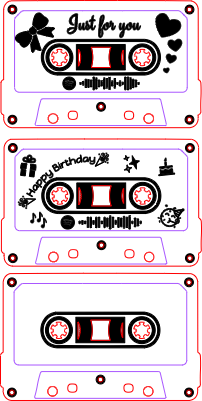
Cassette_CC0
.xcs
Application scenario
Laser processing (15min)
Machine & module

xTool M1 Ultra
20WCompatibles · 13
Material used

1/8"(3mm) Basswood Plywood

1/8"(3mm) Walnut Plywood
2
35
Information
      Some songs stay with us.
They remind us of people, late nights, first dances, long drives, or quiet moments we never really forgot. This project was created to give those memories a physical form — something you can touch, hold, and keep.

The wooden cassette brings back the feeling of mixtapes and handwritten labels, when music was shared with intention. In this remix, the classic design is enriched with warm walnut accents, adding contrast, depth, and a subtle elegance. Light wood and dark walnut come together like melody and rhythm — different, but made to belong together.

Instead of a simple decoration, this cassette becomes a small keepsake: a song, an album, or a playlist engraved into wood using a Spotify Code. No screens, no menus — just a quiet moment, a scan, and the music starts playing.

It’s not just about how it looks.
It’s about what it brings back.
This remix is based on

Laser Cut Wooden Cassette Tape Christmas Ornament with Customisable QR Code
 Ash Amadian
Instruction
1
Step1: Choose your song, album, or playlist 🎧
Decide what you want to link:
- a single song
- an album
- or a playlist
Tip: Songs with emotional meaning work especially well for gifts.
2
Step2: Create your Spotify Code
- Open the Spotify app on your phone or desktop or use this desktop link:
Spotify Codes - Go to the song, album, or playlist
- Click the three dots (⋯)
- Select “Share” → “Spotify Code”
- A scannable Spotify Code will appear
- Take a screenshot or export the image
This code is unique and works like a musical fingerprint.
3
Step3: Prepare the code for laser engraving
- Import the Spotify Code image into your vector or laser software
- Convert it to black & white (SVG files or converting it to svg using the trace function works best)
- Scale it to fit the cassette window
4
Step4: Choose your cassette design
This remix includes:
- classic cassette layout
- decorative symbols and icons
- Birthday version
- Valentines Version
- optional text areas (names, dates, short messages)
Pick the layout that best matches the mood of your song.
5
Step5: Laser cut & engrave 🔥
- Cut the cassette parts from wood
- Engrave the Spotify Code and decorative elements
- Test engraving depth so the code stays readable
A quick test on scrap wood is highly recommended.
6
Step6: Assemble the cassette
Glue or stack the layers carefully
7
Step7: How to play the Spotify Code ▶️
- Open the Spotify app
- Tap Search
- Tap the camera icon in the search bar
- Point the camera at the engraved Spotify Code
- The song or playlist opens instantly
No typing. No guessing. Just music.
Comments
Remixes
xTool Supplies Used in This Project


Related collections


Related tags
License

This work contains AI-generated content.