
Report
![[Laser cut and engrave] Laser Engraved Wood Color Chart Sample with Natural Bark Edge](https://storage-us.atomm.com/resource/xtool/community/attachment/xtool-community/e0cde9bb-b4aa-49f5-afe3-20491451831f.jpg?x-oss-process=image/resize,w_1200,h_900,limit_0/interlace,1/format,webp/auto-orient,1)
![[Laser cut and engrave] Laser Engraved Wood Color Chart Sample with Natural Bark Edge](data:image/png;base64,iVBORw0KGgoAAAANSUhEUgAAAAoAAAAKCAYAAACNMs+9AAAAAXNSR0IArs4c6QAAABdJREFUKFNjZCASMBKpjmFUId6QIjp4AAppAAuXjCs4AAAAAElFTkSuQmCC)
![[Laser cut and engrave] Laser Engraved Wood Color Chart Sample with Natural Bark Edge](https://storage-us.atomm.com/resource/xtool/community/attachment/xtool-community/e0cde9bb-b4aa-49f5-afe3-20491451831f.jpg?x-oss-process=image/resize,w_200,h_150,limit_0/interlace,1/format,webp/auto-orient,1)
![[Laser cut and engrave] Laser Engraved Wood Color Chart Sample with Natural Bark Edge](https://storage-us.atomm.com/resource/xtool/community/attachment/xtool-community/6eb3fcf4-fc21-4aa0-a56d-ed3ef953dc34.jpg?x-oss-process=image/resize,w_200,h_150,limit_0/interlace,1/format,webp/auto-orient,1)
Grille de test sur du BUIS pour M1 ULTRA 20W
 Instruction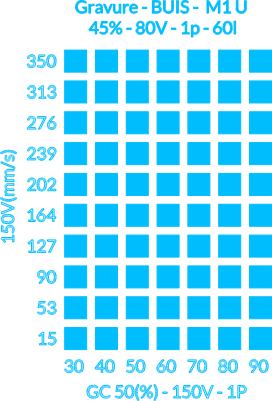
Untitled
.xcs
Application scenario
Laser processing (11.56min)
Machine & module

xTool M1 Ultra
20WMaterial used

BUIS MASSIF

7
694
Information
Find the right engraving parameters on boxwood only. Settings tested on the M1 ULTRA 20W.
Instruction
1
Step1
- Place your boxwood material placed on the M1 ULTRA grid
- Import the test grid and position it on the canvas and where the engraving is to be done
- Start the engraving
Comments
Remixes
License

This work contains AI-generated content.