
Report
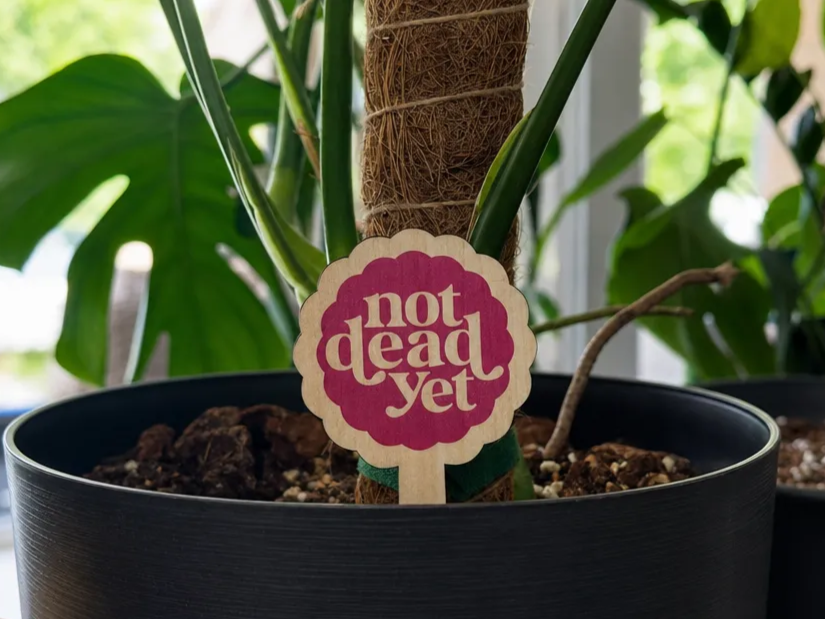
![[Laser cut and engrave] Custom indoor plant marker](https://image-res.atomm.com/resource/xtool/community/attachment/xtool-community/5be6dda9-221d-49d5-a0b8-5664aaf650a6?x-oss-process=image/resize,w_1200,h_900,limit_0/interlace,1/format,webp/auto-orient,1)
![[Laser cut and engrave] Custom indoor plant marker](data:image/png;base64,iVBORw0KGgoAAAANSUhEUgAAAAoAAAAKCAYAAACNMs+9AAAAAXNSR0IArs4c6QAAABdJREFUKFNjZCASMBKpjmFUId6QIjp4AAppAAuXjCs4AAAAAElFTkSuQmCC)
![[Laser cut and engrave] Custom indoor plant marker](https://image-res.atomm.com/resource/xtool/community/attachment/xtool-community/5be6dda9-221d-49d5-a0b8-5664aaf650a6?x-oss-process=image/resize,w_200,h_150,limit_0/interlace,1/format,webp/auto-orient,1)
![[Laser cut and engrave] Custom indoor plant marker](https://image-res.atomm.com/resource/xtool/community/attachment/xtool-community/8d2d9e80-f8b8-41fa-87c4-ac49c3a84d98/20240330_125912.jpg?x-oss-process=image/resize,w_200,h_150,limit_0/interlace,1/format,webp/auto-orient,1)
![[Laser cut and engrave] Custom indoor plant marker](https://image-res.atomm.com/resource/xtool/community/attachment/xtool-community/bae1e241-0574-4ada-931c-47e38d9aed83/20240330_125924.jpg?x-oss-process=image/resize,w_200,h_150,limit_0/interlace,1/format,webp/auto-orient,1)
Custom indoor plant marker
 Instruction
Monstera
.xcs
Application scenario
Laser (15min)
Machine & module

xTool S1
Compatible xTool Machine
New
M2
10W, 20WF2 Ultra UV
5WF2
15WP3
80WF2 Ultra
40WF1 Ultra
20WM1
5W, 10WD1
5W, 10W, 20WD1 Pro
5W, 10W, 20W, 40WP2
55WF1
10WS1
10W, 20W, 40WM1 Ultra
10W, 20WP2S
55WMaterial used

1/8"(3mm) Basswood Plywood

44
1364
Information
This is a plant marker for indoor plants, and this one is for monstera.
Instruction
1
Step1: Make your plant

Preview

Preview

Preview
2 More images
This step will involve inserting a plant for the top of my arrangement. I'm using a Monstera leaf, but you can choose any plant you like. Next, I will create an outline using the outline tool.
2
Step2: Make the stake

Preview

Preview

Preview
Now we will hide the interleaf and then create a long box that intersects the leaf outline.
3
Step3: Add the spike

Preview

Preview

Preview

Preview
Now you need to combine the large rectangle and the outer shape of the leaf. Now we need a spike for this. Grab a triangle, then unlink the triangle and put it on the bottom. After that, combine all the shapes.
4
Step4: Engrave

Preview

Preview

Preview
Now unhide the leaf, then add your text. For this one, I will add the text Monstera. Set the outer perimeter to cut, then the leaf and text to engrave. Now put on your laser-safe glasses and cut.
Comments
Remixes



You may also like

Garden plant marker

35
197

$3.98
$3.98
Credits398
Bundle
Plant Marker Bundles

16

Vegetable Plant Markers

0
7

Colorful Plant Markers for Cucumber, Squash, and Tomato

10
54
Free Plant Stakes Bundle - Engrave or Print and Cut Custom Plant Markers

0
2

Lattice plant trellis for indoor potted vines

1
14

I’d Pick You; Plant Gift Marker

26
186

Garden Plant Markers

0
10

Custom Wooden Garden Plant markers

45
297

Wooden Easter plant marker signs

19
70

Funny Plant Markers with Humorous Quotes for Potted Plants

13
71

$1.99
$1.99
Credits199
Houseplant Trellis Laser Cut Bundle, Indoor Plant Trellis, Garden Decor, Plant Trellis

10

Wooden Flower Plant Marker with Thank You Message

1
9

Plant stakes

9
82

Custom Garden Plant Stakes-Herbs and Veggies

172
880

'/%3e%3cdefs%3e%3clinearGradient%20id='paint0_linear_1433_15752'%20x1='12.5'%20y1='5'%20x2='12.5'%20y2='19.2596'%20gradientUnits='userSpaceOnUse'%3e%3cstop%20stop-color='%232F7FFF'/%3e%3cstop%20offset='1'%20stop-color='%232661F1'/%3e%3c/linearGradient%3e%3c/defs%3e%3c/svg%3e)
Laser Cut Wooden Flower Plant Markers in Terracotta Pots

4
43

Hanging Plant holder

47
88

Laser Engraved Wooden Plant Markers for Herb Garden

1
24