









































Report
![[Laser cut and engrave] Christmas tree Orntament](https://storage-us.atomm.com/resource/xtool/community/attachment/xtool-community/1cc5f632-0d1e-42fd-bd95-76786c554854.jpg?x-oss-process=image/resize,w_1200,h_900,limit_0/interlace,1/format,webp/auto-orient,1)
![[Laser cut and engrave] Christmas tree Orntament](data:image/png;base64,iVBORw0KGgoAAAANSUhEUgAAAAoAAAAKCAYAAACNMs+9AAAAAXNSR0IArs4c6QAAABdJREFUKFNjZCASMBKpjmFUId6QIjp4AAppAAuXjCs4AAAAAElFTkSuQmCC)
![[Laser cut and engrave] Christmas tree Orntament](https://storage-us.atomm.com/resource/xtool/community/attachment/xtool-community/1cc5f632-0d1e-42fd-bd95-76786c554854.jpg?x-oss-process=image/resize,w_200,h_150,limit_0/interlace,1/format,webp/auto-orient,1)
![[Laser cut and engrave] Christmas tree Orntament](https://storage-us.atomm.com/resource/xtool/community/attachment/xtool-community/e056f137-fc86-4891-a398-f8d7db0687a4.jpg?x-oss-process=image/resize,w_200,h_150,limit_0/interlace,1/format,webp/auto-orient,1)
Christmas tree Orntament
 Instruction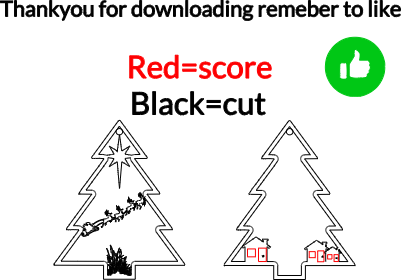
Untitled
.xcs
Application scenario
Laser processing
Machine & module

xTool M1
10WCompatibles · 14
Material used

1/8"(3mm) Walnut Plywood
66
701
Information
a laser cut Christmas tree ornament for the tree.
Instruction
1
Step1: cut

Preview
first resize your image then cut out the file with the material settings acoording to your xtool laser machine. I used 90% for cutting and speed 16% for scoring I used settings 60% and 60%.
2
Step2: clean

Preview
clean your laser cut project with xtool's premium gel called beezwax it helps make your projects look better and high quality for non-smellable creations try beezwax derections included.
Comments
Remixes
xTool Supplies Used in This Project


Related collections


Related tags
License

This work contains AI-generated content.