









































Report
![[Laser cut and engrave] Mouse Portrait - Laser engraved](https://storage-us.atomm.com/resource/xtool/community/attachment/xtool-community/2e9ae013-8df0-4798-8d41-5b19e5c6b463.jpg?x-oss-process=image/resize,w_1200,h_900,limit_0/interlace,1/format,webp/auto-orient,1)
![[Laser cut and engrave] Mouse Portrait - Laser engraved](data:image/png;base64,iVBORw0KGgoAAAANSUhEUgAAAAoAAAAKCAYAAACNMs+9AAAAAXNSR0IArs4c6QAAABdJREFUKFNjZCASMBKpjmFUId6QIjp4AAppAAuXjCs4AAAAAElFTkSuQmCC)
![[Laser cut and engrave] Mouse Portrait - Laser engraved](https://storage-us.atomm.com/resource/xtool/community/attachment/xtool-community/2e9ae013-8df0-4798-8d41-5b19e5c6b463.jpg?x-oss-process=image/resize,w_200,h_150,limit_0/interlace,1/format,webp/auto-orient,1)
![[Laser cut and engrave] Mouse Portrait - Laser engraved](https://storage-us.atomm.com/resource/xtool/community/attachment/xtool-community/009e2a48-90d4-414e-9cde-14c5788c2468.png?x-oss-process=image/resize,w_200,h_150,limit_0/interlace,1/format,webp/auto-orient,1)
![[Laser cut and engrave] Mouse Portrait - Laser engraved](https://storage-us.atomm.com/resource/xtool/community/attachment/xtool-community/fd088952-9df7-43bb-b198-4d6453258030.png?x-oss-process=image/resize,w_200,h_150,limit_0/interlace,1/format,webp/auto-orient,1)
![[Laser cut and engrave] Mouse Portrait - Laser engraved](https://storage-us.atomm.com/resource/xtool/community/attachment/xtool-community/4e42e576-92c7-4ffa-92ff-7882eba86408.jpg?x-oss-process=image/resize,w_200,h_150,limit_0/interlace,1/format,webp/auto-orient,1)
Mouse Portrait - Laser engraved
 Instruction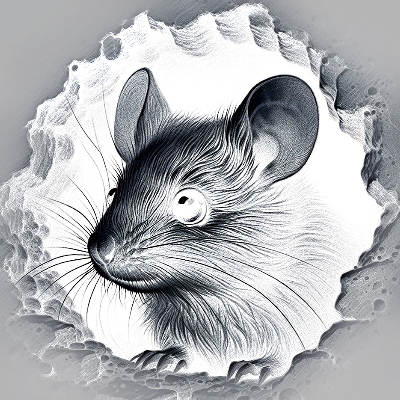
Mouseinhole-BrizDesign
.xcs
Application scenario
Laser processing
Machine & module

xTool F1 Ultra
20WCompatibles · 13
Material used

Rock
92
921
Information
Laser Engraved slate coaster with a cute mouse peeping from a hole
Instruction
1
Step1: Open file

Preview
Open the file in Xtool Studio.
This was the original image I used created with AI.
2
Step2: Settings

Preview
I inverted the image (the XCS file comes with the image already inverted)
You can find invert in EDIT-ADJUSTMENTS
I adjusted the contrast and sharpness
3
Step3: Frame and startSettings
Frame the design on your coaster, my coaster was 10x10cm.
Adjust the size if your coaster is different.
Start the job, and 4 minutes later you have your engraved coaster.
Comments
Remixes
xTool Supplies Used in This Project


Related collections


Related tags
License

This work contains AI-generated content.