
Report
![[Laser cut and engrave] Minimalist Laser Cut Wood Coffee Menu Wall Art](https://storage-us.atomm.com/resource/xtool/community/attachment/xtool-community/257ece80-648e-4b71-8108-72555a0594f6.webp?x-oss-process=image/resize,w_1200,h_900,limit_0/interlace,1/format,webp/auto-orient,1)
![[Laser cut and engrave] Minimalist Laser Cut Wood Coffee Menu Wall Art](data:image/png;base64,iVBORw0KGgoAAAANSUhEUgAAAAoAAAAKCAYAAACNMs+9AAAAAXNSR0IArs4c6QAAABdJREFUKFNjZCASMBKpjmFUId6QIjp4AAppAAuXjCs4AAAAAElFTkSuQmCC)
![[Laser cut and engrave] Minimalist Laser Cut Wood Coffee Menu Wall Art](https://storage-us.atomm.com/resource/xtool/community/attachment/xtool-community/257ece80-648e-4b71-8108-72555a0594f6.webp?x-oss-process=image/resize,w_200,h_150,limit_0/interlace,1/format,webp/auto-orient,1)
![[Laser cut and engrave] Minimalist Laser Cut Wood Coffee Menu Wall Art](https://storage-us.atomm.com/resource/xtool/community/attachment/xtool-community/69180dc6-8d8d-4904-827c-6a4479ffaff2.jpg?x-oss-process=image/resize,w_200,h_150,limit_0/interlace,1/format,webp/auto-orient,1)
![[Laser cut and engrave] Minimalist Laser Cut Wood Coffee Menu Wall Art](https://storage-us.atomm.com/resource/xtool/community/attachment/xtool-community/f7f38844-11cb-4ee4-bbd4-5547776c6a74.jpg?x-oss-process=image/resize,w_200,h_150,limit_0/interlace,1/format,webp/auto-orient,1)
COFFEE SHOP MENU LETTER BOARD
 Instruction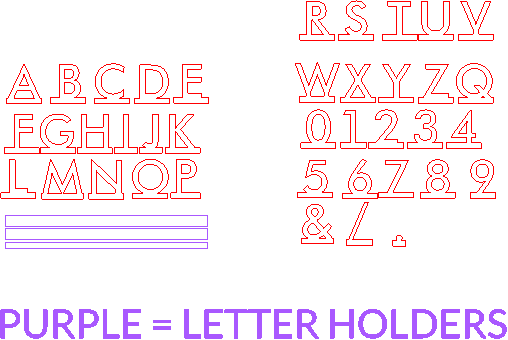
MENULETTERBOARDATOMM
.xcs
Application scenario
Laser processing
Machine & module

xTool F1 Ultra
20WCompatible xTool Machine
M2
10W, 20WF2 Ultra UV
5WF2
15WP3
80WF2 Ultra
40WM1
5W, 10WD1
5W, 10W, 20WD1 Pro
5W, 10W, 20W, 40WP2
55WF1
10WS1
10W, 20W, 40WM1 Ultra
10W, 20WP2S
55WMaterial used

1/8"(3mm) Sapele Plywood

9
1001
Information
Bistro style letter board for menu or decor
Instruction
1
Step1
Decide how big you want your menu to be.
To make the menu letters bigger, make sure you size all pieces together.
After you choose letter size Stretch only the three letter holder pieces to desired length.
Cut them out.
Paint or stain.
Glue three letter holders together with the skinnier piece in the middle. All pieces need to be lined up at the bottom.
Once dry, attach letter holder to desired location. Add letters.
Thank you! Please share your pics!
Comments
