![[Laser cut and engrave] Laser Cut Wooden Dad Best Ever Wall Art Decor](https://image-res.atomm.com/resource/xtool/community/attachment/xtool-community/c683d0f0-adc6-46e1-9f2a-3cd5030633f7?x-oss-process=image/resize,w_1200,h_900,limit_0/interlace,1/format,webp/auto-orient,1)
![[Laser cut and engrave] Laser Cut Wooden Dad Best Ever Wall Art Decor](data:image/png;base64,iVBORw0KGgoAAAANSUhEUgAAAAoAAAAKCAYAAACNMs+9AAAAAXNSR0IArs4c6QAAABdJREFUKFNjZCASMBKpjmFUId6QIjp4AAppAAuXjCs4AAAAAElFTkSuQmCC)
![[Laser cut and engrave] Laser Cut Wooden Dad Best Ever Wall Art Decor](https://image-res.atomm.com/resource/xtool/community/attachment/xtool-community/c683d0f0-adc6-46e1-9f2a-3cd5030633f7?x-oss-process=image/resize,w_200,h_150,limit_0/interlace,1/format,webp/auto-orient,1)
![[Laser cut and engrave] Laser Cut Wooden Dad Best Ever Wall Art Decor](https://image-res.atomm.com/resource/xtool/community/attachment/xtool-community/dc80b970-4060-4603-b585-ba9a77ba0d38.png?x-oss-process=image/resize,w_200,h_150,limit_0/interlace,1/format,webp/auto-orient,1)
![[Laser cut and engrave] Laser Cut Wooden Dad Best Ever Wall Art Decor](https://image-res.atomm.com/resource/xtool/community/attachment/xtool-community/126820df-8f8b-45be-a1fc-7cd1fc918ae2.jpeg?x-oss-process=image/resize,w_200,h_150,limit_0/interlace,1/format,webp/auto-orient,1)
![[Laser cut and engrave] Laser Cut Wooden Dad Best Ever Wall Art Decor](https://image-res.atomm.com/resource/xtool/community/attachment/xtool-community/2e566b9c-c2e2-4e47-a3c6-7abefbf0ef31.jpeg?x-oss-process=image/resize,w_200,h_150,limit_0/interlace,1/format,webp/auto-orient,1)
![[Laser cut and engrave] Laser Cut Wooden Dad Best Ever Wall Art Decor](https://image-res.atomm.com/resource/xtool/community/attachment/xtool-community/34713af2-e5b9-4028-8476-7263c11754eb.jpeg?x-oss-process=image/resize,w_200,h_150,limit_0/interlace,1/format,webp/auto-orient,1)
👨👧 “Best Dad Ever” – Layered Father’s Day Tribute
 Second Prize in 2025 Father's Day Contest
 Instruction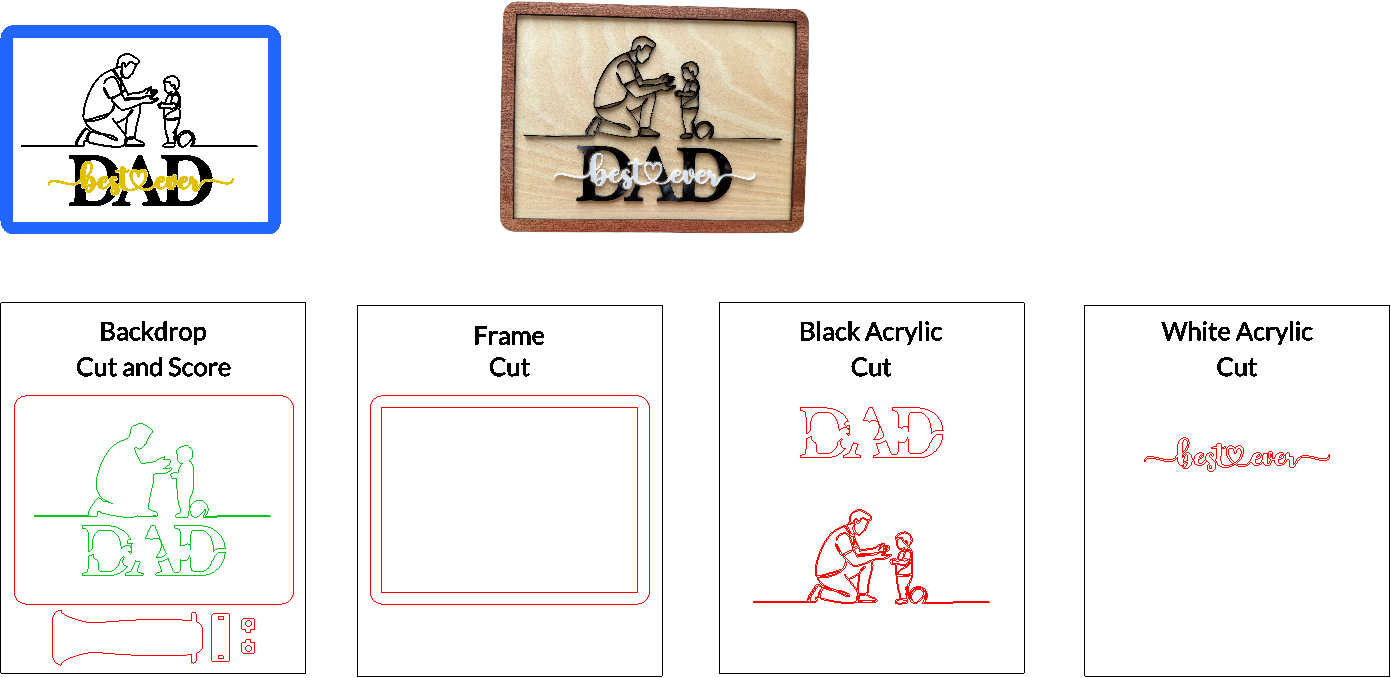


Information
      A Simple Moment. A Lasting Memory.

Celebrate the heart of fatherhood with “Best Dad Ever”, a layered keepsake crafted from 3mm black and white acrylic, basswood plywood, and okoume plywood. Featuring a tender silhouette of a dad kneeling to greet his child, with a playful ball at their feet, this design captures the beauty of everyday connection. The bold “DAD” lettering is softened by the elegant, flowing white acrylic script reading best ever—a timeless message in a clean, modern style.

Perfect for Father’s Day gifting or desktop décor, this piece speaks volumes with just a few lines—just like Dad.
Instruction
Step1: Prepare Your Workspace and Materials


Before you begin crafting your “Best Dad Ever” artwork, make sure you’re fully prepared with the following steps:
Gather Your Materials:
- 3mm black and white acrylic (for the silhouettes and the words)
- 3mm basswood plywood (for the background panel and stand)
- 3mm Okoume plywood (for the outer frame)
Load the Design File:
- Open the xTool Creative Space software.
- Import the “Best Dad Ever” design file into your project workspace.
Check Your Laser Settings:
- Focus: Ensure your laser module is properly focused on the material surface for clean and accurate cuts.
- Power & Speed: Double-check the recommended settings for each material type:
- Black acrylic – typically requires slower speed and higher power.
- Basswood/okoume plywood – medium power and speed often work best.
- Adjust as needed based on your specific machine and material batch.
Safety First:
- Never leave your laser unattended while it’s operating.
- Keep a fire extinguisher nearby and always monitor your workspace while cutting or engraving.
Step2: Cut Each Layer with Care


Now that your file is loaded and your laser is prepared, it’s time to begin the cutting process.
Verify or Adjust Settings:
- If you’re using an xTool P2, the recommended settings are already included in the project file—just follow those for optimal results.
- If you’re using a different xTool machine:
- Refer to the xTool materials database for tested power and speed settings.
- Adjust as needed for material thickness, machine wattage, and laser type.
Material-by-Material Cutting Guide:
- Okoume Plywood (3mm) – Cut the outer frame pieces.
- Basswood Plywood (3mm) – Score the background panel and cut the stand piece.
- Black and White Acrylic (3mm) – Cut the layered silhouettes and words.
Handle with Caution:
- As each set of pieces finishes cutting, gently remove them from your laser bed and set them aside in a safe space.
- Special note: The black acrylic silhouette layer is very delicate—handle it with care to avoid snapping or cracking fine lines or narrow joints.
Step3: Assemble and Finish the Artwork


With all your components cut and prepped, it’s time to bring “Mountain March” to life through careful assembly and finishing.
🪵 1. Frame Assembly
- Lay the basswood back panel flat on your workspace.
- Apply wood glue along the edges of the back panel, then place the Okoume frame pieces around it to form a border.
- Use clamps to hold the frame tightly in place. Allow to dry completely before moving on.
🪛 2. Stand Assembly
Refer to the stand pieces (shown above) which include:
- One tall vertical support
- One horizontal brace with two square slots
- Two pin-style locking tabs
- Apply glue to one side of the brace, then insert and attach the first locking tab.
- Slide the brace onto the main vertical stand piece, aligning the tabs with the notches.
- Insert the second locking tab and glue it into place.
- Allow the stand to dry fully before attaching it to the back of the frame if you choose to use the freestanding option.
🎨 3. Apply Protective Finish
Before attaching the acrylic layer, apply a coat of polyurethane to:
- The Okoume frame
- The basswood back panel
- Let the finish dry according to the product instructions.
🖼️ 4. Attach the Acrylic Scene
- Once the finish is dry, apply a thin, even layer of adhesive to the back of the black and white acrylic pieces.
- Carefully align and place it onto the front of the finished back panel.
To protect the delicate acrylic while clamping:
- Lay a flat scrap piece of wood over the silhouette layer.
- Clamp gently but firmly, and allow time for the adhesive to cure fully.
Step4: Enjoy!


Remixes
License



You may also like

You Were There... — A Timeless Tribute to Dad


A laser cut decorative wood sign for Dad on Father's Day


Best Dad Ever Father's Day Circular Wall Plaque


Best Dad Ever Wooden Sign Featuring Father and Son Fishing - Laser Engraving File - CNC Woodworking Pattern


Laser Engraved Wooden Best Dad Fishing Plaque


Father's Day Tradesman Laser Cut Hammer with Personalised Accessories as the Children + XCS Settings + PDF Tutorial Included


Metalfab Laser Cut Dad Saw With Engraved Wood Father's Day Plaque


Happy Father's Day Wooden Lasered Plaque with Father and Children

The Best Dad Ever - Father's Day Decorative Signs


GRANDMA GRANDPA Multi-layered inscriptions


Saw Fathers Day


Father's Day Present


Baseball Home Plate Sign for Dad with Stepping Up to the Plate Quote


Fathers Day Gift If Dad Can't Fix It No One Can Wooden Sign


Laser Engraved Father's Day Wooden Sign with Truck and Quote

Father Daughter Bike Scenic Cut and Engrave

Memorial Plaque with Dad Tribute

1930 Ford Model A Father's Day