






































![[Laser cut and engrave] 2W Material Test](https://image-res.xtool.com/resource/xtool%2Fcommunity%2Fmaking%2F7da1ff3b-a86e-47e3-b170-0b8abecf4166%2F20231124_101841.jpg?x-oss-process=image/resize,w_1200,h_900,limit_0/interlace,1/format,webp/auto-orient,1)
![[Laser cut and engrave] 2W Material Test](data:image/png;base64,iVBORw0KGgoAAAANSUhEUgAAAAoAAAAKCAYAAACNMs+9AAAAAXNSR0IArs4c6QAAABdJREFUKFNjZCASMBKpjmFUId6QIjp4AAppAAuXjCs4AAAAAElFTkSuQmCC)
![[Laser cut and engrave] 2W Material Test](https://image-res.xtool.com/resource/xtool%2Fcommunity%2Fmaking%2F7da1ff3b-a86e-47e3-b170-0b8abecf4166%2F20231124_101841.jpg?x-oss-process=image/resize,w_200,h_150,limit_0/interlace,1/format,webp/auto-orient,1)
![[Laser cut and engrave] 2W Material Test](https://image-res.xtool.com/resource/xtool%2Fcommunity%2Fmaking%2F3d1d8a75-b230-4c9c-beef-af900df21bce%2F20231124_094743.jpg?x-oss-process=image/resize,w_200,h_150,limit_0/interlace,1/format,webp/auto-orient,1)
2W Material Test
 Instruction


Information
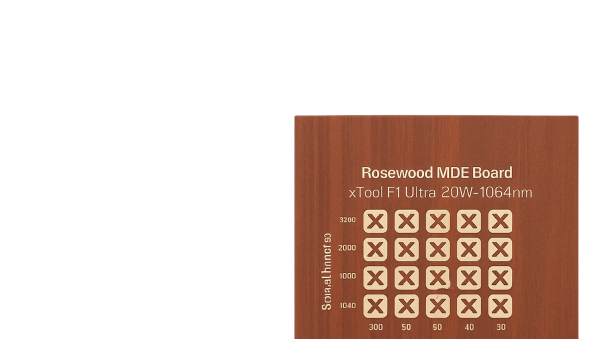
Material Test 2W laser on black acrylic
Instruction
Step1: Insert Shape into workspace

Insert a shape into work space. I used a rectangle. Ensure the shape is approximately the size of one square. In the array step it will multiply the shape.
Step2: Select Array

Click on the shape that was added in Step one. It will then allow you to click the array box. Select the number of boxes you want on the x and y and the spacing betwee the shapes. In this scenario I used 10 and 10 and 5 for the spacing.
Step3: Select speed and power settings for your scenario


Highlight all your shapes and select score, engrave, or cut. Once selected, decide which power and speed settings you want to use. You can change entire rows at once if you highlight the row so you don't have to adjust individual squares.
Step4: Process your image


Click process in the lower right, frame if you like, press start then following the directions on the screen push the button on the front right of the S1
Step5: Let laser finish processing


Once finished like and follow!


