
Report
![[Laser cut and engrave] Support surélevé en bois pour clavier d'ordinateur de bureau](https://image-res.atomm.com/resource/xart/result/317592/070db2bd-03b1-49e8-9d1e-3a3e8cb4ddb9.png?x-oss-process=image/resize,w_1200,h_900,limit_0/interlace,1/format,webp/auto-orient,1)
![[Laser cut and engrave] Support surélevé en bois pour clavier d'ordinateur de bureau](data:image/png;base64,iVBORw0KGgoAAAANSUhEUgAAAAoAAAAKCAYAAACNMs+9AAAAAXNSR0IArs4c6QAAABdJREFUKFNjZCASMBKpjmFUId6QIjp4AAppAAuXjCs4AAAAAElFTkSuQmCC)
![[Laser cut and engrave] Support surélevé en bois pour clavier d'ordinateur de bureau](https://image-res.atomm.com/resource/xart/result/317592/070db2bd-03b1-49e8-9d1e-3a3e8cb4ddb9.png?x-oss-process=image/resize,w_200,h_150,limit_0/interlace,1/format,webp/auto-orient,1)
![[Laser cut and engrave] Support surélevé en bois pour clavier d'ordinateur de bureau](https://image-res.atomm.com/resource/xtool/community/attachment/xtool-community/5f326289-90d9-4976-ad19-fe1a16ea9037.jpeg?x-oss-process=image/resize,w_200,h_150,limit_0/interlace,1/format,webp/auto-orient,1)
![[Laser cut and engrave] Support surélevé en bois pour clavier d'ordinateur de bureau](https://image-res.atomm.com/resource/xtool/community/attachment/xtool-community/235aa67a-1517-4eec-a014-4f0cfae909fd.jpeg?x-oss-process=image/resize,w_200,h_150,limit_0/interlace,1/format,webp/auto-orient,1)
![[Laser cut and engrave] Support surélevé en bois pour clavier d'ordinateur de bureau](https://image-res.atomm.com/resource/xtool/community/attachment/xtool-community/c91c7609-abdb-48b0-93f1-452e250e953b.jpeg?x-oss-process=image/resize,w_200,h_150,limit_0/interlace,1/format,webp/auto-orient,1)
![[Laser cut and engrave] Support surélevé en bois pour clavier d'ordinateur de bureau](https://image-res.atomm.com/resource/xtool/community/attachment/xtool-community/be07bae5-6160-4c22-9acc-83bceac2c167.jpeg?x-oss-process=image/resize,w_200,h_150,limit_0/interlace,1/format,webp/auto-orient,1)
![[Laser cut and engrave] Support surélevé en bois pour clavier d'ordinateur de bureau](https://image-res.atomm.com/resource/xtool/community/attachment/xtool-community/1a9d1820-ebe6-4704-8ce1-d6643c18c579.jpeg?x-oss-process=image/resize,w_200,h_150,limit_0/interlace,1/format,webp/auto-orient,1)
Raised Wooden Stand for Desktop Keyboard
 Instruction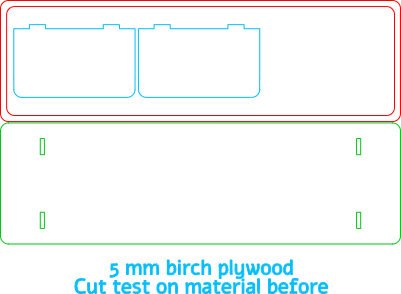
support clavier de bureau 5 mm
.xcs
Application scenario
Laser processing
Machine & module

xTool S1
40WCompatible xTool Machine
New
M2
10W, 20WF2 Ultra UV
5WF1 Ultra
20WM1
5W, 10WD1
5W, 10W, 20WD1 Pro
5W, 10W, 20W, 40WP2
55WF1
10WS1
10W, 20WM1 Ultra
10W, 20WP2S
55WMaterial used

1/4"(6mm) MDF

18
582
Information
      I wanted an elevated stand for my computer keyboard.
I also wanted to have the option to store the keyboard underneath the stand, and leave my phone and coffee cup on the stand.
Now I use the space under the stand to store my headphones, notebook, and computer mouse.
I think I couldn't do without it because it's too practical for the storage space under the keyboard.
NOTE: I used 6mm plywood to complete this project.
Instruction
1
Step1
I used 5mm thick birch plywood for this backing.
If you don't have plywood or 5 mm MDF, just change the width of the 4 notches. Check that they are still in the same alignment.
If you can't make it, leave a request in the comments, and I'll make the XCS file suitable for your plywood thickness.
I don't recommend using a lower thickness because the support will be less solid.
Use cutting settings that are appropriate for your materials and machine.
Cut out the elements.
Clean the soot from the cut edges.
Glue the frame to the tray.
Glue the feet.
It's over.
Comments
Remixes



You may also like

Wooden Snail Tongs Stand

1
3

Wooden phone holder with deer head pattern

1
6

Wooden phone holder in the shape of a lion for children

25
102
Printer support

28
59

Wooden phone holder with pandas illustration

4
10

Wooden display stand for plates and frames

6
52

Cell phone holder

0
37

Support en bois découpé au laser pour flûtes décoratives marocaines

8
22

Personalized engraved wooden phone holder with cyclists and name Antonin

1
6

Wooden Storage Rack for Test Tubes with Colored Beads

2
13

Wooden stand for digital tablet
9
28

support
37
440
Wooden Phone Holder in the Shape of a Rabbit TV
16
38

Support de téléphone en bois en forme d'Arc de Triomphe

3
4

Wooden phone holder with lion head pattern
1
12

$0.90
$0.90
$3.00
Credits90
wooden cork display - support en bois pour bouchon

19

Black Presentation Stand for Frames

13
226

Laser cut wooden wall bracket for curtain rod
2
9