
![[Laser cut and engrave] How to Make a Domino Hub](https://image-res.atomm.com/resource/xtool/community/attachment/xtool-community/e1af39b5-268c-45ae-b7bb-02d6a1138135?x-oss-process=image/resize,m_fill,w_1280,h_960,limit_0/interlace,1/format,webp/auto-orient,1)


![[Laser cut and engrave] How to Make a Domino Hub](data:image/png;base64,iVBORw0KGgoAAAANSUhEUgAAAAoAAAAKCAYAAACNMs+9AAAAAXNSR0IArs4c6QAAABdJREFUKFNjZCASMBKpjmFUId6QIjp4AAppAAuXjCs4AAAAAElFTkSuQmCC)
![[Laser cut and engrave] How to Make a Domino Hub](https://image-res.atomm.com/resource/xtool/community/attachment/xtool-community/e1af39b5-268c-45ae-b7bb-02d6a1138135?x-oss-process=image/resize,m_fill,w_160,h_120,limit_0/interlace,1/format,webp/auto-orient,1)
![[Laser cut and engrave] How to Make a Domino Hub](https://image-res.atomm.com/resource/xtool/community/attachment/xtool-community/b3e5c394-2fdc-4e9c-aeb9-80cf2957eac5/Slide1.JPG?x-oss-process=image/resize,m_fill,w_160,h_120,limit_0/interlace,1/format,webp/auto-orient,1)
![[Laser cut and engrave] How to Make a Domino Hub](https://image-res.atomm.com/resource/xtool/community/attachment/xtool-community/f25daa38-5012-4e38-bf07-33569d2042c5/20240607_131756.jpg?x-oss-process=image/resize,m_fill,w_160,h_120,limit_0/interlace,1/format,webp/auto-orient,1)
![[Laser cut and engrave] How to Make a Domino Hub](https://image-res.atomm.com/resource/xtool/community/attachment/xtool-community/b5fa1d27-53b6-41a3-af8d-7aa59e172854/20240607_135105.jpg?x-oss-process=image/resize,m_fill,w_160,h_120,limit_0/interlace,1/format,webp/auto-orient,1)
How to Make a Domino Hub
 Instruction


Information
      Learn how to create this cute domino hub for your next family game night.  It can be used for popular games, such as, Chicken Foot and Mexican Train.
I'll be using Creative Space 2.0 for this project.
Instruction
Step1: Create the Domino Shape

Measure your domino. Now draw a rectangle and resize it to that dimension and add .1". For example, my domino measures 1" x 2" so I have resized my rectangle to 1.1" x 2.1".
Add a radius of 0.2.
Place the shape toward the top left corner of your work area.
Step2: Use the Circular Array Tool


Make a copy of the rectangle and place it towards the upper center of the work area. Draw a 6" circle and place it so that is overlaps the bottom quarter of the domino shape.
With the domino shape selected open the “Application" menu Do not change the values in the x and y boxes. Start = 0 – End = 360 – Step = 45 – Copies = 8 (See picture)
Click on the upper arrow of the “Y” dimension and hold, the software will start to space out the other 7 rectangles. Stop when it looks like they are evenly spaced. Click OK.
The 8 rectangles will automatically be grouped. Select both the rectangles and the circle and from the “Align” tools select “align center”
With these items still selected go to the “Combine” tool and select “Subtract”
Take the original rectangle and place it into the center of the hub. Use the “align center” to ensure it is centered. Select both the hub and the rectangle and from the “Combine” tool select “subtract from overlap”.
Step3: Personalize
Personalize your domino hub as you please, for example, family name, game name, etc.
Step4: Prepare for Laser

This project has 2 parameters: Cut and Engrave.
Cut = Red layer
Black = Engrave
Step5: Finished Example

Remove the domino hub from the laser and give it a wipe with a soft cloth. Stand back, admire your work, haha, and enjoy your next game night.
Remixes
License



You may also like

Mexican train set


Wooden domino set with storage box.


Zoo Laser Dominos: Fauna Precision-Carved


domino


Domino Duo Box: Laser Plans for Stackable Storage with Customizable Lid

Wooden Triominos board game with sliding storage box

Jeu de dominos


Kids Dominoes Wooden Game Laser Cut Bundle. Educational Games for Kids. Wooden Toys. Children's Plays


Laser Spooky Dominos: Thrills Etched in Wood

EASTER DOMINO


3D Family Game Cases Bundle. Board Game Box Laser Cut Files. Wooden Game Holder. Family Activity SVG. Tic Tac Toe. Dominoes. Checkers


jeu domino chiffre scheme


Precision Transit Dominos: Journeys Laser-Traced

A pocket Farkle Dice Game Scoreboard with Scoring Reference
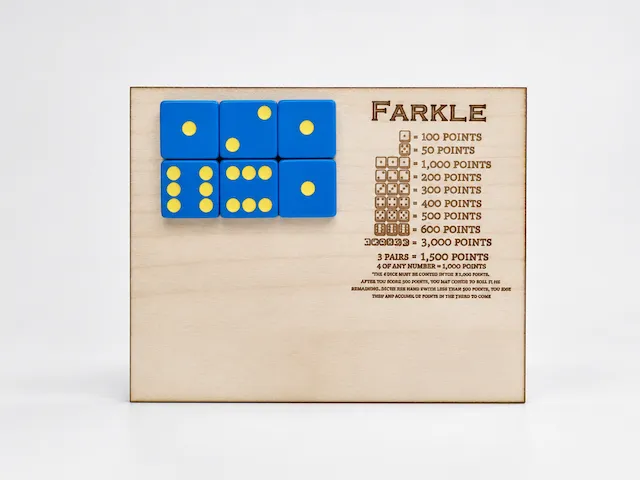
A pocket Farkle math game

Laser Cut Wooden Tic Tac Toe Game Set with Keychain Pieces


Dart Holder Organizer Laser File Dart Holder Wall Mount Laser Cut File SVG Cut File Lasercut File 3mm and 4mm DXF File Dart Pfeil Wandhalterung


Lasergeschnittenes Tic Tac Toe Spiel
