
![[Laser cut and engrave] Laser Cut Wooden Monitor Stand Riser with Cable Management](https://storage-us.atomm.com/resource/xtool/community/attachment/xtool-community/6f2bbb36-6944-461a-b935-21ef3336d1a9.jpeg?x-oss-process=image/resize,w_1200,h_900,limit_0/interlace,1/format,webp/auto-orient,1)
![[Laser cut and engrave] Laser Cut Wooden Monitor Stand Riser with Cable Management](data:image/png;base64,iVBORw0KGgoAAAANSUhEUgAAAAoAAAAKCAYAAACNMs+9AAAAAXNSR0IArs4c6QAAABdJREFUKFNjZCASMBKpjmFUId6QIjp4AAppAAuXjCs4AAAAAElFTkSuQmCC)
![[Laser cut and engrave] Laser Cut Wooden Monitor Stand Riser with Cable Management](https://storage-us.atomm.com/resource/xtool/community/attachment/xtool-community/6f2bbb36-6944-461a-b935-21ef3336d1a9.jpeg?x-oss-process=image/resize,w_200,h_150,limit_0/interlace,1/format,webp/auto-orient,1)
![[Laser cut and engrave] Laser Cut Wooden Monitor Stand Riser with Cable Management](https://storage-us.atomm.com/resource/xtool/community/attachment/xtool-community/3aa3347c-4a1e-4ae9-b7c2-cdfbaf75e938.jpeg?x-oss-process=image/resize,w_200,h_150,limit_0/interlace,1/format,webp/auto-orient,1)
Uchwyt na materiał dla S1
 Instrukcja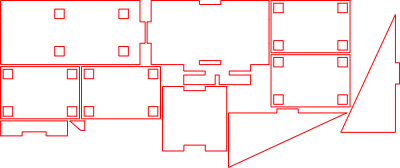


Informacja
Ten uchwyt na szpilki z materiału wycinanego laserowo został zaprojektowany specjalnie dla xTool S1, zapewniając zorganizowany i stabilny sposób przechowywania szpilek materiałowych podczas projektów laserowych. Konstrukcja zapewnia wytrzymałość i precyzję, a kompaktowa konstrukcja ułatwia dostęp do pinów w Twoim miejscu pracy. Idealne do poprawy pracy i utrzymania porządku w ustawieniu lasera.
Instrukcja
Krok1: Wycięte laserowo wszystkie części

Wytnij laserowo wszystkie wymagane części z wybranego materiału.
Krok2: Przymocuj pierwszą ścianę boczną

Przyklej pierwszą ścianę boczną do płyty podstawowej, jak pokazano na zdjęciach.
Krok3: Przymocuj drugą ścianę boczną

Przyklej drugą boczną ścianę, starannie ją ustawiając.
Krok4: Przymocuj tylną ścianę

Przyklej tylną ścianę do zespołu, jak pokazano na obrazach.
Krok5: Przyklej mały boczny element

Przyklej mały boczny element do płyty bazowej.
Uwaga: Pozycjonowanie jest wyraźnie pokazane na obrazach.
Krok6: Dodaj mały element wzmocnienia

Przyklej mniejszą część wzmocnienia na miejsce, jak pokazano na obrazach.
Krok7: Złóż blok uchwytu na sworzeń

Sklej cztery identyczne płytki razem, upewniając się, że są idealnie wyrównane i równe.
Krok8: Zamontuj blok uchwytu na sworzeń

Przyklej złożony blok do dużej płyty, dokładnie wyrównując go z otworami.
Krok9: Montaż końcowy

Przyklej gotową jednostkę do płyty bazowej, jak pokazano na zdjęciach.
Krok10: Gotowy do użycia

Włóż sworznie materiałowe do wyznaczonych otworów — uchwyt jest gotowy do użycia.
Krok11: Zamontuj uchwyt na sworzeń do xTool S1

Lekko podnieś xTool S1 i wsuń uchwyt na sworzeń materiałowy z boku. Ostrożnie opuść maszynę, aby uchwyt był mocno zacisnięty pod spodem.
Upewnij się, że uchwyt jest umieszczony między stopami maszyny, a nie bezpośrednio pod jedną z nich.
Remiksy



Możesz również polubić

Uchwyt na magnetyczny pin plastra miodu S1


Przyrząd do grawerowania ołówkiem do Xtool S1


Plansza organizacyjna na sznurówki, taśmy


miernik wysokości/głębokości M1

szablon do wizytówki 85mm x 55mm szablon wycinanego laserowo


Płyta wieloszablonowa


Przyrząd do tablicy z nazwą S1-40 watów

Laserowo wycięta drewniana tacka na małe metalowe etykiety w formie JIG 38x25

Drewniany breloczek


Przystawka do wizytówek z podstawą F2


Dystans materiałowy stosowany z pinami materiałowymi xTool Honeycomb


Przyrząd do miękkich długopisów xTool S1


Przyrząd laserowy do aluminiowego otwieracza do butelek z drewnem 2 mm

Laserowo wycięty szablon F1 z oznaczeniami siatki i okręgami

Aluminiowy przyrząd do otwierania butelek


Zestaw breloków 27x64mm M1 Ultra

Pomoc malarska


Laserowo wycięty drewniany przyrząd do kolejki 4"
