Report
![[Laser cut and engrave] Hat Patch](https://image-res.atomm.com/resource/xtool/community/attachment/xtool-community/fcc2cf99-4108-48ad-8861-ae1a147f6b34?x-oss-process=image/resize,m_fill,w_1280,h_960,limit_0/interlace,1/format,webp/auto-orient,1)
![[Laser cut and engrave] Hat Patch](data:image/png;base64,iVBORw0KGgoAAAANSUhEUgAAAAoAAAAKCAYAAACNMs+9AAAAAXNSR0IArs4c6QAAABdJREFUKFNjZCASMBKpjmFUId6QIjp4AAppAAuXjCs4AAAAAElFTkSuQmCC)
![[Laser cut and engrave] Hat Patch](https://image-res.atomm.com/resource/xtool/community/attachment/xtool-community/fcc2cf99-4108-48ad-8861-ae1a147f6b34?x-oss-process=image/resize,m_fill,w_160,h_120,limit_0/interlace,1/format,webp/auto-orient,1)
![[Laser cut and engrave] Hat Patch](https://image-res.atomm.com/resource/xtool/community/attachment/xtool-community/b92dbf0c-85df-4cc4-b007-3ff568015989.jpg?x-oss-process=image/resize,m_fill,w_160,h_120,limit_0/interlace,1/format,webp/auto-orient,1)
![[Laser cut and engrave] Hat Patch](https://image-res.atomm.com/resource/xtool/community/attachment/xtool-community/80a9344b-94fa-44ab-a8f8-c52addab23ea.jpg?x-oss-process=image/resize,m_fill,w_160,h_120,limit_0/interlace,1/format,webp/auto-orient,1)
Hat Patch
 Instruction
Files

Original files
AuthorS1 · leather sheet
1


Add Make Profile
Same design, different machine or material · Earn 100 Credits

30
1964
Information
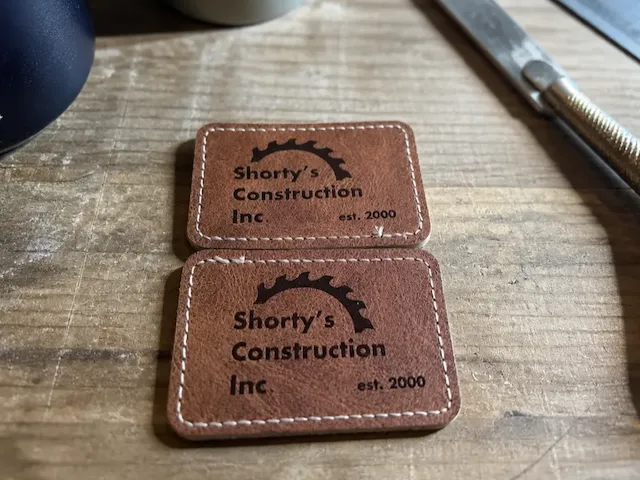
Nice way to show a logo on the brim of a hat.
Instruction
1
Step1: Design

Preview

Preview

Preview
5 More images
- This project starts by placing leather material in machine
- Once in place the 2 point position system is used to map the material
- Now a size can be set in the software for the engraving and cutting of the leather.
- With all parts of the 2 sided logo created the adjustments are set
- With all cutting scoring and engraving adjustments ready it is time to send to be processed.
- When machine has finished it is time to heat the xTool mini heat press.
- With the heat press on high the leather is heated to adhere to the hat on both the top and bottom of the brim.
- Press time is 12 seconds @385F
- Now with any custom logo it is ready to be enjoyed.
Comments
Remixes
License



You may also like
Shorty's Construction Inc. Rectangular Faux Leather Patch

0
0

Patches Patch Formula 1 Racing Car Clothing & Accessories Labels

5
6

Black metal card with X logo and XTOOL S1 40W lettering

0
12

Leather patch jig round, square and squoval

21
69

'/%3e%3cpath%20d='M15.9997%2019.3335L11.833%2014.3335H14.333L15.9997%2017.6668L17.6663%2014.3335H20.1663L15.9997%2019.3335Z'%20fill='white'/%3e%3c/g%3e%3cdefs%3e%3clinearGradient%20id='paint0_linear_1412_57140'%20x1='16'%20y1='7.6665'%20x2='16'%20y2='24.3332'%20gradientUnits='userSpaceOnUse'%3e%3cstop%20stop-color='%23FFA15F'/%3e%3cstop%20offset='1'%20stop-color='%23E37C32'/%3e%3c/linearGradient%3e%3c/defs%3e%3c/svg%3e)
Patriotic Combine Harvester SVG DXF | Farm Flag Design for Laser

1
21
.PNG?x-oss-process=image/resize,m_fill,w_640,h_480,limit_0/interlace,1/format,webp/auto-orient,1)
xTool T-shirt

22
106

leather hat patch on adjustible hat

0
0

Black Plastic Xtool Cover lens

21
346
'/%3e%3c/g%3e%3cdefs%3e%3clinearGradient%20id='paint0_linear_1737_57170'%20x1='16.5097'%20y1='8.87061'%20x2='16.5097'%20y2='23.3945'%20gradientUnits='userSpaceOnUse'%3e%3cstop%20stop-color='%232E9AFF'/%3e%3cstop%20offset='1'%20stop-color='%233378FF'/%3e%3c/linearGradient%3e%3c/defs%3e%3c/svg%3e)
Good Dad Gang Leather Patch

0
0

Custom Leather Hat Patch-Country Roads

19
139

Remix of a Leather Patched Hat

7
18

hat patches

88
567

Day Drinking Hat Patches
11
26

Leather laser engraved hat patch

56
307

Storage Box for S1 20W module

4
28

Hat with Area 51 Leather Patch engraving

2
6

Swansboro Football Hat Patch

0
3

Patched Hat

57
204