
![[Laser cut and engrave] Cocker Spaniel Portrait Glass Christmas Ornament](https://image-res.atomm.com/resource/xtool/community/attachment/xtool-community/cd64a3d2-ed0a-4159-8aae-188a5b1e7cd8.jpg?x-oss-process=image/resize,w_1200,h_900,limit_0/interlace,1/format,webp/auto-orient,1)
Cocker Spaniel Portrait Glass Christmas Ornament
 Instruction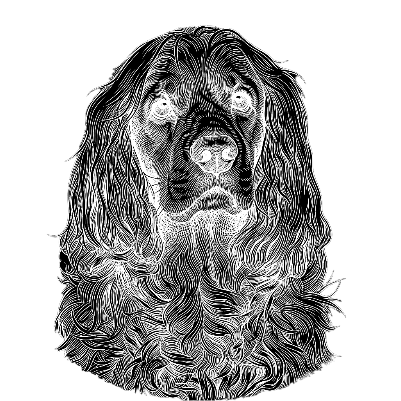


Information
Custom engraved glass Christmas ornament using a processed photo of my Cocker Spaniel. The image was enhanced with AI and optimized in xTool Creative Space for clean and detailed laser engraving.
Instruction
Step1
Step 1: Prerequisites
-- Tools and materials --
- xTool F2
- Glass Christmas ornament
- Black metal business card
- xTool Creative Space (XCS)
- Isopropyl alcohol
- Cloth
Step 2: Image preparation
I used a photo of my Cocker Spaniel and processed it with AImake using the preset “Exquisite Carvings · Vintage Pen Drawing”. After that, I imported the image into xTool Creative Space and applied Auto Adjust and Invert to prepare it for engraving.
Step 3: Setup
Before engraving the glass ornament, I focused the laser on a black metal business card. Then I placed the glass ornament on top of the card to ensure proper focus and engraving quality.
Step 4: Engraving
Start the engraving process with the prepared image. Make sure the ornament is stable and correctly positioned during the entire process.
Step 5: Finishing
After engraving, clean the engraved area using isopropyl alcohol and a cloth. Let it dry well and check the final result.
Remixes
License


.jpg?x-oss-process=image/resize,m_fill,w_240,h_240,limit_0/interlace,1/format,webp/auto-orient,1)


You may also like

Personalized Dog Ornament


Personalized Paw Print Ornament with Names


personalized dog Christmas ornament


Bubba Christmas Dog Ornament


Paw Dog Christmas Ornament


Laser Engraved Wooden Dog Ornaments with Hanging Loop

Laser Cut Merry Woofmas Dog Christmas Ornament Decoration


Laser Cut Personalized Dog Paw Christmas Ornament Bruce

Wooden Paw Print Christmas Ornaments with Floral Accents


Bernese Mountain Dog Christmas Ornament


3D Christmas pet ornament. Pet ornament laser cut, Merry Christmas quotes svg. Cats and dogs bauble. Wooden xmas tree toy


Laser Cut Dog Ornament SVG | Pet Name Bauble | Wood Engraved Style Christmas Decoration


Spaniel Heart-Shaped Christmas Ornamen


Personalised 1st Christmas 2026 Dog Portrait Ornament


Laser Cut Merry Christmas Dog Paw High Five Ornament


Layered dog bone shape with name


Laser Cut Wooden Dog Paw and Gift Christmas Tree Ornaments


Customizable Dog Christmas Ornament
