![[Laser cut and engrave] Laser Cut Wooden Name Sign Sofia Decorative Wall Art](https://image-res.atomm.com/resource/xtool/community/attachment/xtool-community/ac00d5bb-b43e-4dff-ad40-82d91548d645?x-oss-process=image/resize,w_1200,h_900,limit_0/interlace,1/format,webp/auto-orient,1)
라탄 글자 S
 설명서
설명서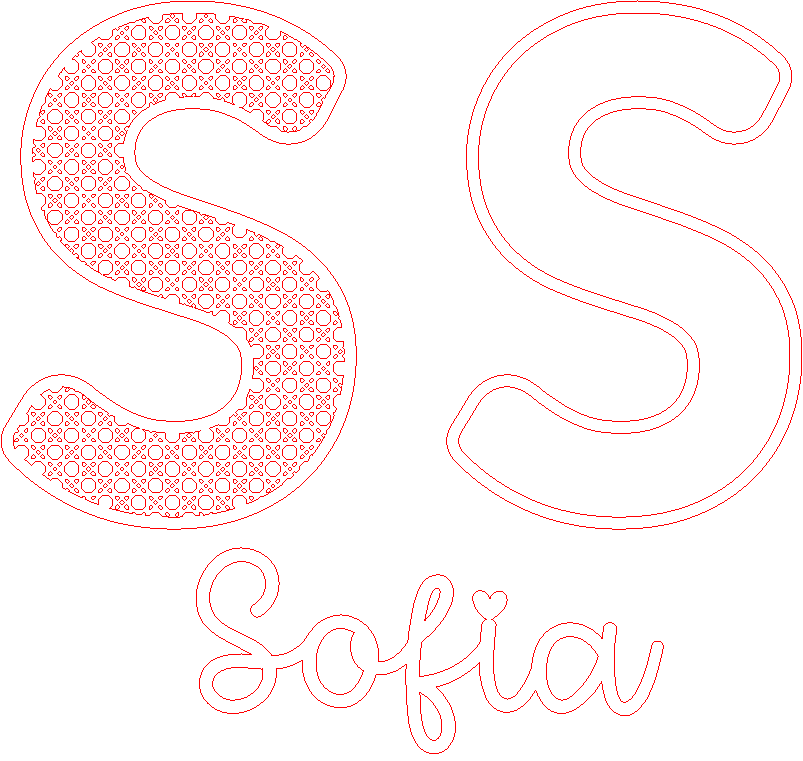
Sratán
.xcs
응용 시나리오
레이저 가공
기계 및 모듈

xTool D1 Pro
10W호환되는 xTool 기기
새로 만들기
M2
10W, 20WF2 Ultra UV
5WF1 Ultra
20WM1
5W, 10WD1
5W, 10W, 20WD1 Pro
5W, 20W, 40WP2
55WF1
10WS1
10W, 20W, 40WM1 Ultra
10W, 20WP2S
55W사용된 재료

3mm 포플러 합판

1/8인치(3mm) MDF 보드

96
1476
설명서
1
단계1: 설계

미리보기

미리보기

미리보기
7 More images
S 글자를 디자인하려면 다음 단계를 따라야 합니다:
- svg에서 라탄 템플릿을 추가합니다.
- 이 템플릿처럼 각 도형은 따로 나오며, 모두 그룹화할 것입니다.
- 텍스트를 추가하고 S라는 글자를 작성합니다. 가장 마음에 드는 글꼴을 찾습니다. 글
- 자를 원하는 크기로 만듭니다(저는 약 165mm 너비, 252mm 높이로 만들었습니다). 우리는
- S 글자 6의 윤곽선을 만들고 두 글자 모두 복사합니다.
- 원래 크기의 S 하나를 라탄 템플릿 위에 올려둡니다. 두 양식을 모두 선택하고 결합과 빼기를 클릭하세요. 이렇게 하면 이미 S자형 라탄 템플릿이 완성되었습니다. 우리는
- 수직과 수평 모두에 정렬된 방향으로 윤곽선을 배치합니다. 그룹을 만들고 자르기 선택을 하세요.
- 나머지 두 글자 S(원래는 라탄과 윤곽선 없이 선택)를 선택하고 중첩에서 결합과 빼기를 클릭하세요. 라
- 탄 이니셜이 준비되었습니다. 아름다운 이름을 만들 거예요. 텍스트를 삽입하는데
- , 이 경우 소피아라는 이름을 선택했고, 타이포그래피("I heart you")를 선택했으며, 이름 크기를 이니셜 크기에 맞게 조정합니다.
- 소피아가 i를 가지고 있고, 문구가 느슨해지니 문자에 구호점을 연결해야 합니다. 이를 위해 하트를 덮는 타원형을 삽입하고, 두 도형을 선택한 후 결합과 빼기를 클릭합니다. 나는 마음 없는 이름만 가지고 있어. 하트를 추가하고 작게 만들어서 i 위에 올려놓으면서 하트 부리를 'i 안에 조금 넣으려 합니다.' 두 도형을 모두 선택하고 결합과 결합을 클릭합니다. 우리는 이미 단어에 'i'가 붙어 있습니다.
- 이것이 바로 'i'나 악센트가 붙은 이름에 대해 우리가 할 방식입니다.
2
단계2: 컷

미리보기

미리보기

미리보기
3 More images
Xtool을 켜고, 작업할 재료(두께 3mm MDF 보드)를 놓고, 레이저 높이를 조절한 뒤 파라미터를 확인한 후 시작을 누릅니다. 우리는 기계가 일을 하게 두는 거죠.
3
단계3: 도색 및 조립

미리보기

미리보기

미리보기
모든 작품을 모으면 그냥 칠하거나 자연스럽게 둘 수 있습니다.
이 프로젝트에서는 다양한 장식을 만들 수 있습니다:
- 이름만 있으면 됩니다.
- 처음 하나만 있었어요.
- 라탄으로 이니셜만 적었어요.
- 이니셜과 이름.
- 라탄으로 이니셜과 이름 .
이번에는 분필 흰색 페인트로 이름을 칠했어요. 말릴 때까지 기다려요.
그동안 라탄 이니셜 가장자리를 접착해서 잘 붙게 해요.
다음으로 이니셜에 페인트 이름을 붙입니다.
마지막으로, 저는 작업을 마무리할 때 전체 표면에 무광 스프레이 바니시를 조금 뿌리는 걸 좋아해요.
매끄러운 S는 같은 프로젝트를 다른 이름으로 만들 때 저장해둘 수 있어요.
댓글
리믹스



이것도 좋아하실 수 있습니다

알파벳 번팅

22
99

더트 케이크 레시피

4
11

보헤미안 월 아트

26
96

세계 자폐 인식의 날입니다

32
31

주간 메뉴판과 매일 칠판 섹션이 있습니다

34
108

매크로 호넷

3
6

인어 페인터블 월 아트

9
51

여름 실루엣 벽걸이

78
693

가계도 (어머니의 날 선물)

91
407

버팔로 USA 지도 프로젝트

122
373

안녕하세요, 여름 간판

41
90

캔버스 아트
23
79

마크라메 벽 예술
24
73

기념 기증
41
108

정글의 호랑이 저부조 판화 작품

7
31

할로윈 장식

9
69

모토크로스 넘버 및 월아트
14
45

경기 당일 시터
3
14