신고
![[Laser cut and engrave] xTool Hat](https://image-res.atomm.com/ali-res/community/making/3cdbff62-3b13-48f8-8bf4-e1c51d8e2ed4.JPEG?x-oss-process=image/resize,m_fill,w_1280,h_960,limit_0/interlace,1/format,webp/auto-orient,1)
x툴 모자
 설명서
설명서파일

원본 파일
작성자M1 · Heat transfer film
1

가공 설정 추가
동일한 디자인, 다른 기계, 소재 또는 개선 사항 · 100 크레딧 획득

44
3414
설명서
1
단계1
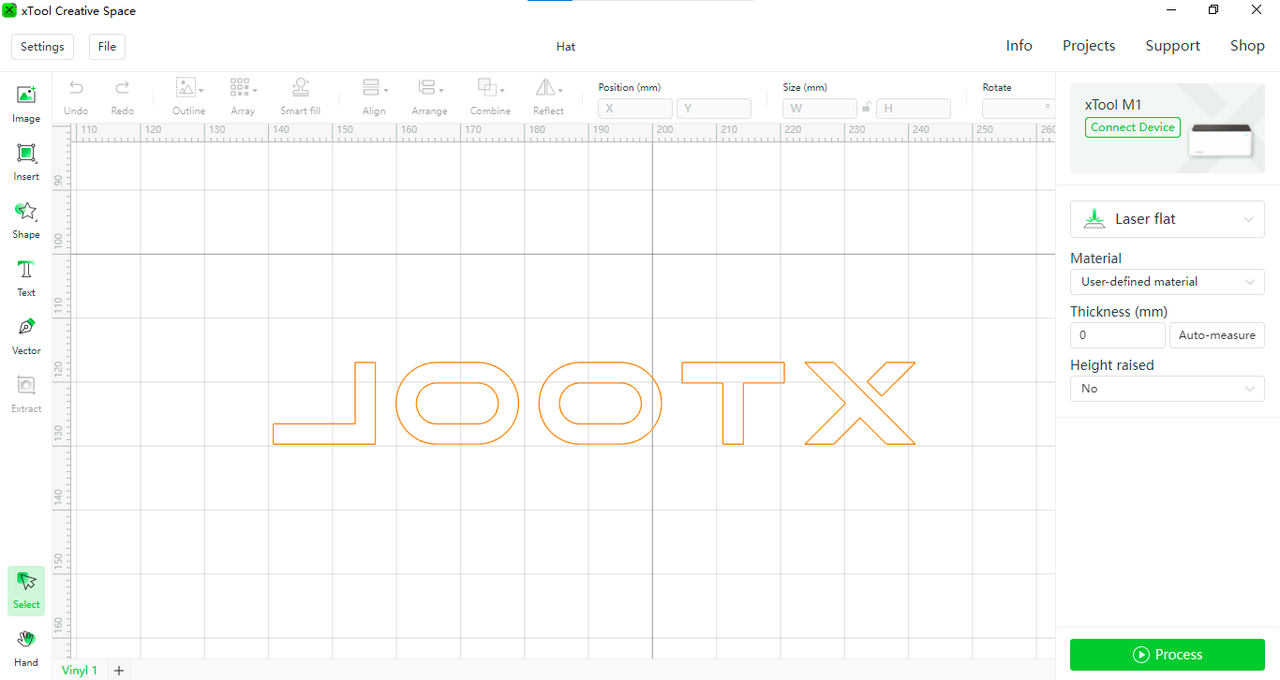 핑크 커팅 매트를 설치하고, PU 열전사 비닐을 붙인 뒤 포인트 블레이드를 설치하세요. 파일을 XCS 소프트웨어로 가져오고, 장치를 연결한 뒤 Glow in the Dark PU Heat Transfer Vinyl을 잘라내세요.
2
단계2
 패턴을 자르고 모자에 열을 찍으면 독특한 모자를 얻을 수 있습니다.
주석
1.Glow in the Dark PU 열전사 비닐은 뒷면에서 잘라낸 후 인쇄물을 앞면으로 옮기니, 텍스트 같은 그래픽을 자르 때 [reflect]를 선택하세요.
2. 절단 범위에 주의하세요. 절개 면적은 Glow in the Dark PU 열전사 비닐의 범위를 초과해서는 안 됩니다. 그렇지 않으면 커팅 매트 바닥을 손상시키기 쉽습니다.
3. 두 가지 색상의 Glow in the Dark PU 열전사 비닐을 절단할 때, 두 가지 작은 색상의 다른 색상을 동시에 기계에 넣을 수 있습니다. 그 다음 패턴을 Glow in the Dark PU 열전사 비닐에 붙여 절단하세요.
댓글
리믹스
.PNG?x-oss-process=image/resize,m_fill,w_640,h_480,limit_0/interlace,1/format,webp/auto-orient,1)


이것도 좋아하실 수 있습니다

검은색 플라스틱 Xtool 커버 렌즈

21
346

공식 Xtool Maker 샵 간판

11
43

'/%3e%3c/g%3e%3cdefs%3e%3clinearGradient%20id='paint0_linear_1737_57170'%20x1='16.5097'%20y1='8.87061'%20x2='16.5097'%20y2='23.3945'%20gradientUnits='userSpaceOnUse'%3e%3cstop%20stop-color='%232E9AFF'/%3e%3cstop%20offset='1'%20stop-color='%233378FF'/%3e%3c/linearGradient%3e%3c/defs%3e%3c/svg%3e)
완두어 엑스툴 스쿼드

0
1

xTool S1 모듈 박스

88
190

X 로고와 XTOOL S1 40W 글자가 새겨진 검은 금속 카드

0
12

XTOOL S1 40W 레이저 박스 저장 공간

6
47

모자 패치

12
30

Xtool 멀티레이어 레터링
1
6

F1 및 F2 울트라 스크린 지원
46
152

Testors용 페인트 셰이커 1/4oz 정사각형 유리병

7
15

$0.60
$0.60
크레딧60
TBP

0

엔벨로프 레이저만

24
193

'/%3e%3cpath%20d='M15.9997%2019.3335L11.833%2014.3335H14.333L15.9997%2017.6668L17.6663%2014.3335H20.1663L15.9997%2019.3335Z'%20fill='white'/%3e%3c/g%3e%3cdefs%3e%3clinearGradient%20id='paint0_linear_1412_57140'%20x1='16'%20y1='7.6665'%20x2='16'%20y2='24.3332'%20gradientUnits='userSpaceOnUse'%3e%3cstop%20stop-color='%23FFA15F'/%3e%3cstop%20offset='1'%20stop-color='%23E37C32'/%3e%3c/linearGradient%3e%3c/defs%3e%3c/svg%3e)
도그태그 블랭크 메탈 팹 f2ultra
0
4

GIF
노란색 레몬색과 초록색 잎 모양의 후프 귀걸이
2
2

소나무 기둥

4
44

원더프레스 레이저 모듈용 저장 랙
.jpg?x-oss-process=image/resize,m_fill,w_80,h_80,limit_0/interlace,1/format,webp/auto-orient,1)
0
0

고정 홀더
272
1.3k

xTool 프린트 스크린 슬리브 액세서리
32
59