
![[Laser cut and engrave,Blade cut] Leaves Patterned Clock](https://image-res.atomm.com/resource/xtool/community/attachment/xtool-community/dedba88d-5613-4553-9312-bd36c4cffe31?x-oss-process=image/resize,m_fill,w_1280,h_960,limit_0/interlace,1/format,webp/auto-orient,1)
![[Laser cut and engrave,Blade cut] Leaves Patterned Clock](data:image/png;base64,iVBORw0KGgoAAAANSUhEUgAAAAoAAAAKCAYAAACNMs+9AAAAAXNSR0IArs4c6QAAABdJREFUKFNjZCASMBKpjmFUId6QIjp4AAppAAuXjCs4AAAAAElFTkSuQmCC)
![[Laser cut and engrave,Blade cut] Leaves Patterned Clock](https://image-res.atomm.com/resource/xtool/community/attachment/xtool-community/dedba88d-5613-4553-9312-bd36c4cffe31?x-oss-process=image/resize,m_fill,w_160,h_120,limit_0/interlace,1/format,webp/auto-orient,1)
![[Laser cut and engrave,Blade cut] Leaves Patterned Clock](https://image-res.atomm.com/resource/xtool/community/attachment/xtool-community/7e555035-893e-4c48-9c7a-f489523cac11/img_v3_02c2_b0a80be4-57be-4758-ab48-409b4be51f2g.jpg?x-oss-process=image/resize,m_fill,w_160,h_120,limit_0/interlace,1/format,webp/auto-orient,1)
![[Laser cut and engrave,Blade cut] Leaves Patterned Clock](https://image-res.atomm.com/resource/xtool/community/attachment/xtool-community/6e9a1706-a448-4ecd-ba14-39b6e408641e/image(1).png?x-oss-process=image/resize,m_fill,w_160,h_120,limit_0/interlace,1/format,webp/auto-orient,1)
![[Laser cut and engrave,Blade cut] Leaves Patterned Clock](https://image-res.atomm.com/resource/xtool/community/attachment/xtool-community/3a09dd25-7b14-4db3-a353-5daf2888a452/img_v3_02c2_75eea43b-fdd7-4ce1-a1ef-eb4a9fd8c02g.jpg?x-oss-process=image/resize,m_fill,w_160,h_120,limit_0/interlace,1/format,webp/auto-orient,1)
Vzorčasta ura z listi
 Navodilo


.png?x-oss-process=image/resize,m_lfit,w_2000,h_2000,limit_0/interlace,1/format,webp/auto-orient,1)


Informacije
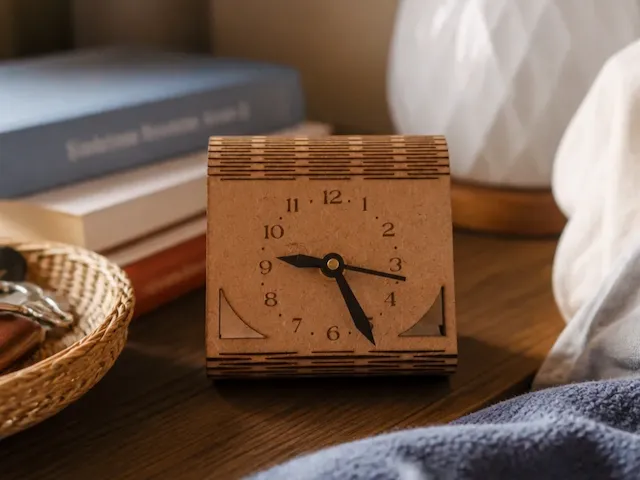
Leaves Patterned Clock je preprosta in stilska namizna ura, ki združuje lep videz z visoko praktičnostjo. Izbirate lahko med štirimi živahnimi vzorci številčnic, ki ustrezajo vašemu okusu. Obdan v trpežnem bukovem okvirju z bogato teksturo je več kot le merilec časa — je dekorativni kos, ki poudari čar vsakega prostora, bodisi doma, v pisarni ali v učnem prostoru.
Navodilo
Korak1: Preverite gradivo

Odpakirajte in preverite vse priložene materiale. Za ta projekt je treba vključiti naslednje materiale:
Mehanizem ure × 1
šestkotna matica × 1
podložka × 1
gumijasto tesnilo × 1
urni kazalec × 1
minutni kazalec × 1
rabljeni × 1
sekundno lepilo × 1
3 mm lipova vezana plošča ×
1leseni okvir × 1
Korak2: Priprave
.png?x-oss-process=image/resize,m_fill,w_1280,h_960,limit_0/interlace,1/format,webp/auto-orient,1)
Vklopi M1 Ultra in ga poveži z računalnikom.
Odprite programsko opremo xTool Creative Space (XCS) in povežite svoj M1 Ultra na XCS.
Odprite datoteko "Leaves Patterned Clock Dial.xcs". Poskrbite, da so parametri obdelave navedeni zgoraj.
Pripravite kos lipove vezane plošče.
Korak3: Izvedite inkjet tiskanje in lasersko izrežite številčnico ure

Izvedite brizgalno tiskanje
(1) Odprite pokrov M1 Ultra in namestite modul za črnilo.
(2) Trikotne prizme vstavite v držala in to sestavljeno trikotno prizmo namestite na osnovno ploščo M1 Ultra.
(3) Na trikotni prizmatični panel položite ploščo vezane plošče iz lipe.
(4) Zapri pokrov M1 Ultra.
(5) Izberite kadriranje na XCS, nato pritisnite gumb Start/Stop na M1 Ultra za začetek kadriranja. Poskrbite, da je območje za brizgalno tiskanje na plošči vezane plošče lipe.
(6) Ko je uokvirjanje končano, izberite Uokvirjanje zaključeno na XCS.
(7) Odpri pokrov M1 Ultra in prilepi maskirni trak na štiri vogale plošče vezane plošče iz lipovega lesa, da jo pritrdiš.
(8) Izberite Pojdi na obdelavo in nato izberite Začni 1/2 na XCS.
(9) Ko se na XCS pojavi Ready, pritisnite gumb Start/Stop na M1 Ultra za začetek brizgalnega tiskanja.
Opomba: Med postopkom tiskanja z brizgalnim tiskalnikom, če na plošči vezane plošče lipa ne nastane večbarvni vzorec, je lahko kartuša prazna. Če se to zgodi, izberite Premor na XCS, zamenjajte kartušo in nato nadaljujte postopek brizgalnega tiskanja.
Črnilo, uporabljeno v kartuši, je topno v vodi. Ko je postopek brizgalnega tiskanja končan, počakajte približno 2 minuti, preden odstranite ploščo vezane plošče iz lipovega lesa. To omogoča, da se črnilo pravilno posuši in pomaga preprečiti morebitne kapljice črnila zaradi gravitacije, kar lahko povzroči vodne madeže na številčnici ure ali nenamerno razmazanje črnila na koži.
Korak4: Laser je prerezal številčnico ure
.jpg?x-oss-process=image/resize,m_fill,w_1280,h_960,limit_0/interlace,1/format,webp/auto-orient,1)
(1) Odpri pokrov M1 Ultra in zamenjaj črnilni modul z laserskim modulom.
(2) Izberite naslednje in nato izberite Start2/2 na XCS.
(3) Pritisnite gumb Start/Stop na M1 Ultra za začetek laserskega rezanja.
(4) Ko je postopek laserskega rezanja končan, izberite Dokončano na XCS.
(5) Odprite pokrov M1 Ultra, odstranite maskirni trak s plošče vezane plošče lipovega lesa, nato odstranite ploščo iz vezane plošče in izrezane dele številčnice ure.
Korak5: Sestavi številčnico ure


- Izberi številčnico ure in nanesi lepilo na zadnjo stran.
- Opomba: Ne nanesite preveč lepila, saj se lahko prelije in se prilepi na roke.
- Gumb ure prilepite na podnožje in poravnajte luknje, kot je prikazano.
- Pritisnite na gumb ure 15 sekund, da zagotovite močno vez.
Korak6: Vstavite mehanizem ure v številčnico ure


.png?x-oss-process=image/resize,m_fill,w_640,h_480,limit_0/interlace,1/format,webp/auto-orient,1)
- Na mehanizem namestite črno gumijasto tesnilo, da bo ravna stran gumijaste tesnila obrnjena navzgor.
- Mehanizem vstavite v številčnico ure, kot je prikazano, in poravnajte središče mehanizma z luknjo na številčnici.
Opomba: Če mehanizem ne prehaja gladko skozi luknjo na številčnici ure, poskusite mehanizem priviti v luknjo.
Korak7: Prilagodite uro, minuto in sekundne kazalce na uro

.png?x-oss-process=image/resize,m_fill,w_640,h_480,limit_0/interlace,1/format,webp/auto-orient,1)
.png?x-oss-process=image/resize,m_fill,w_640,h_480,limit_0/interlace,1/format,webp/auto-orient,1)

Opomba: Ne pritiskajte močno na kazalce za uro, minuto in sekunde. Lahko se hitro upognejo. Če so kazalci za uro, minuto in sekundo upognjeni, ne paničarite. Samo nežno jih poravnajte.
- Spravite podložko skozi mehanizem.
- Šestkotno matico privijte v mehanizem v smeri urinega kazalca.
- Odstrani zaščitne folije na urnih in minutnih kazalcih, nato pa na mehanizem namesti uro, minuto in sekundo po vrsti.
Korak8: Sestavi uro


- Na štiri vogale številčnice nanesite lepilo in nato vstavite številčnico v okvir ure.
- Pritisnite na gumb ure za 5 sekund, da zagotovite močno vez.
Korak9: Prilagodi uro na svoj lokalni čas


- Gumb na premiku obrnite v smeri urinega kazalca ali nasprotno, da nastavite uro na vaš lokalni čas.
- V držalo za baterijo vstavite baterijo in zaprite pokrov baterije.
Korak10
.jpg?x-oss-process=image/resize,m_fill,w_1280,h_960,limit_0/interlace,1/format,webp/auto-orient,1)
Sestava zaključena
Predelave
Licenca



Morda vam bo všeč tudi
Minimalistična kvadratna lesena namizna ura


'/%3e%3cpath%20d='M15.9997%2019.3335L11.833%2014.3335H14.333L15.9997%2017.6668L17.6663%2014.3335H20.1663L15.9997%2019.3335Z'%20fill='white'/%3e%3c/g%3e%3cdefs%3e%3clinearGradient%20id='paint0_linear_1412_57140'%20x1='16'%20y1='7.6665'%20x2='16'%20y2='24.3332'%20gradientUnits='userSpaceOnUse'%3e%3cstop%20stop-color='%23FFA15F'/%3e%3cstop%20offset='1'%20stop-color='%23E37C32'/%3e%3c/linearGradient%3e%3c/defs%3e%3c/svg%3e)
Lesena stenska ura s šestkotnim cvetličnim vzorcem


Okrogla stenska ura s pisanim vzorcem šopka cvetja


Preprosta številčnica ure


Lasersko gravirana lesena ura za kavo s kvadratnim dizajnom


Pultna ura iz plute z zlatim rimskim številčnikom


Kockasta svetilka


Gorska ura


Personaliziran okrogli okvir z imenom in cvetličnimi motivi


Cvetlična stenska dekoracija

Lasersko izrezana ustvarjalna risana lesena ura, DIY lesena stenska ura, prikupna sodobna stenska dekoracija, edinstvena domača dekoracija


Ura na kaminu za hišico punčk v 1:12


Rastlinske škatle | Laser Cut | SVG | AI | Prenosljive datoteke


Številčnica ure za elektronski mehanizem


Lesena stenska ura z velikimi številkami v sodobnem slogu


Majhna namizna ura


Sodobna ljubezenska stenska ura SVG, Predloga sodobne ure z laserskim rezanjem, romantična dekoracija doma, digitalni prenos

Namizna ali stenska ura iz naravnega drevesnega diska z letnimi obroči
