Report
![[Laser cut and engrave] Hat Patch](https://image-res.atomm.com/resource/xtool/community/attachment/xtool-community/fcc2cf99-4108-48ad-8861-ae1a147f6b34?x-oss-process=image/resize,m_fill,w_1280,h_960,limit_0/interlace,1/format,webp/auto-orient,1)
![[Laser cut and engrave] Hat Patch](data:image/png;base64,iVBORw0KGgoAAAANSUhEUgAAAAoAAAAKCAYAAACNMs+9AAAAAXNSR0IArs4c6QAAABdJREFUKFNjZCASMBKpjmFUId6QIjp4AAppAAuXjCs4AAAAAElFTkSuQmCC)
![[Laser cut and engrave] Hat Patch](https://image-res.atomm.com/resource/xtool/community/attachment/xtool-community/fcc2cf99-4108-48ad-8861-ae1a147f6b34?x-oss-process=image/resize,m_fill,w_160,h_120,limit_0/interlace,1/format,webp/auto-orient,1)
![[Laser cut and engrave] Hat Patch](https://image-res.atomm.com/resource/xtool/community/attachment/xtool-community/b92dbf0c-85df-4cc4-b007-3ff568015989.jpg?x-oss-process=image/resize,m_fill,w_160,h_120,limit_0/interlace,1/format,webp/auto-orient,1)
![[Laser cut and engrave] Hat Patch](https://image-res.atomm.com/resource/xtool/community/attachment/xtool-community/80a9344b-94fa-44ab-a8f8-c52addab23ea.jpg?x-oss-process=image/resize,m_fill,w_160,h_120,limit_0/interlace,1/format,webp/auto-orient,1)
Hat Patch
 Instruction
hatlogo
.xcs
Application scenario
Laser processing (15min)
Machine & module

xTool S1
20WCompatible xTool Machine
M2
P3
F2
F2 Ultra UV
F2 Ultra(Single)
F2 Ultra
F1 Ultra
F1
F1 Lite
P2S
P2
M1 Ultra
M1
D1 Pro 2.0
D1 Pro
D1
Laserbox
Material used

leather sheet

30
1952
Information
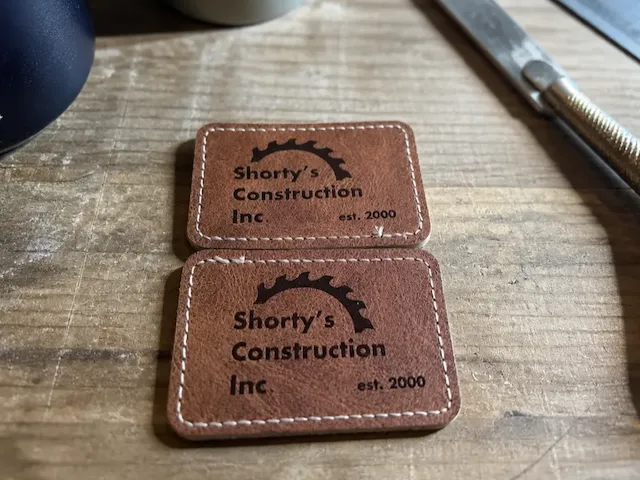
Nice way to show a logo on the brim of a hat.
Instruction
1
Step1: Design

Preview

Preview

Preview
5 More images
- This project starts by placing leather material in machine
- Once in place the 2 point position system is used to map the material
- Now a size can be set in the software for the engraving and cutting of the leather.
- With all parts of the 2 sided logo created the adjustments are set
- With all cutting scoring and engraving adjustments ready it is time to send to be processed.
- When machine has finished it is time to heat the xTool mini heat press.
- With the heat press on high the leather is heated to adhere to the hat on both the top and bottom of the brim.
- Press time is 12 seconds @385F
- Now with any custom logo it is ready to be enjoyed.
Comments
Remixes
License



You may also like
Shorty's Construction Inc. Rectangular Faux Leather Patch

0
0

Black metal card with X logo and XTOOL S1 40W lettering

0
12

Patches Patch Formula 1 Racing Car Clothing & Accessories Labels

5
6
.PNG?x-oss-process=image/resize,m_fill,w_640,h_480,limit_0/interlace,1/format,webp/auto-orient,1)
xTool T-shirt

22
106

Leather patch jig round, square and squoval

21
69

'/%3e%3cpath%20d='M15.9997%2019.3335L11.833%2014.3335H14.333L15.9997%2017.6668L17.6663%2014.3335H20.1663L15.9997%2019.3335Z'%20fill='white'/%3e%3c/g%3e%3cdefs%3e%3clinearGradient%20id='paint0_linear_1412_57140'%20x1='16'%20y1='7.6665'%20x2='16'%20y2='24.3332'%20gradientUnits='userSpaceOnUse'%3e%3cstop%20stop-color='%23FFA15F'/%3e%3cstop%20offset='1'%20stop-color='%23E37C32'/%3e%3c/linearGradient%3e%3c/defs%3e%3c/svg%3e)
Patriotic Combine Harvester SVG DXF | Farm Flag Design for Laser

1
21

Black Plastic Xtool Cover lens

21
345

Custom Leather Hat Patch-Country Roads

19
139

leather hat patch on adjustible hat

0
0
'/%3e%3c/g%3e%3cdefs%3e%3clinearGradient%20id='paint0_linear_1737_57170'%20x1='16.5097'%20y1='8.87061'%20x2='16.5097'%20y2='23.3945'%20gradientUnits='userSpaceOnUse'%3e%3cstop%20stop-color='%232E9AFF'/%3e%3cstop%20offset='1'%20stop-color='%233378FF'/%3e%3c/linearGradient%3e%3c/defs%3e%3c/svg%3e)
Good Dad Gang Leather Patch

0
0

hat patches

88
567

Leather laser engraved hat patch

56
307

Remix of a Leather Patched Hat

7
18

Halley's Camps Ontario Canada Seaplane Leather Patch

0
0

Day Drinking Hat Patches
11
26

Swansboro Football Hat Patch

0
3

Storage Box for S1 20W module

4
28

Round Leather Coaster Featuring a Puffin Wearing a Baseball Cap and Sunglasses

2
2