報告
![[Laser cut and engrave] Blessed Mama Bear Necklace](https://image-res.xtool.com/resource/xtool/community/attachment/xtool-community/d9631624-0ead-4e35-92ad-02f8db3ea6f6?x-oss-process=image/resize,w_1200,h_900,limit_0/interlace,1/format,webp/auto-orient,1)
![[Laser cut and engrave] Blessed Mama Bear Necklace](data:image/png;base64,iVBORw0KGgoAAAANSUhEUgAAAAoAAAAKCAYAAACNMs+9AAAAAXNSR0IArs4c6QAAABdJREFUKFNjZCASMBKpjmFUId6QIjp4AAppAAuXjCs4AAAAAElFTkSuQmCC)
![[Laser cut and engrave] Blessed Mama Bear Necklace](https://image-res.xtool.com/resource/xtool/community/attachment/xtool-community/d9631624-0ead-4e35-92ad-02f8db3ea6f6?x-oss-process=image/resize,w_200,h_150,limit_0/interlace,1/format,webp/auto-orient,1)
![[Laser cut and engrave] Blessed Mama Bear Necklace](https://image-res.xtool.com/resource/xtool/community/attachment/xtool-community/be315d7e-f972-49b2-a233-79fdd1b9ca0e/Photoroom_20240422_225606.jpg?x-oss-process=image/resize,w_200,h_150,limit_0/interlace,1/format,webp/auto-orient,1)
![[Laser cut and engrave] Blessed Mama Bear Necklace](https://image-res.xtool.com/resource/xtool/community/attachment/xtool-community/1f23d746-2115-43b7-a68f-8f922df4acf6/Photoroom_20240422_224828.jpg?x-oss-process=image/resize,w_200,h_150,limit_0/interlace,1/format,webp/auto-orient,1)
![[Laser cut and engrave] Blessed Mama Bear Necklace](https://image-res.xtool.com/resource/xtool/community/attachment/xtool-community/38df133d-7036-40f2-98e7-eeb2a5be89d3/IMG_9993.HEIC?x-oss-process=image/resize,w_200,h_150,limit_0/interlace,1/format,webp/auto-orient,1)
![[Laser cut and engrave] Blessed Mama Bear Necklace](https://image-res.xtool.com/resource/xtool/community/attachment/xtool-community/80408139-3d78-448a-9cda-30d06bff3063/IMG_9991.HEIC?x-oss-process=image/resize,w_200,h_150,limit_0/interlace,1/format,webp/auto-orient,1)
![[Laser cut and engrave] Blessed Mama Bear Necklace](https://image-res.xtool.com/resource/xtool/community/attachment/xtool-community/e695af93-d1a9-4c52-9e35-41d73b35fefd/Photoroom_20240422_225024.jpg?x-oss-process=image/resize,w_200,h_150,limit_0/interlace,1/format,webp/auto-orient,1)
![[Laser cut and engrave] Blessed Mama Bear Necklace](https://image-res.xtool.com/resource/xtool/community/attachment/xtool-community/0c528de9-accc-4e98-a1a9-11ace102ccf0/IMG_9993.HEIC?x-oss-process=image/resize,w_200,h_150,limit_0/interlace,1/format,webp/auto-orient,1)
![[Laser cut and engrave] Blessed Mama Bear Necklace](https://image-res.xtool.com/resource/xtool/community/attachment/xtool-community/a87e4d50-7ab8-4a52-8d39-5ce29a5978c6/IMG_9996.HEIC?x-oss-process=image/resize,w_200,h_150,limit_0/interlace,1/format,webp/auto-orient,1)
祝福されたママ・ベアのネックレス
 指示
指示
Mama Bear necklace
.xcs
アプリケーションシナリオ
レーザー (45min)
機械とモジュール

xTool F1
互換性のある · 11
使用される材料

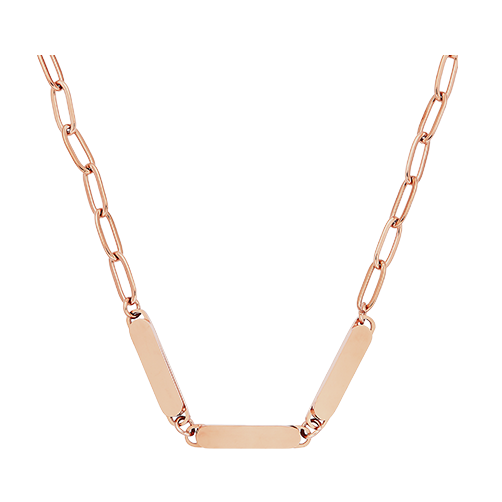
ローズゴールドステンレススチールペーパークリップネックレス

ステンレス鋼のネックレス
114
1293
指示
1
ステップ1: ファイルデザイン

プレビュー

プレビュー
Adobe Illustratorでファイルのデザインをしました。Creative Fabricaのクマのアウトラインをアップロードしました。デザインを変更する場合に商業利用が可能です。ベアの内側の線を外して、フィルツールで黒く仕上げました。 テキストボックスを作成し、「Mama」と入力し、ネックレスに似合いそうなフォントを選びました。私はクマの中に書きたい場所に言葉を置いた。パスファインダーツールを使ってクマの形から文字を切り取りました。さらにテキストボックスを追加し、「blessed」という言葉を追加しました。ワープツールを使って曲げました。これをSVGとして保存しました。
- クマの輪郭を挿入または作る。既に作成されているものを挿入する場合は、著作権を守り、デジタル使用を許可しないものは使用しないでください。Creative Fabricaは、サブスクリプションユーザー向けにデジタルファイルとしてその要素を商業的に利用することを許可しています。 「
- Mama」と入力し、フォントを選択してください。テキストボックスを選択して「アウトライン作成」を選択し、その後パスファインダーツールで組み合わせます。
- クマのフィギュアに「ママ」という言葉を入れます。
- パスファインダーツールでクマの言葉を切り取ってください。
- もう一つのテキストボックスを追加し、「Blessed」などの望む単語を入力してください。
- ワープツールを使って、単語の弧を描いて曲線を描きます。
- 「クマ」の上に単語を置き、必要に応じてサイズを調整してください。
- SVGとして保存してください。
2
ステップ2: レーザーセットアップ

プレビュー

プレビュー

プレビュー

プレビュー
XCSを開き、Adobe Illustratorで作成したファイルをSVGとして追加しました。ネックレスの形を表す円を加えました。これが正しいアライメントに役立ちます。フレーミングツールを使って、ネックレスが置かれた場所に円を配置しました。ステンレスのフレームライトは見えにくいので、Rectのフレーム設定を使い、フレーミングスクエアをネックレスの周りに配置しています。
- XCS(XCS)を開いてデザインファイルを追加します。
- ネックレスと同じくらいの大きさの円を加えます。
- 画像を円内に配置してください。
- ネックレスはF1スペースの中央に置きます。
- イメージをフレームにして円を描く。正方形の端がネックレスの端と揃うまで画像を動かします。
- レーザーを集中させろ。
- 設定を入力してください。
- 円の設定は無視を選択します。
- 彫刻を実行してください。 彫
- 刻が十分に暗くない場合は、動かさずに再度実行してください。
3
ステップ3: 組み立て

プレビュー

プレビュー
- ネックレスをレーザーベッドから外してください。
- 消毒用アルコールで掃除してください。
- 留め具をつけて穴をつまんで固定します。必要なら小さなペンチを使ってください。
- 鎖に繋げ。
- 着て楽しんでください!
コメント