









































Reportar
![[Laser cut and engrave] Laser Cut Graduation Keychains Congrats Class of 2025](https://storage-us.atomm.com/resource/xart/result/12720/bf74b9af-e8fe-496f-91b7-58a10ca50115.png?x-oss-process=image/resize,w_1200,h_900,limit_0/interlace,1/format,webp/auto-orient,1)
![[Laser cut and engrave] Laser Cut Graduation Keychains Congrats Class of 2025](data:image/png;base64,iVBORw0KGgoAAAANSUhEUgAAAAoAAAAKCAYAAACNMs+9AAAAAXNSR0IArs4c6QAAABdJREFUKFNjZCASMBKpjmFUId6QIjp4AAppAAuXjCs4AAAAAElFTkSuQmCC)
![[Laser cut and engrave] Laser Cut Graduation Keychains Congrats Class of 2025](https://storage-us.atomm.com/resource/xart/result/12720/bf74b9af-e8fe-496f-91b7-58a10ca50115.png?x-oss-process=image/resize,w_200,h_150,limit_0/interlace,1/format,webp/auto-orient,1)
![[Laser cut and engrave] Laser Cut Graduation Keychains Congrats Class of 2025](https://storage-us.atomm.com/resource/xtool/community/attachment/xtool-community/5ac177eb-3bc1-47c0-8f07-95108973c03c.jpg?x-oss-process=image/resize,w_200,h_150,limit_0/interlace,1/format,webp/auto-orient,1)
![[Laser cut and engrave] Laser Cut Graduation Keychains Congrats Class of 2025](https://storage-us.atomm.com/resource/xtool/community/attachment/xtool-community/7c56498c-f737-4a17-8f48-f7d0b74ded55.jpg?x-oss-process=image/resize,w_200,h_150,limit_0/interlace,1/format,webp/auto-orient,1)
Llaveros de graduación
 Instrucción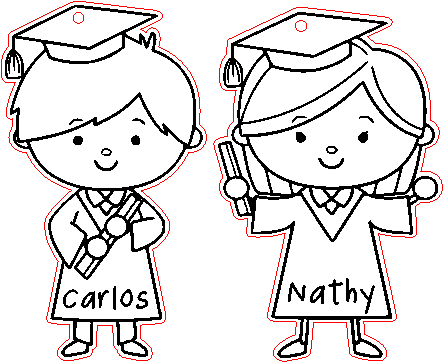
graduationkeychains-MQP
.xcs
Escenario de aplicación
Procesamiento láser (20min)
Máquina y módulo

xTool M1
10WCompatibles · 9
Material utilizado

Tablero MDF de 1/8" (3mm)
47
532
Información
celebrar y recordar un logro importante...
Instrucción
1
Paso1: Desing
Vista previa
Vista previa
Vista previa
5 More images
Descarga vectores gratuitos de la web, traza las 2 imágenes
Añade un contorno de 1
Elimina el vector compuesto de mi contorno para liberar las partes internas
Elimina las partes
internas Añadí un color rojo a este contorno para diferenciar el grabado del corte.
Coloca las 2 imágenes dentro del contorno
,añade un círculo de 1,8 a cada imagen para colgar mi llavero
2
Paso2: grabado

Vista previa
De los materiales elegí MDF, prefiero seleccionar solo grabado y luego comprobar si debería añadir otra pasada
3
Paso3: Cortar y montar

Vista previa

Vista previa
Después de grabar, sin mover mi diseño, selecciono cortar.
Limpio con una toallita y alcohol isopropílico y punto, y procedo a colocar el herraje en mi llavero
Comentarios




