
![[Laser cut and engrave,Screen printing] Bumble Bee Embossed and Cut from 2mm Brass coin](https://image-res.atomm.com/resource/xtool/community/attachment/xtool-community/aacb87eb-5a94-4a99-9441-dc821a74294a.JPG?x-oss-process=image/resize,m_fill,w_1280,h_960,limit_0/interlace,1/format,webp/auto-orient,1)
![[Laser cut and engrave,Screen printing] Bumble Bee Embossed and Cut from 2mm Brass coin](data:image/png;base64,iVBORw0KGgoAAAANSUhEUgAAAAoAAAAKCAYAAACNMs+9AAAAAXNSR0IArs4c6QAAABdJREFUKFNjZCASMBKpjmFUId6QIjp4AAppAAuXjCs4AAAAAElFTkSuQmCC)
![[Laser cut and engrave,Screen printing] Bumble Bee Embossed and Cut from 2mm Brass coin](https://image-res.atomm.com/resource/xtool/community/attachment/xtool-community/aacb87eb-5a94-4a99-9441-dc821a74294a.JPG?x-oss-process=image/resize,m_fill,w_160,h_120,limit_0/interlace,1/format,webp/auto-orient,1)
![[Laser cut and engrave,Screen printing] Bumble Bee Embossed and Cut from 2mm Brass coin](https://storage-us.atomm.com/resource/xtool/community/attachment/xtool-community/4f36bb23-a743-4ae2-a413-1cc4adda6ac9.gif)
![[Laser cut and engrave,Screen printing] Bumble Bee Embossed and Cut from 2mm Brass coin](https://storage-us.atomm.com/resource/xtool/community/attachment/xtool-community/73cc3fe4-f77f-44f1-bbf2-3f7459cca34f.gif)
![[Laser cut and engrave,Screen printing] Bumble Bee Embossed and Cut from 2mm Brass coin](https://storage-us.atomm.com/resource/xtool/community/attachment/xtool-community/48777f2f-e688-4ac9-8890-256ced2cce2a.gif)
![[Laser cut and engrave,Screen printing] Bumble Bee Embossed and Cut from 2mm Brass coin](https://storage-us.atomm.com/resource/xtool/community/attachment/xtool-community/6d3e952d-7898-4b83-9c21-84868ebd224d.gif)
![[Laser cut and engrave,Screen printing] Bumble Bee Embossed and Cut from 2mm Brass coin](https://storage-us.atomm.com/resource/xtool/community/attachment/xtool-community/58ae1c89-e1ed-4f3d-87cd-a945d6abfbe5.gif)
![[Laser cut and engrave,Screen printing] Bumble Bee Embossed and Cut from 2mm Brass coin](https://image-res.atomm.com/resource/xtool/community/attachment/xtool-community/b42a994c-f0e9-4c30-97d2-28299ec8300b.jpg?x-oss-process=image/resize,m_fill,w_160,h_120,limit_0/interlace,1/format,webp/auto-orient,1)
![[Laser cut and engrave,Screen printing] Bumble Bee Embossed and Cut from 2mm Brass coin](https://image-res.atomm.com/resource/xtool/community/attachment/xtool-community/08c98d78-d43c-41b5-81e0-f9d5b4668a4c.jpg?x-oss-process=image/resize,m_fill,w_160,h_120,limit_0/interlace,1/format,webp/auto-orient,1)
![[Laser cut and engrave,Screen printing] Bumble Bee Embossed and Cut from 2mm Brass coin](https://image-res.atomm.com/resource/xtool/community/attachment/xtool-community/076e074a-56d1-45dd-9157-69647c861137.jpg?x-oss-process=image/resize,m_fill,w_160,h_120,limit_0/interlace,1/format,webp/auto-orient,1)
![[Laser cut and engrave,Screen printing] Bumble Bee Embossed and Cut from 2mm Brass coin](https://image-res.atomm.com/resource/xtool/community/attachment/xtool-community/843e2847-ff48-49c6-a002-18b60c63339b.jpg?x-oss-process=image/resize,m_fill,w_160,h_120,limit_0/interlace,1/format,webp/auto-orient,1)
![[Laser cut and engrave,Screen printing] Bumble Bee Embossed and Cut from 2mm Brass coin](https://image-res.atomm.com/resource/xtool/community/attachment/xtool-community/f941b98c-9afe-48fb-88ad-529d138ab678.JPG?x-oss-process=image/resize,m_fill,w_160,h_120,limit_0/interlace,1/format,webp/auto-orient,1)
![[Laser cut and engrave,Screen printing] Bumble Bee Embossed and Cut from 2mm Brass coin](https://image-res.atomm.com/resource/xtool/community/attachment/xtool-community/f80f9218-e843-4bca-a20c-e234e3d0231f.JPG?x-oss-process=image/resize,m_fill,w_160,h_120,limit_0/interlace,1/format,webp/auto-orient,1)
![[Laser cut and engrave,Screen printing] Bumble Bee Embossed and Cut from 2mm Brass coin](https://image-res.atomm.com/resource/xtool/community/attachment/xtool-community/0af783c5-294b-4fc6-96cb-3da207f00edd.JPG?x-oss-process=image/resize,m_fill,w_160,h_120,limit_0/interlace,1/format,webp/auto-orient,1)
![[Laser cut and engrave,Screen printing] Bumble Bee Embossed and Cut from 2mm Brass coin](https://image-res.atomm.com/resource/xtool/community/attachment/xtool-community/d69097fb-e55e-45b4-bac5-cddcbb4339e1.JPG?x-oss-process=image/resize,m_fill,w_160,h_120,limit_0/interlace,1/format,webp/auto-orient,1)
![[Laser cut and engrave,Screen printing] Bumble Bee Embossed and Cut from 2mm Brass coin](https://image-res.atomm.com/resource/xtool/community/attachment/xtool-community/abec3a65-b881-42f3-82be-e9ebdaae2eb9.JPG?x-oss-process=image/resize,m_fill,w_160,h_120,limit_0/interlace,1/format,webp/auto-orient,1)
2mm 황동 동전으로 엠보싱 및 컷된 범블 비
 설명서
설명서
Untitled
.xcs
응용 시나리오
레이저 가공、스크린 인쇄
기계 및 모듈

xTool F2 Ultra
60W호환되는 xTool 기기
F2
F2 Ultra UV
F2 Ultra(Single)
사용된 재료

빈 기념용 황동 동전

3/64"(1mm) H62 황동 시트

56
1682
설명서
1
단계1
먼저 벌의 깊이 맵을 엠보싱하세요.
중요 : 항상 사용자 정의 처리 기능을 사용하세요: 처리 옆에 있는 3개의 점을 클릭하세요. 
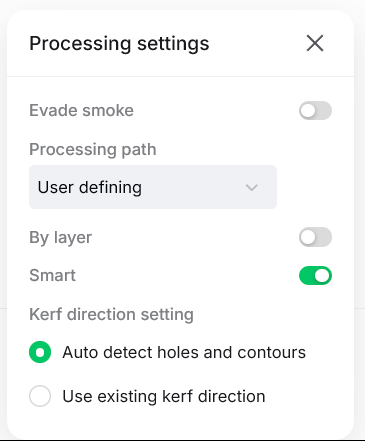
그 다음 Embossment 모드에서 Incise를 사용하세요. - 자신의 기계 설정을 사용하세요. 절개 설정은 제 기계마다 다르지만, 직접 시도해 보실 수 있습니다.
마지막으로 평면 처리로 변경하고 폴리싱 설정을 사용하세요.
디자인은 라벨링되어 있고, 디자인 A 또는 B 중 하나를 사용할 수 있습니다.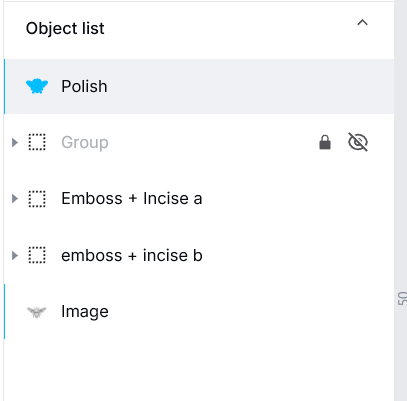
Embossment: 더 깊은 엠보싱을 원하면 공격적으로 할 수 있지만, 복잡한 디테일링 때문에 디자인과 대화를 나누기도 합니다.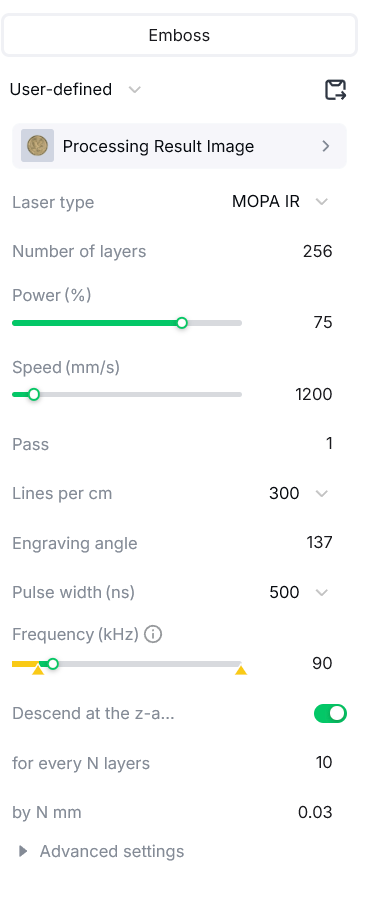
incise: 이 설정들은 과할 수 있지만, 265 대신 180 레이어를 시도해볼 수 있습니다.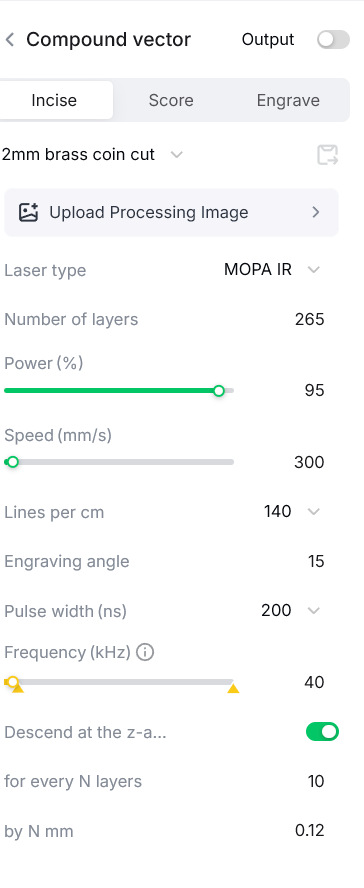
광택 및 채색: 광택을 내면 황동이 은색으로 변할 수 있습니다. 제 설정을 시도해보시면 잘 작동했습니다.
- 이걸 청소용으로 돌려.
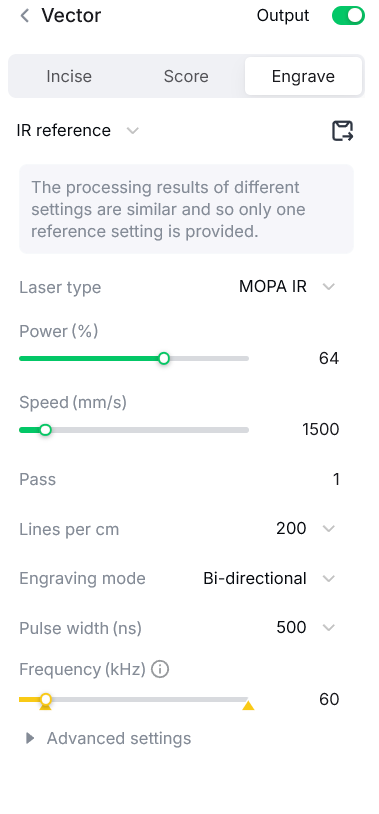
- 그다음 이걸 실행해 연마하세요. 청색광이 아니라 적외선을 사용하세요.
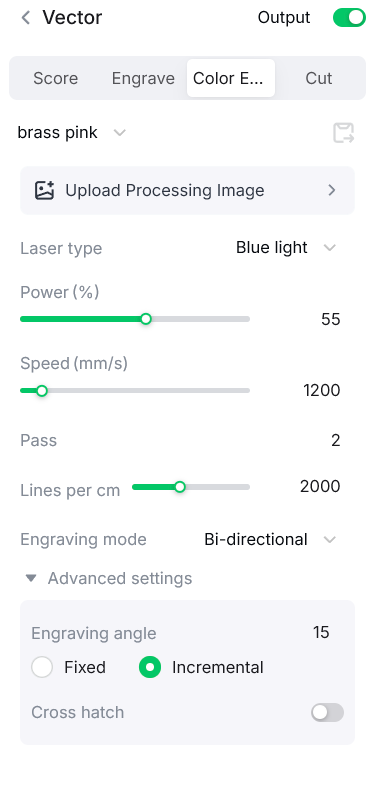
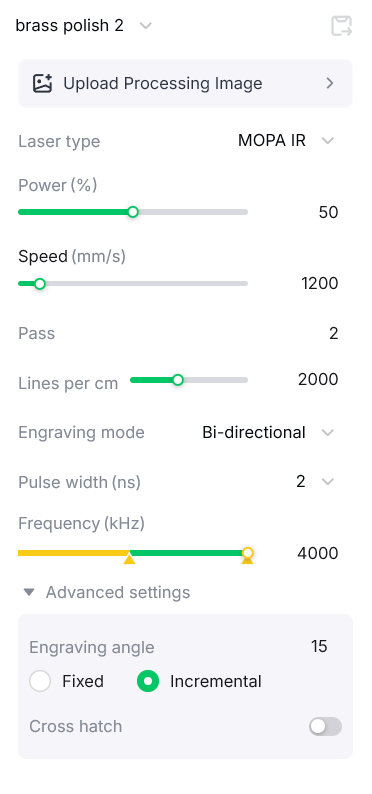
이 설정을 통해 실버로 바뀌었습니다: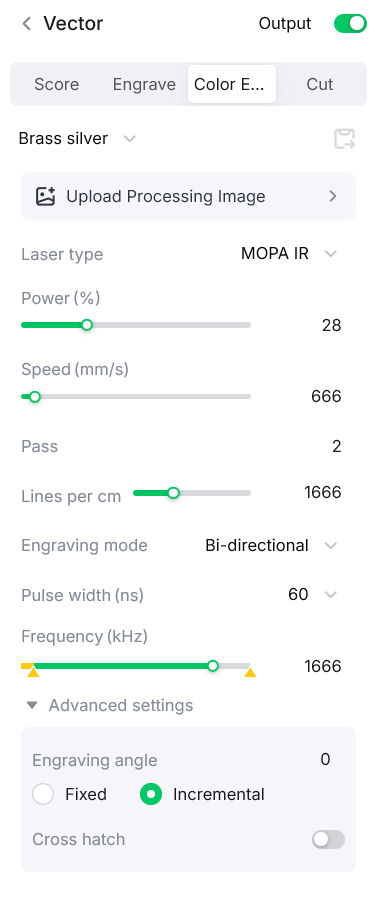
동전 케이스 인쇄 파일:
makeitreal-beta.eufymake.com/userCenter/?project_detail_id=536d916ae498fd935f502331850b1f3f&index=0&type=Published
댓글
리믹스



이것도 좋아하실 수 있습니다

꿀벌

13
97

나무 위의 벌

5
81

벌

45
343

파이어플라이 / 라이트닝 버그 경치 절단 및 조각

8
41

$0.69
$0.69
크레딧69
기하학적 벌집 날개 패턴이 있는 레이저 컷 나무 꿀벌 벽 아트

0

슬레이트 위의 벌 롤러코스터

171
1.2k
벌집과 벌집 벽걸이 장식 중 참나무 잎
0
2

꿀벌

28
111

벌 모델

3
24

비 경치 좋은 컷 및 조각
23
107

GIF
$2.00
$2.00
크레딧200
은하와 별이 있는 금속 군번줄에 새겨진 천체 벌 색상 각인

14

테이블 장식용 벌 모양의 나무 피규어

13
43

수제 벌과 벌집 나무 코스터, 수지 디테일

10
65

레이저 각인 코르크 벌과 꽃 코스터

34
360

비

88
421

레이저 컷 벌 퍼즐 3mm DWG 파일

17
110

범블비 모델

36
249
꽃벌 장식

5
47