举报
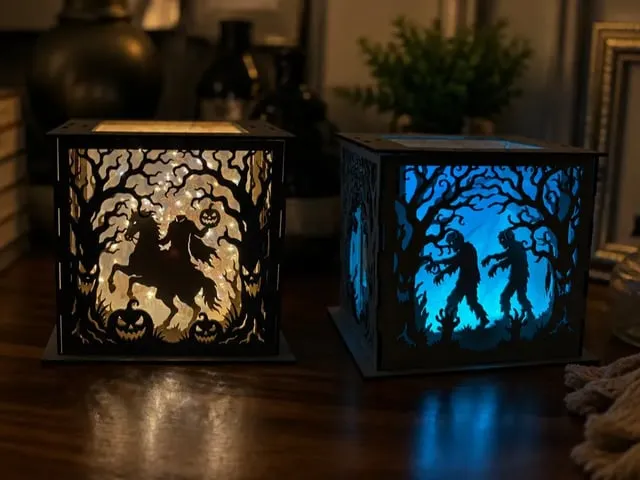
![[Laser cut and engrave] Halloween ColorCraft Light](https://image-res.atomm.com/resource/xtool/community/attachment/xtool-community/d4b79560-b36a-4a2d-ae2c-c55cc61c9f8b?x-oss-process=image/resize,m_fill,w_1280,h_960,limit_0/interlace,1/format,webp/auto-orient,1)
![[Laser cut and engrave] Halloween ColorCraft Light](data:image/png;base64,iVBORw0KGgoAAAANSUhEUgAAAAoAAAAKCAYAAACNMs+9AAAAAXNSR0IArs4c6QAAABdJREFUKFNjZCASMBKpjmFUId6QIjp4AAppAAuXjCs4AAAAAElFTkSuQmCC)
![[Laser cut and engrave] Halloween ColorCraft Light](https://image-res.atomm.com/resource/xtool/community/attachment/xtool-community/d4b79560-b36a-4a2d-ae2c-c55cc61c9f8b?x-oss-process=image/resize,m_fill,w_160,h_120,limit_0/interlace,1/format,webp/auto-orient,1)
![[Laser cut and engrave] Halloween ColorCraft Light](https://image-res.atomm.com/resource/xtool/community/attachment/xtool-community/9fd13643-eb93-4754-8e1e-e1ed524c22d9/Halloween.jpg?x-oss-process=image/resize,m_fill,w_160,h_120,limit_0/interlace,1/format,webp/auto-orient,1)
万圣节ColorCraft灯
 二创
二创 教程
教程
Halloween ColorCraft Light1
.xcs
显示剩余(1项)
应用场景
激光
机器与模块

xTool P2
55W材料兼容的 xTool 机器
P3
F2
F2 Ultra UV
F2 Ultra(Single)
F2 Ultra
F1 Ultra
F1
F1 Lite
S1
P2S
M1 Ultra
M1
D1 Pro 2.0
D1 Pro
D1
Laserbox
M2
使用的材料

0.2mm 牛皮纸

55
5212
信息
彩色纸雕灯通过叠加多层纸张,营造空间的深度感。这个盒子结合了万圣节主题元素,并结合了浅色,打造出一盏符合万圣节主题的纸雕灯。它可以作为节日期间的小装饰品使用,也可以作为装饰品放置在家中任何地方。
此二创基于

xTool ColorCraft Light Kit
 xTool DIY Kit
教程
1
步骤1

预览

预览
把套装材料包里的彩色纸和硫酸纸放进机器,固定四个角,导入电脑,设定参数,然后切割模型。
模式:激光切割
卡纸(彩色)
power: 15
speed: 60
of passes: 1
张卡纸(白色)
power: 10
speed: 70
通行次数:1
张描图纸
power: 5
速度:60
通行次数:1
金色自粘乙烯
基power: 10
速度:35
传递次数:1
2
步骤2

预览

预览

预览
把第一张彩色纸和硫酸纸放进相框。
3
步骤3

预览
把带灯带粘上的丙烯画框装上。
4
步骤4

预览
继续添加彩色纸。
每层加四条丙烯胶条。
5
步骤5

预览

预览

预览
12 More images
继续添加彩色纸。
每层加四条丙烯胶条。
6
步骤6

预览

预览
放上最后一张白纸,再用按尺寸裁剪的硫酸纸。
7
步骤7

预览

预览
把灯带固定在后面板上,并覆盖后面板。
8
步骤8

预览
结尾
说明:
在剪彩色纸之前,你可以在四个角落贴上遮蔽胶带来固定。
组装亚克力板时,尽量保持它垂直于桌面。
评论
二创



您可能也喜欢

$6.00
$6.00
Credits600
万圣节激光切割分层灯盒,配有南瓜和圣诞树

0

$1.70
$1.70
Credits170
一套五块万圣节主题方形壁画面板

1

$4.00
$4.00
Credits400
万圣节装裱多层纸艺,南瓜和骷髅图案

0
$3.00
$3.00
Credits300
3D多层万圣节主题灯箱,配有无头骑士、女巫、鬼屋和僵尸剪影

7

$10.00
$10.00
Credits1000
万圣节猫与哥特式窗户灯箱

1

万圣节装框影盒,南瓜和墓地场景
0
6

$4.00
$4.00
Credits400
万圣节装框影盒,南瓜和墓地场景
0

$3.50
$3.50
$5.00
Credits350
仙女小提琴影盒SVG,3D纸激光切割光盒,魔法森林猫头鹰光盒,仙女音乐剪纸模板,激光切割影盒数字版

0

万圣节主题的飞天女巫剪影桌灯

4
17

$5.98
$5.98
Credits598
飞天女巫3D分层万圣节墙画

4

$1.60
$1.60
$4.00
Credits160
海底大气中的章鱼 3D阴影盒层叠纸剪
1

$4.97
$4.97
Credits497
独家
精灵灯

15

$4.00
$4.00
Credits400
万圣节墓地与南瓜框灯箱
0

层叠剪纸芭蕾舞者影盒墙画

4
36

$9.33
$9.33
$13.33
xTool ColorCraft 灯具套件

54

$4.00
$4.00
Credits400
万圣节装饰 分层激光切割
0

$1.50
$1.50
Credits150
万圣节影盒分层剪纸盒 鬼魅夜灯盒

2

圣诞彩工灯

18
79