
Laporkan
![[Laser cut and engrave] Leather patch Two tones Effect](https://image-res.atomm.com/resource/xtool/community/attachment/xtool-community/544b6db4-deda-40a0-9407-8d590c53bdb0?x-oss-process=image/resize,m_fill,w_1280,h_960,limit_0/interlace,1/format,webp/auto-orient,1)
![[Laser cut and engrave] Leather patch Two tones Effect](data:image/png;base64,iVBORw0KGgoAAAANSUhEUgAAAAoAAAAKCAYAAACNMs+9AAAAAXNSR0IArs4c6QAAABdJREFUKFNjZCASMBKpjmFUId6QIjp4AAppAAuXjCs4AAAAAElFTkSuQmCC)
![[Laser cut and engrave] Leather patch Two tones Effect](https://image-res.atomm.com/resource/xtool/community/attachment/xtool-community/544b6db4-deda-40a0-9407-8d590c53bdb0?x-oss-process=image/resize,m_fill,w_160,h_120,limit_0/interlace,1/format,webp/auto-orient,1)
![[Laser cut and engrave] Leather patch Two tones Effect](https://image-res.atomm.com/resource/xtool/community/attachment/xtool-community/a8c07d87-5fb5-4581-8bff-dbd681bbd48a_IMG_8741.png?x-oss-process=image/resize,m_fill,w_160,h_120,limit_0/interlace,1/format,webp/auto-orient,1)
![[Laser cut and engrave] Leather patch Two tones Effect](https://image-res.atomm.com/resource/xtool/community/attachment/xtool-community/e38da411-c7ba-4750-bfe2-13f965abfb4b_IMG_8739.png?x-oss-process=image/resize,m_fill,w_160,h_120,limit_0/interlace,1/format,webp/auto-orient,1)
![[Laser cut and engrave] Leather patch Two tones Effect](https://image-res.atomm.com/resource/xtool/community/attachment/xtool-community/29e65962-a7ab-4f0d-9db2-ae72c6fec1e7_IMG_8741.png?x-oss-process=image/resize,m_fill,w_160,h_120,limit_0/interlace,1/format,webp/auto-orient,1)
![[Laser cut and engrave] Leather patch Two tones Effect](https://image-res.atomm.com/resource/xtool/community/attachment/xtool-community/dc1ba55c-935b-42c6-88d2-311f36fec407_IMG_8743.png?x-oss-process=image/resize,m_fill,w_160,h_120,limit_0/interlace,1/format,webp/auto-orient,1)
![[Laser cut and engrave] Leather patch Two tones Effect](https://image-res.atomm.com/resource/xtool/community/attachment/xtool-community/b9a14bcc-6c14-4694-8d41-08b99468dbd2_IMG_8744.png?x-oss-process=image/resize,m_fill,w_160,h_120,limit_0/interlace,1/format,webp/auto-orient,1)
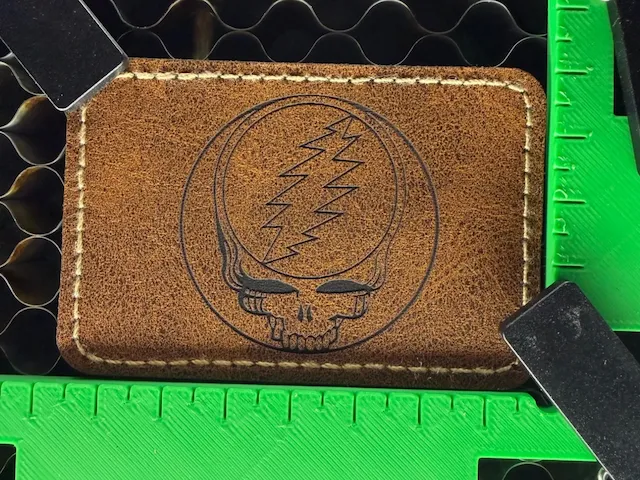
Tambalan kulit Efek dua nada
 Instruksi
Berkas

Berkas asli
PenulisF1 · Kulit PU
1


Tambahkan profil pengerjaan
Desain yang sama, mesin, material, atau perbaikan apa pun yang berbeda · Dapatkan 100 Kredit

142
3341
Informasi
      Patch Reguler dengan punggung / lem yang disiapkan untuk disetrika
https://youtube.com/shorts/VJKaaJfws3U?si=-ZCuU4v9TafhbJV2
Instruksi
1
Langkah1: Buka file XCS terlampir

Pratinjau

Pratinjau
Buka Nama Perubahan
File XCS terlampir
(Font= ITC Garamond (cari di google untuk: font ITC Garamond gratis)
Perhatikan bahwa pengaturan untuk wajah Mac berbeda dari bingkai persegi untuk wajah mac
Pengaturan terlampir
Cahaya biru untuk Teks
Lampu IR berulang untuk wajah Mac persegi
Video:
https://youtube.com/shorts/VJKaaJfws3U?si=-ZCuU4v9TafhbJV2
Komentar
Remix


Anda mungkin juga menyukai

Pita Nama Kulit

1
15

Kerajinan Kulit Buatan Tangan dengan Alat Pemotong Presisi

0
19

Mencocokkan buku catatan dan bookmark
18
52

Unicorn Nakal

2
11

Laser pertama saya dari foto
.jpg?x-oss-process=image/resize,m_fill,w_80,h_80,limit_0/interlace,1/format,webp/auto-orient,1)
0
1

Jig Gantungan Kunci Kulit Imitasi

11
119

'/%3e%3cpath%20d='M15.9997%2019.3335L11.833%2014.3335H14.333L15.9997%2017.6668L17.6663%2014.3335H20.1663L15.9997%2019.3335Z'%20fill='white'/%3e%3c/g%3e%3cdefs%3e%3clinearGradient%20id='paint0_linear_1412_57140'%20x1='16'%20y1='7.6665'%20x2='16'%20y2='24.3332'%20gradientUnits='userSpaceOnUse'%3e%3cstop%20stop-color='%23FFA15F'/%3e%3cstop%20offset='1'%20stop-color='%23E37C32'/%3e%3c/linearGradient%3e%3c/defs%3e%3c/svg%3e)
Llavero satu potong

0
1

foto gantungan kunci kayu
1
1
Grateful Dead Patch

0
3

Vespa 125 primavera

0
8

Jig Kayu untuk Gantungan Kunci

195
751

Pemegang Kartu Magnetik

2
7

Ukiran Kulit Sasquatch

11
61

Dompet Kulit Potong Laser dengan Desain Penghukum Bendera Amerika
7
146

Pemegang Kartu Nama Kulit dengan Informasi Kontak Terukir Laser Kustom

0
10

Liontin kulit
3
25

'/%3e%3c/g%3e%3cdefs%3e%3clinearGradient%20id='paint0_linear_1737_57170'%20x1='16.5097'%20y1='8.87061'%20x2='16.5097'%20y2='23.3945'%20gradientUnits='userSpaceOnUse'%3e%3cstop%20stop-color='%232E9AFF'/%3e%3cstop%20offset='1'%20stop-color='%233378FF'/%3e%3c/linearGradient%3e%3c/defs%3e%3c/svg%3e)
Pemegang kartu dengan potret (Dibuat dari kulit PU)

0
1

Dompet Bendera Amerika

56
412