![[Laser cut and engrave] Hand holding decorative antique coin with intricate design](https://image-res.atomm.com/resource/xtool/community/attachment/xtool-community/2ecc46fb-a3c2-4106-810a-b9d264957f8a.png?x-oss-process=image/resize,w_1200,h_900,limit_0/interlace,1/format,webp/auto-orient,1)

![[Laser cut and engrave] Hand holding decorative antique coin with intricate design](data:image/png;base64,iVBORw0KGgoAAAANSUhEUgAAAAoAAAAKCAYAAACNMs+9AAAAAXNSR0IArs4c6QAAABdJREFUKFNjZCASMBKpjmFUId6QIjp4AAppAAuXjCs4AAAAAElFTkSuQmCC)
![[Laser cut and engrave] Hand holding decorative antique coin with intricate design](https://image-res.atomm.com/resource/xtool/community/attachment/xtool-community/2ecc46fb-a3c2-4106-810a-b9d264957f8a.png?x-oss-process=image/resize,w_200,h_150,limit_0/interlace,1/format,webp/auto-orient,1)
![[Laser cut and engrave] Hand holding decorative antique coin with intricate design](https://image-res.xtool.com/resource/xtool/community/attachment/xtool-community/b3ee2928-88f6-4924-8d2c-f6d36e9ca917.png)
![[Laser cut and engrave] Hand holding decorative antique coin with intricate design](https://image-res.atomm.com/resource/xtool/community/attachment/xtool-community/cdea8b3e-ba51-418a-8dcf-ba300b6f4ef0.jpg?x-oss-process=image/resize,w_200,h_150,limit_0/interlace,1/format,webp/auto-orient,1)
Aztec coin, embossing F1 Ultra
 Instruction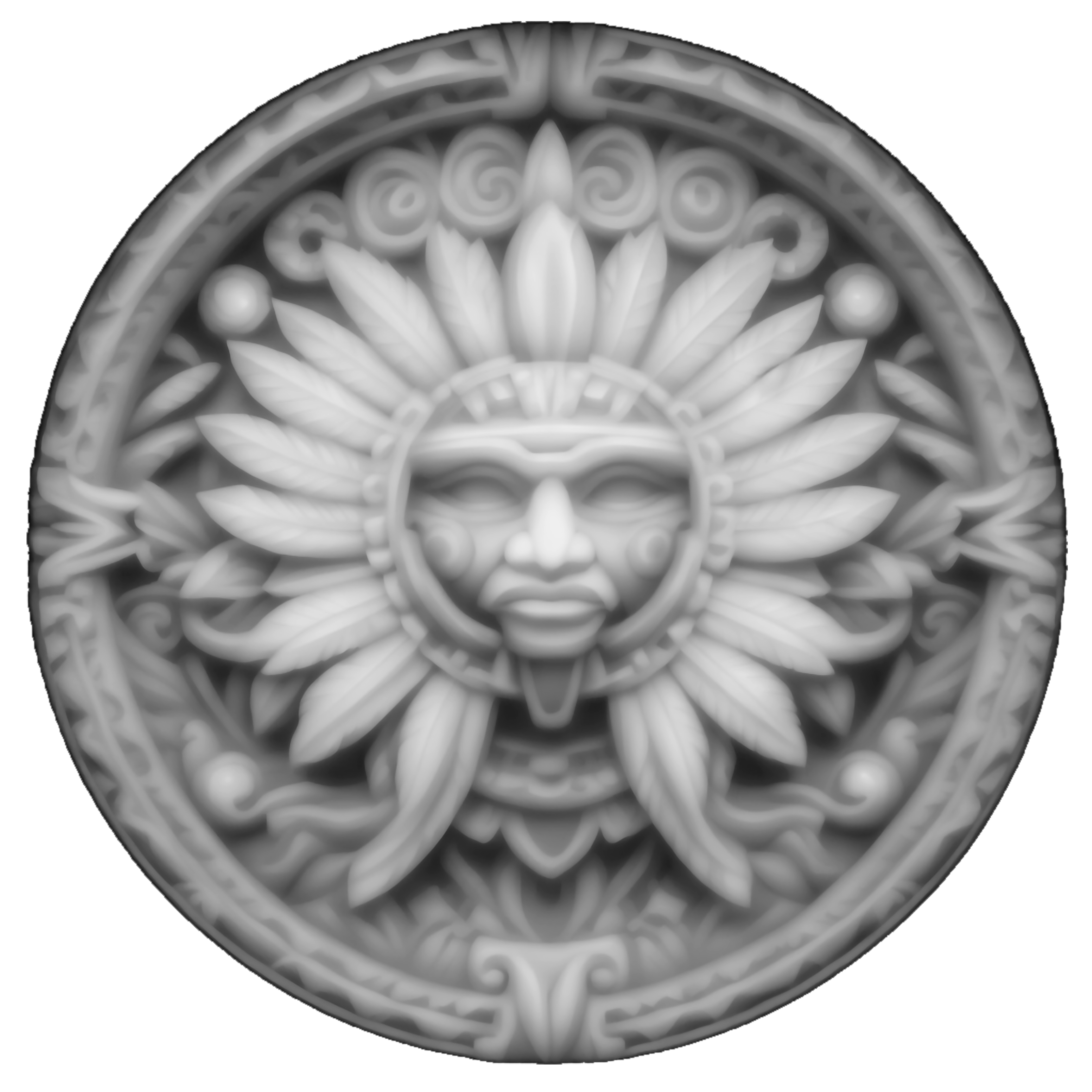


Information
      Aztec coin embossed by F1 Ultra
Image dephtmap available
Settings and process in description!

--

Aztec part embossed by the F1 Ultra.
Dephtmap image available
Settings and processes in description!
Instruction
Step1


Place your part in the machine and make sure to focus it properly so that your laser is set to the correct distance.
To do this, make sure that the red dot overlaps the blue dot by moving the laser up or down.
---
Place your part in the machine and make sure to focus your laser at the right distance.
To do this, make sure that the red dot overlaps the blue dot by raising or lowering the laser.
Step2


Open the file in depthmap and position it on your part.Set
the parameters as in the photo:
Mode: embossing
Laser type: fiber
Number of layers: 256
Power: 100%
Speed: 600
Pass: 1
Lines: 300
Angle: 30
Frequency: 30
Go down to z axis: on
All N layers: 2
N mm: 0.01
Start the process: 3h40 of engraving
---
Open the file in dephtmap and position it on your part.
Adjust the parameters as in the photo:
Mode: embossing
Laser type: fiber
Number of layers: 256
Power: 100%
Speed: 600
Pass: 1
Lines: 300
Angle: 30
Frequency: 30
Go down to the z-axis: on
All N layers: 2
N mm: 0.01
Start the process: 3h40 of engraving
Step3

Wash and scrub the part well under water with soap--
Wash and scrub the part well under water with soap
Step4: Optional


This step is optional.
I dipped the piece in a metal burnisher to give it a more "old" and patinated look.
Leave it in the liquid for a few seconds until the piece turns black.
Rub with a green sponge under water to remove the black and reveal the details.
Stop when you like the result.
---
This step is optional.
I immersed the piece in a metal burnisher to give it an "old" and patinated look.
Leave for a few seconds in the liquid until the piece turns black.
Rub with a green sponge under water to remove the black and reveal the details.
Stop when you like the result.
Step5


Finish by rubbing with steel wool to polish and shine.
You can also use a dremel to polish even more.
Admire!
---
Finir en frottant avec une laine d'acier afin de polir et faire briller.
Vous pouvez aussi utiliser une dremel pour polir encore plus.
Admirez !
Remixes
License



You may also like

Engraved circular decision coin with skull and axes design, YES and No


'/%3e%3cdefs%3e%3clinearGradient%20id='paint0_linear_1433_15675'%20x1='12'%20y1='3.25'%20x2='16.6891'%20y2='20.75'%20gradientUnits='userSpaceOnUse'%3e%3cstop%20stop-color='%23FF5D80'/%3e%3cstop%20offset='1'%20stop-color='%23FF0035'/%3e%3c/linearGradient%3e%3c/defs%3e%3c/svg%3e)
Pièce laiton créativité - Engraved Brass Challenge Coin with Creative Symbols


Challenge Coin


Cutting metal with a standard F1 / coin cell battery holder

Brass Coin - Aztec Owl - F2 Ultra UV or F2 Ultra


$50 Gift Coins


Pirates Of The Caribbean Aztec Gold Coin


S'mores and Campfires decorative cracker design


Laser Engraved Ice and chips Cream Tokens Green Plastic Coins


Circular patch with T-Rex illustration and text


Engraved Lighter


Seattle Commemorative/Challenge Coin


Large Zippo Lighter


Viking warrior woman with sword silver coin

Hell Ya! or Nope! Not Happenin' Coin


$100 Gift Coin

Funny Hip Flask for Parent of Teenagers - 'Don't Judge Me - I Have Teenagers


Cute tea sticker with a smiling face
