
![[Laser cut and engrave] Set of 4 Laser Engraved Slate Coffee Coasters with Motivational Quotes](https://image-res.atomm.com/resource/xtool/community/attachment/xtool-community/1c62898f-cb6f-44d6-bb75-a55a7254f742.png?x-oss-process=image/resize,w_1200,h_900,limit_0/interlace,1/format,webp/auto-orient,1)
![[Laser cut and engrave] Set of 4 Laser Engraved Slate Coffee Coasters with Motivational Quotes](data:image/png;base64,iVBORw0KGgoAAAANSUhEUgAAAAoAAAAKCAYAAACNMs+9AAAAAXNSR0IArs4c6QAAABdJREFUKFNjZCASMBKpjmFUId6QIjp4AAppAAuXjCs4AAAAAElFTkSuQmCC)
![[Laser cut and engrave] Set of 4 Laser Engraved Slate Coffee Coasters with Motivational Quotes](https://image-res.atomm.com/resource/xtool/community/attachment/xtool-community/1c62898f-cb6f-44d6-bb75-a55a7254f742.png?x-oss-process=image/resize,w_200,h_150,limit_0/interlace,1/format,webp/auto-orient,1)
![[Laser cut and engrave] Set of 4 Laser Engraved Slate Coffee Coasters with Motivational Quotes](https://image-res.atomm.com/resource/xtool/community/attachment/xtool-community/c8ed521b-4f72-486c-855b-890a2dae9d92.png?x-oss-process=image/resize,w_200,h_150,limit_0/interlace,1/format,webp/auto-orient,1)
![[Laser cut and engrave] Set of 4 Laser Engraved Slate Coffee Coasters with Motivational Quotes](https://image-res.atomm.com/resource/xtool/community/attachment/xtool-community/08ba813c-84a2-4005-b142-166be7e62469.png?x-oss-process=image/resize,w_200,h_150,limit_0/interlace,1/format,webp/auto-orient,1)
![[Laser cut and engrave] Set of 4 Laser Engraved Slate Coffee Coasters with Motivational Quotes](https://image-res.atomm.com/resource/xtool/community/attachment/xtool-community/c1927923-f9e9-4396-9456-9d7b38972bd4.png?x-oss-process=image/resize,w_200,h_150,limit_0/interlace,1/format,webp/auto-orient,1)
Sada vysokooktanové břidlicové dráhy
 Instrukce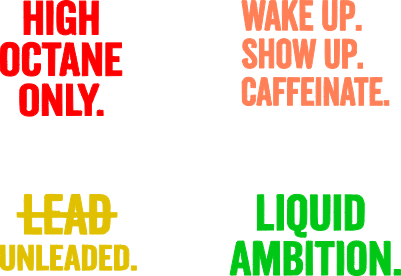


Informace
      Začněte ráno s náladou a silnou kávou ☕

Tyto gravírované břidlicové podtácky jsou určeny pro milovníky kofeinu, kteří jedou na výrazných pivech a ještě výraznějších náladách.
Každá podtácka obsahuje zábavný, laserem gravírovaný kávový citát ostrým bílým písmem na přírodní černé břidlici:
• POUZE VYSOKOOKTANOVÉ
•VZBUĎ SE. PŘIJĎ. KOFEIN.
• OLOVNATÝ BENZÍN.
• LIKVIDNÍ AMBICE

Perfektní do kaváren, kuchyňských pultů, kancelářských stolů nebo jako dárek pro přítele, který rozhodně není ranní ptáče bez svého nápoje.

Přidejte trochu barvy přes gravírování a vypadají nádherně.
Instrukce
Krok1
Příprava
1. Vyčistěte desku
Slate je zaprášená. Podtácku otřete vlhkým hadříkem nebo trochou isopropylalkoholu, abyste odstranili volný kamenný prach. Nechte to úplně uschnout.
2. Trik s "předpečetěním
Pro tmavší, "mokrý" vzhled, který zvýrazní bílou rytinou, naneste tenkou vrstvu čirého matného nebo saténového laku (spreje) na břidlici před rytím. Nechte to uschnout 20 minut.
Krok2
Nastavení softwaru
1. Importujte svůj design
- li type="disc">Otevřete soubor XCS v xTool Studiu
- Zvětšete obrázek podle vaší horské dráhy (standardní dráhy mají obvykle rozměry 100mm x 100mm nebo 4" x 4"). Nechte malý rozmezí (např. velikost designu na 90 mm).
2. Nastavení výkonu a rychlosti
nastavení se mírně liší podle stroje, ale jsou to bezpečné "výchozí body" pro běžné modely xToolu. Vždy nejdřív udělejte malou testovací mřížku na zadní straně dráhy.
| Machine Model | th style="border:1.0pt solid windowtext;padding:.75pt;">PowerČáry na cm (LPC) | |
|---|---|---|
| xTool D1 / D1 Pro (10W) | 80% - 100% | 60 mm/s (3600 mm/m) | td style="border:1.0pt solid windowtext;padding:.75pt;">100 - 120
| xTool D1 Pro (20W) | 60% - 80% | td style="border:1.0pt solid windowtext;padding:.75pt;">80 mm/s (4800 mm/m)120 |
| 40% - 60% | 100 mm/s (6000 mm/m) | 120 |
| 150 mm/s | td style="border:1.0pt solid windowtext;padding:.75pt;">140
: Pokud používáte "mm/m" (milimetry za minutu) ve svých nastaveních, vynásobte výše uvedenou rychlost 60.
Krok3
Rámování a gravírování
1. Zaostření
- Vložte podtácek do stroje.
- Použijte páku stojanu (D1/S1) nebo funkci automatického ostření k nastavení správné výšky laseru. U Slate je klíčové zaměření zaměření; Pokud je rozmazaný, rytina nebude jasně bílá.
2. Rámování
- Kliknutí na rámování v XCS.
- Sledujte, jak laserová hranice obkresluje oblast na vaší podtáce.
- Fyzicky nastavte podtácek, dokud není rámová krabice dokonale vystředěna.
3. Gravírovat
- li typ="disk">Nasadit si ochranné brýle.
- na proces > Start.
- Bezpečnostní poznámka: Rytiny do břidlice produkují malé množství kamenného prachu a zápachu. Ujistěte se, že máte zapnutý odsávací ventilátor nebo otevřené okno.
Krok4
Post-processing
1. Vyčistit<o:p>
- Po dokončení laseru bude podtácka pokryta jemným prachem.
- Vezměte ho ke dřezu a umyjte starým kartáčkem (nebo měkkou houbičkou) a vodou. Jemně drhni, aby se z vyrytých drážek odstranil volný prach.
2. Konečná ochrana
- Pokud jste to nepředtím utěsnili, můžete nyní nanést tenkou vrstvu čirého laku, abyste ochránili kámen před skvrnami od vína (ironie, vzhledem k designu!).
- Přidejte plstěné nebo pěnové nožičky do spodních rohů, abyste nepoškrábali stůl.
Remixy



Mohlo by se vám také líbit

Laserem gravírovaná břidlicová kávová podložka – kofeinové načítání, prosím, počkejte


Laserem gravírované břidlicové podtácky s kávovým designem


Sada dřevěných podtácků s citáty na kávu s laserem gravírovanými


Laserem gravírovaná deska "Umění v kelímku" nebo umělecká deska


Laserem gravírovaná břidlicová podložka s kávovým hrnkem Citát


Sada čtyř podtácek s dřevěnými kávovými citáty s laserem gravírovaným

Káva dělá váš okamžik – Gravírovaná břidlicová podtácka


Břidlicový podtácek s kávovou tematikou

Sada 4 laserem gravírovaných břidlicových podtácek s designem motorkářského králíka


Laserem gravírovaná břidlicová kávová podložka s designem Outin No Boundaries

Laserem gravírovaný podtácek na kávu s břidlicovým designem

Sada břidlicového podtácku s tématem farmy a dřevěnou krabicí


Laserem gravírované břidlicové podtácky s karikaturou a citátem z kávových zrn

Jack Daniels grafika pro vyrytý bridlicový whiskey podtácek a další!


Inspirované dřevěnými podtácky na kávu inspirovanými OutIn


Břidlicové dráhy s inspirativními citáty


Břidlicový kávový podtácek

Stolní dráha
