![[Laser cut and engrave] Log-Slide Rule](https://storage-public.atomm.com/xtool/community/attachment/xtool-community/06e361fc-3f7d-415f-97e3-66ba0991927b.PNG?x-oss-process=image/resize,m_fill,w_1280,h_960,limit_0/interlace,1/format,webp/auto-orient,1)
![[Laser cut and engrave] Log-Slide Rule](data:image/png;base64,iVBORw0KGgoAAAANSUhEUgAAAAoAAAAKCAYAAACNMs+9AAAAAXNSR0IArs4c6QAAABdJREFUKFNjZCASMBKpjmFUId6QIjp4AAppAAuXjCs4AAAAAElFTkSuQmCC)
![[Laser cut and engrave] Log-Slide Rule](https://storage-public.atomm.com/xtool/community/attachment/xtool-community/06e361fc-3f7d-415f-97e3-66ba0991927b.PNG?x-oss-process=image/resize,m_fill,w_160,h_120,limit_0/interlace,1/format,webp/auto-orient,1)
![[Laser cut and engrave] Log-Slide Rule](https://storage-public.atomm.com/xtool/community/attachment/xtool-community/b0d62742-847b-4d06-85ef-096d5199e1e1.jpeg?x-oss-process=image/resize,m_fill,w_160,h_120,limit_0/interlace,1/format,webp/auto-orient,1)
![[Laser cut and engrave] Log-Slide Rule](https://storage-public.atomm.com/xtool/community/attachment/xtool-community/0c80c7cd-85ef-4eaf-afd5-507aa0ecd087.jpeg?x-oss-process=image/resize,m_fill,w_160,h_120,limit_0/interlace,1/format,webp/auto-orient,1)
Log-Slide Rule
 Instruction


Information
      Log-Slide Rule – 3D Printing & xTool Laser Engraving

A fully functional, compact slide rule with a modern design! This project brings back a piece of classic engineering history by combining 3D printing with the extreme precision of an xTool laser. The slide rule features the standard scales (A, B, C, D) and is perfect for multiplication, division, and calculating square roots—no batteries required.


Highlights & Features:

- 100% Dimensionally Accurate: The scales were generated as a precise 1:1 SVG file (CAD-ready).

- Multi-Material Look: A high-contrast design featuring a matte, dark body and a bright red cursor.

- Fully Functional: Consists of the fixed frame (scales A & D), the movable slide (scales B & C), and the
   sliding cursor (runner).

- Perfect for xTool: Thanks to the vector template, the delicate logarithmic scales and numbers can be
  laser-marked or engraved with pinpoint sharpness.

Manufacturing (Quick Guide):

- Print Body & Slide: The base plate and the slider are 3D-printed with a precise fit (e.g., using PLA or    PETG).

- Laser Engraving (xTool): Place the printed part into the laser and align the precise SVG file for the scales flush with the surface. The fine lines are engraved directly onto the plastic.

- Print the Cursor: 3D-print the small red cursor separately.

- Assembly: Insert the slide, snap on the cursor—and your analog calculation marvel is ready to use!

Link to 3D project:
https://makerworld.com/de/models/3179842-log-slide-rule#profileId-3596377

Link to social media:
 https://www.reddit.com/r/xToolOfficial/comments/1vqru5p/logslide_rule/

#2026backtoschoolcontest #atomm
Instruction
Step1: 3D-Printed Slide Rule with IR Laser Engraving


3D Printed Slide Rules with IR Laser Marking
A completely 3D printed analog slide rule with precise infrared laser marking! This functional maker gadget uses logarithm scales A, B, C, and D for multiplication, division, squaring, rooting, and rule of three calculations—all without batteries.
Material & 3D printing
- main body (body & tongue): Black PLA (optimized for bright white contrast through laser foaming).
- Runner: 3D printed frame made of PLA with a fine red PLA filament line as a precise hairline.
- Assembly: The tongue is simply inserted into the frame, the runner is placed on top.
Structure
& Components
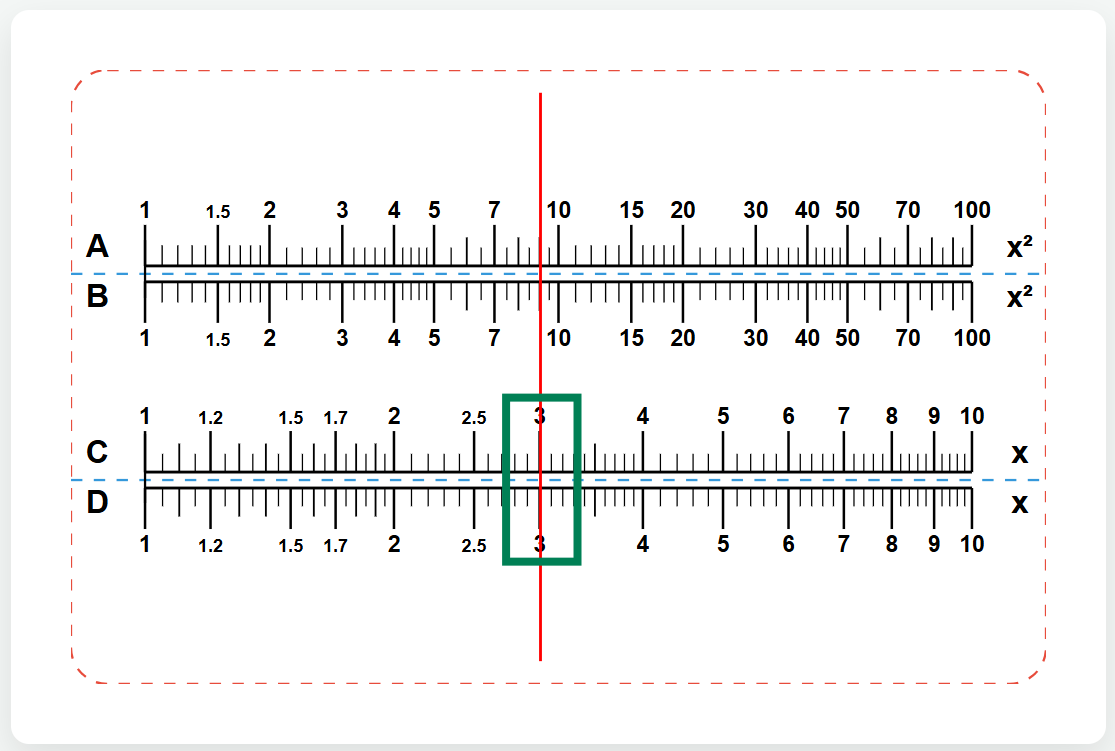
- Solid Body (top & bottom): Includes scale A (top) and scale D (bottom).
- Tongue (movable middle section): Includes scale B (top) and scale C (bottom).
- Runner: Slider with red PLA hairline for exact alignment and reading.
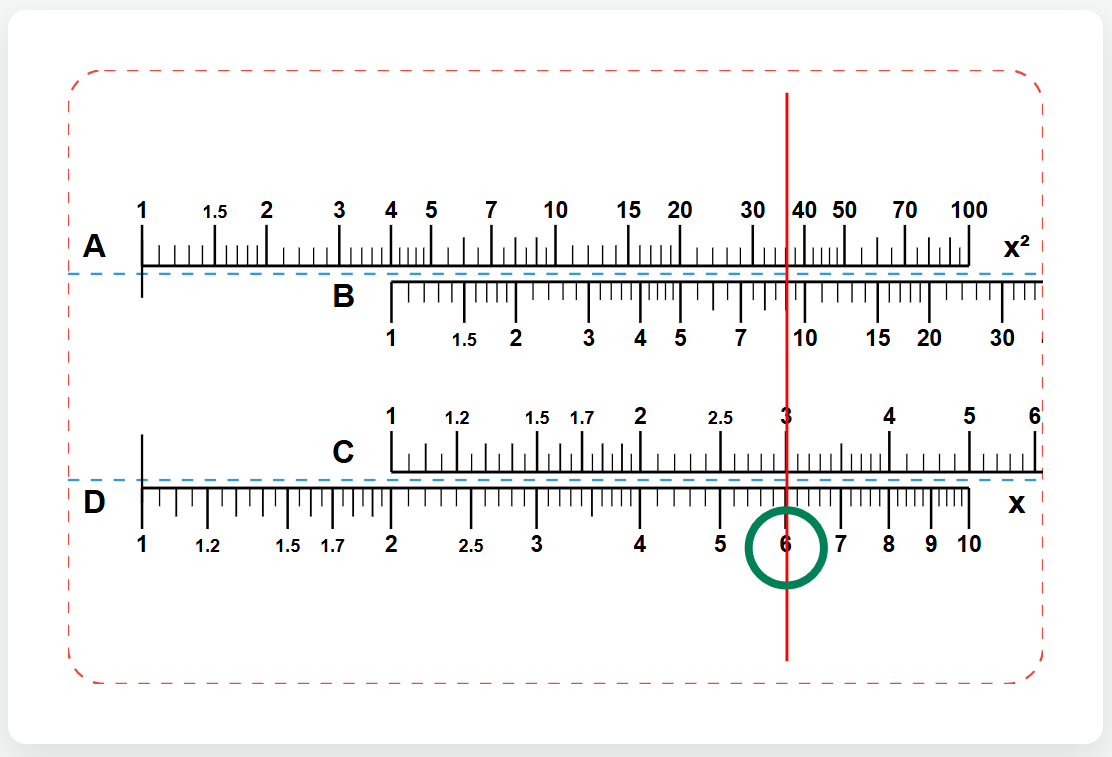
2. Multiplication (x * y) - Example: 2 * 3 = 6
- Move the tongue so that the 1 of the scale C is exactly above the 2 of the scale D.
- Slide the runner with the red line to the 3 of the scale C.
- Read the result under the red line on the fixed scale D: 6.
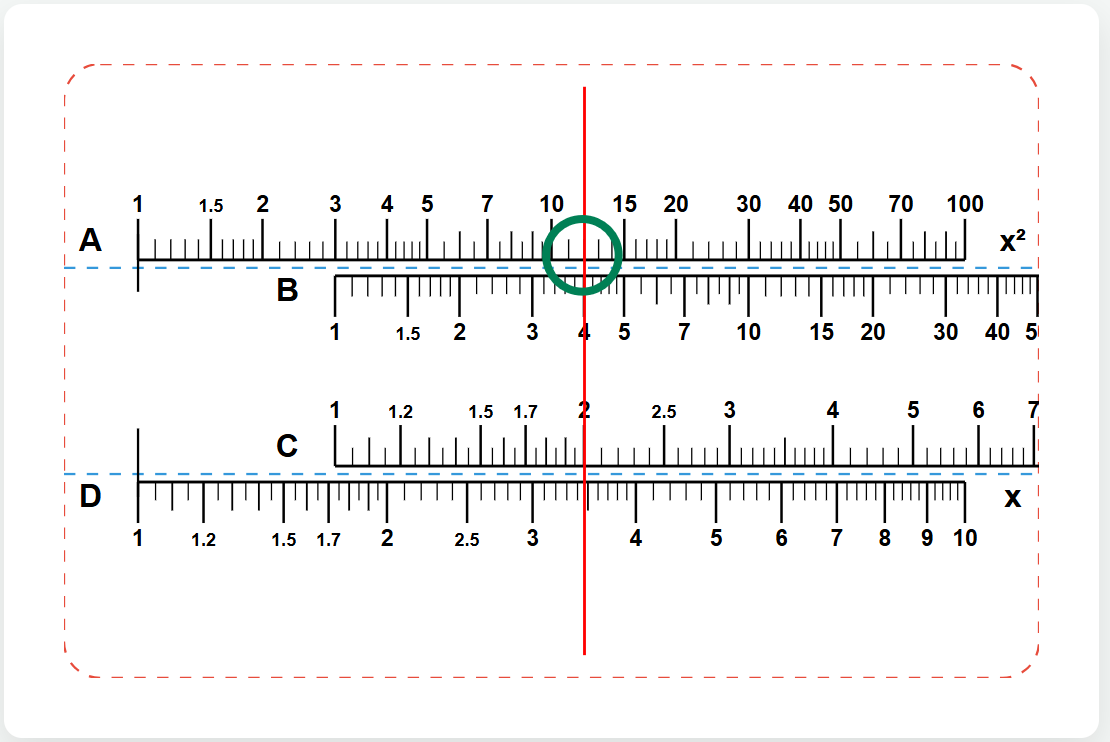
For larger values, use scales A and B:
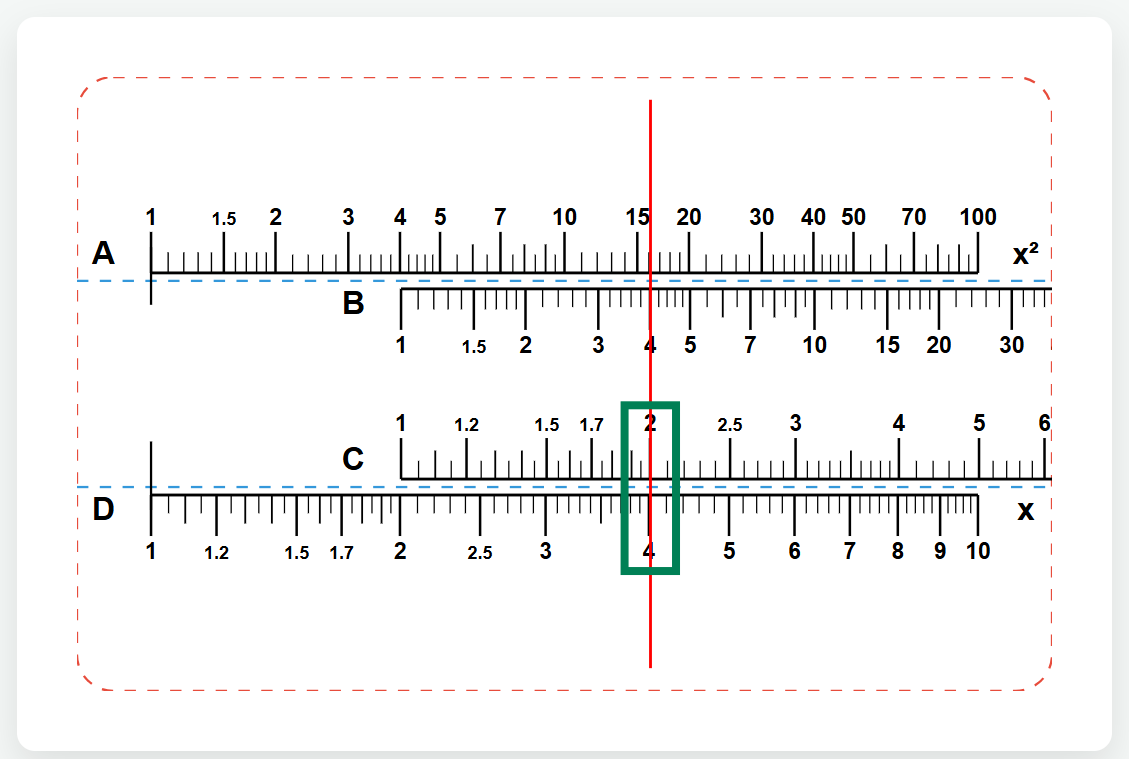
- Move the tongue so that the 1 of scale B is exactly above the 3 of scale A.
- Slide the runner with the red line to 4 on scale B.
- Read the result under the red line on the fixed scale A: 12.
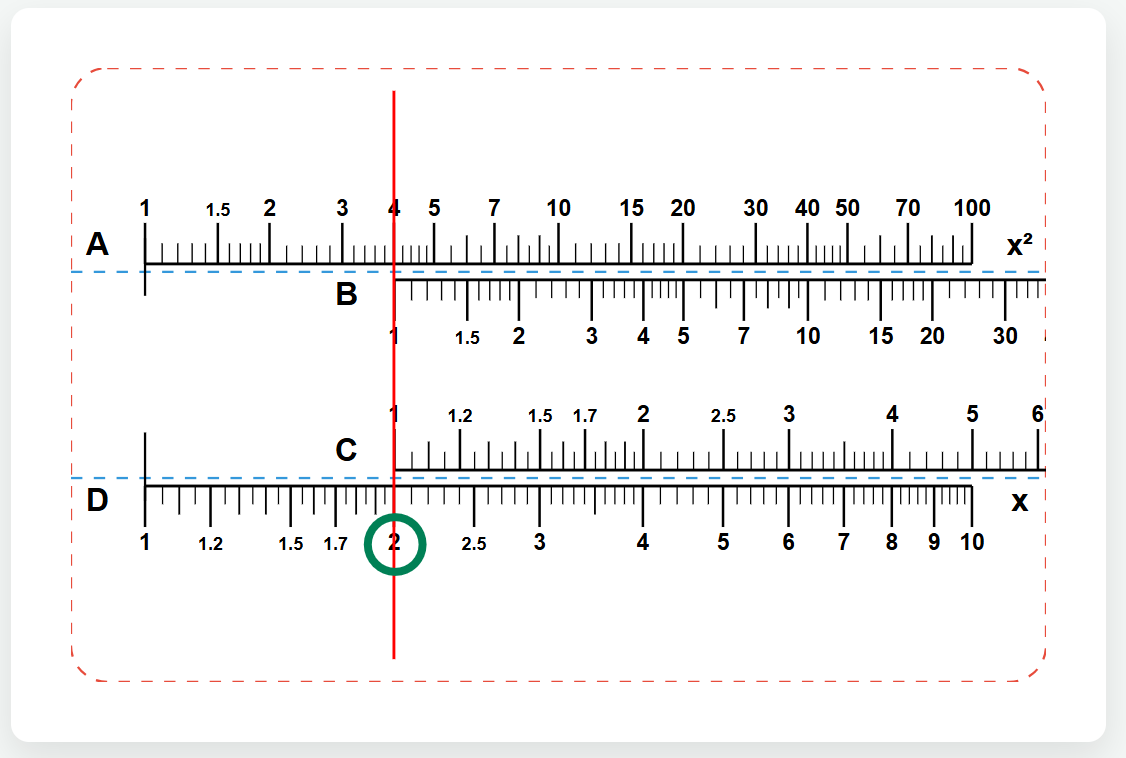
3rd division (x / y) - Example: 6 / 3 = 2
- Slide the runner with the red line to the 6 of the scale D.
- Move the tongue until the 3 of the scale C is exactly below the red line.
- Push the runner to 1 on scale C.
- Read the result under the red line on scale D: 2.
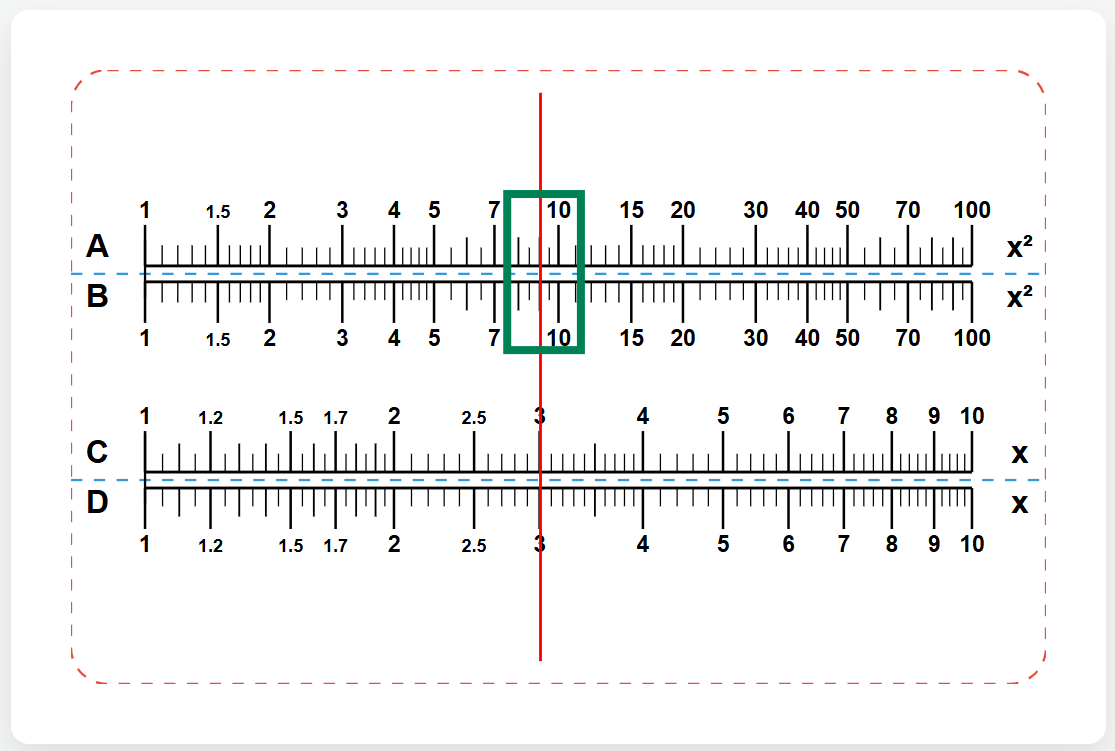
4. Square (x²) - Example: 3² = 9
- Move the runner to 3 on scale D.
- Look along the red line directly up to the scale A.
- Read the square there: 9. (Note: The tongue does not have to be moved for this!)
5√√.
- Look along the red line directly down to the scale D.
- Read the result there: 3.
6.
- Run the runner down any value on scale C – on scale D you will immediately read the proportional value.
-------------------------------------------------------------------------------------------
3D-Printed Slide Rule with IR Laser Engraving
A fully 3D-printed analog slide rule featuring high-precision infrared laser marking! This functional maker gadget utilizes logarithmic scales A, B, C, and D for multiplication, division, squaring, square roots, and proportions – completely battery-free.
Materials & 3D Printing
- Main Body (Frame & Slide): Black PLA (optimized for bright white contrast via laser foaming).
- Cursor (Indicator): 3D-printed PLA frame featuring a fine red PLA filament line as a precise hairline indicator.
- Assembly: Simply slide the middle tongue into the frame and snap on the cursor.
Anatomy & Components
- Fixed Frame (Top & Bottom): Features Scale A (top) and Scale D (bottom).
- Slide / Tongue (Movable Middle Section): Features Scale B (top) and Scale C (bottom).
- Cursor: Sliding window with a red PLA hairline for precise alignment and reading.
2. Multiplication (x * y) — Example: 2 * 3 = 6
- Move the Slide so that the 1 on Scale C aligns directly above the 2 on Scale D.
- Slide the Cursor so its red line is over the 3 on Scale C.
- Read the result directly under the red line on fixed Scale D: 6.
For larger values, use scales A and B:
- Move the Slide so that the 1 on Scale B aligns directly above the 3 on Scale A.
- Slide the Cursor so its red line is over the 4 on Scale B.
- Read the result directly under the red line on fixed Scale A: 12.
3. Division (x / y) — Example: 6 / 3 = 2
- Slide the Cursor so its red line is over the 6 on Scale D.
- Move the Slide until the 3 on Scale C is positioned right under the red line.
- Move the Cursor to the 1 on Scale C.
- Read the result directly under the red line on Scale D: 2.
4. Squaring (x²) — Example: 3² = 9
- Slide the Cursor over the 3 on Scale D.
- Look straight up along the red line to Scale A.
- Read the squared result: 9. (Note: You do not need to move the slide for this!)
5. Square Root (√x) — Example: √9 = 3
- Slide the Cursor over the 9 on Scale A.
- Look straight down along the red line to Scale D.
- Read the result: 3.
6. Proportions / Rule of Three (A / B = C / D)
- Align a known ratio between the slide and the frame (e.g., align 4 on Scale C directly over 8 on Scale D).
- Move the cursor to any value on Scale C – you will instantly read the proportional value directly below on Scale D.
Remixes
License



You may also like

polymer


Acrylic Multiplication Chart - School Bag tag


xTool Ruler


Technical Blueprint Poster of a Northstar Navigation Compass


Make your own ruler templates


Low Air Assist Engraving Color/Tone Chart - Engraving Test Grid For Stained Wood/Plywood


Black semi-circle protractor for geometry and technical drawing


Inch to Metric & Fraction to Decimal Conversion chart on wooden surface.


First Laser Project after Settingup


Material Test Cards F2 Ultra UV for TPU project


Custom 30-centimeter black ruler

Parameter testing with PLA calibration grid


xtool f1 ultra alignment grid 0-220mm

Maßskala 40 cm


Wooden Protractor


Pencil Jig Laser Cut Design, Pencil Engraver SVG, Pencil Jig Template


Spirograph Kit | Atomm Logo, Ruler, Protractor and Circles!


Engraved 3D Printed Tool Box for Machinist Gauges - F2 Ultra UV project
