











































신고
![[Laser cut and engrave] A mother's love is the heart of the Giving Tree wooden decor](data:image/png;base64,iVBORw0KGgoAAAANSUhEUgAAAAoAAAAKCAYAAACNMs+9AAAAAXNSR0IArs4c6QAAABdJREFUKFNjZCASMBKpjmFUId6QIjp4AAppAAuXjCs4AAAAAElFTkSuQmCC)
![[Laser cut and engrave] A mother's love is the heart of the Giving Tree wooden decor](https://storage-us.atomm.com/resource/xtool/community/attachment/xtool-community/2364155f-367f-4da8-8d7a-10bae3fad1d6.jpeg?x-oss-process=image/resize,w_200,h_150,limit_0/interlace,1/format,webp/auto-orient,1)
![[Laser cut and engrave] A mother's love is the heart of the Giving Tree wooden decor](https://storage-us.atomm.com/resource/xtool/community/attachment/xtool-community/bac24a84-4898-4578-91c1-06ff8c31af7f.jpeg?x-oss-process=image/resize,w_200,h_150,limit_0/interlace,1/format,webp/auto-orient,1)
![[Laser cut and engrave] A mother's love is the heart of the Giving Tree wooden decor](https://storage-us.atomm.com/resource/xtool/community/attachment/xtool-community/252598eb-5440-465b-91f1-f0c0814342dc.jpeg?x-oss-process=image/resize,w_200,h_150,limit_0/interlace,1/format,webp/auto-orient,1)
![[Laser cut and engrave] A mother's love is the heart of the Giving Tree wooden decor](https://storage-us.atomm.com/resource/xtool/community/attachment/xtool-community/606ac697-8916-4c36-96d0-ea8e5bca1268.jpeg?x-oss-process=image/resize,w_200,h_150,limit_0/interlace,1/format,webp/auto-orient,1)
사랑이 자라나는 곳
 지침
지침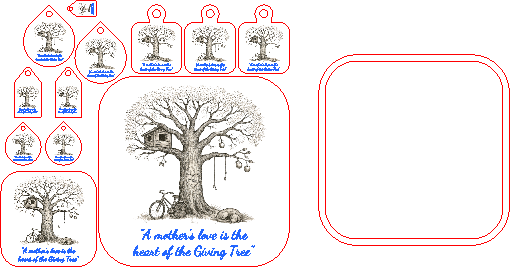
WhereLoveGrows
.xcs
응용 시나리오
레이저 가공 (60min)
기계 및 모듈

xTool P2S
55W호환되는 · 12
사용된 재료

3mm 자작나무 합판
153
1429
지침
1
단계1: 재질을 선택하고 파일 실행하기(Run File)

미리보기

미리보기
시작하려면 디자인이 포함된 Creative Space 파일이 필요합니다. 파일을 Creative Space에 불러오고 다음 단계를 따르세요:
1. 재료 선택
• 선호하는 자료를 선택하세요. 이 프로젝트는 3mm 합판을 사용해 설계되었습니다.
2. xTool 레이저 머신 설치
• 합판 시트를 xTool 레이저 머신에 넣
으세요.• 3mm 합판 기계의 설정에 맞춰 레이저 초점을 설정하세요.
• 파일 사양에 따라 절단 및 조각 영역을 설정합니다.
3. 조각을 절단하고 새기기
• 모든 부품을 절단합니다.
2
단계2: 선택지, 선택지, 선택지

미리보기

미리보기
이 파일에 다양한 컷아웃이 있습니다. 컵받침, 키체인, 그리고 특별한 명판용 컷아웃도 있습니다.
- 장식용 테두리(검은 호두나무 또는 원하는 것 )를 추가하세요.
- 키체인 하드웨어를 추가해 키체인을 만들 고,
- 코르크 코르크 층을 덧대어 코스터 한두 개를 완성하세요.
댓글
리믹스
이 프로젝트에 사용된 xTool 공급품


관련 컬렉션


관련 태그
라이센스

이 작품에는 인공지능이 생성한 내용이 포함되어 있습니다.