
举报
![[Laser cut and engrave] "Brass Veteran's Commemorative Challenge Coin"](https://image-res.atomm.com/resource/xtool/community/attachment/xtool-community/804fc3f7-c54c-41d0-802d-fb59dcb35169.jpg?x-oss-process=image/resize,w_1200,h_900,limit_0/interlace,1/format,webp/auto-orient,1)
![[Laser cut and engrave] "Brass Veteran's Commemorative Challenge Coin"](data:image/png;base64,iVBORw0KGgoAAAANSUhEUgAAAAoAAAAKCAYAAACNMs+9AAAAAXNSR0IArs4c6QAAABdJREFUKFNjZCASMBKpjmFUId6QIjp4AAppAAuXjCs4AAAAAElFTkSuQmCC)
![[Laser cut and engrave] "Brass Veteran's Commemorative Challenge Coin"](https://image-res.atomm.com/resource/xtool/community/attachment/xtool-community/804fc3f7-c54c-41d0-802d-fb59dcb35169.jpg?x-oss-process=image/resize,w_200,h_150,limit_0/interlace,1/format,webp/auto-orient,1)
![[Laser cut and engrave] "Brass Veteran's Commemorative Challenge Coin"](https://image-res.atomm.com/resource/xtool/community/attachment/xtool-community/36043548-e0f3-4c90-a99f-9c845477053e.png?x-oss-process=image/resize,w_200,h_150,limit_0/interlace,1/format,webp/auto-orient,1)
![[Laser cut and engrave] "Brass Veteran's Commemorative Challenge Coin"](https://image-res.atomm.com/resource/xtool/community/attachment/xtool-community/a76b6a64-d308-4110-a202-4b45f8d01031.JPG?x-oss-process=image/resize,w_200,h_150,limit_0/interlace,1/format,webp/auto-orient,1)
![[Laser cut and engrave] "Brass Veteran's Commemorative Challenge Coin"](https://image-res.atomm.com/resource/xtool/community/attachment/xtool-community/e2b1950c-5247-4d6c-a858-841a79712161.JPG?x-oss-process=image/resize,w_200,h_150,limit_0/interlace,1/format,webp/auto-orient,1)
“黄铜退伍军人纪念挑战币”
 教程
教程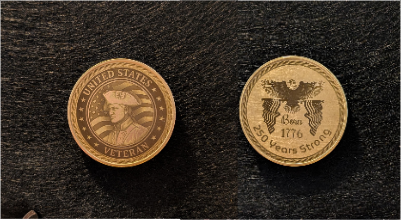
Challenge Coin
.xcs
应用场景
激光加工 (60min)
机器与模块

xTool F2
5W, 15W材料兼容的 xTool 机器
上新
M2
3WF2 Ultra UV
5WP3
5WF2 Ultra
60WF1 Ultra
20WD1
2WD1 Pro
2WF1
2WS1
2WF2 Ultra (Single)
60W使用的材料

空白黄铜纪念币

21
574
教程
1
步骤1: 下载并雕刻硬币正面

预览
- 先下载(我的设置在文件里)用
- canvas 2
- 雕刻硬币正面。根据你的系统 ,我的设置可能和你的设置不同。
- 我做了三遍,但下次我打算增加雕刻次数,让雕刻颜色更深。
2
步骤2: 将硬币刻回去

预览
- 用canvas 3
- 雕刻硬币背面 再次强调,我的设置可能和你的设置不同,基于你的系统
- 。我做了三次雕刻,但下次我打算增加雕刻次数,让雕刻颜色更深。
注意: 多调整设置,玩得开心......
评论
二创
许可证

本作品包含AI生成的内容。

您可能也喜欢

背后有诗的木制退伍军人硬币

25
150

RQ-7挑战币
17
164

可爱兔子——深雕铜纪念币

71
201

GIF
海龟挑战/纪念币

13
95

军事欣赏挑战币,纪念退伍军人和美国武装部队

8
17

激光雕刻三维浮雕五周年纪念币

2
33

雕刻纪念币、战争士兵与旗帜

1
6

铜币阶梯深度图

7
44

凯尔特十字币(黄铜/锌)

0
11

2026年中国马铜币

3
20

带有多种硬币设计的金质纪念币

16
81

金铜币雕刻

7
79

十二生肖三维铜币
108
899

死亡纪念币
15
70

黄铜斗牛犬硬币

49
340

$2.99
$2.99
Credits299
兽人战士浮雕硬币激光雕刻设计

7

西部斗牛犬挑战币
0
3

圣诞夜惊魂铜币

284
902