![[Laser cut and engrave] Circle Keychain Jig](https://image-res.atomm.com/resource/xtool/community/attachment/xtool-community/f31e54b8-addf-4b2b-b653-aa83d6f1a60d?x-oss-process=image/resize,m_fill,w_1280,h_960,limit_0/interlace,1/format,webp/auto-orient,1)
![[Laser cut and engrave] Circle Keychain Jig](data:image/png;base64,iVBORw0KGgoAAAANSUhEUgAAAAoAAAAKCAYAAACNMs+9AAAAAXNSR0IArs4c6QAAABdJREFUKFNjZCASMBKpjmFUId6QIjp4AAppAAuXjCs4AAAAAElFTkSuQmCC)
![[Laser cut and engrave] Circle Keychain Jig](https://image-res.atomm.com/resource/xtool/community/attachment/xtool-community/f31e54b8-addf-4b2b-b653-aa83d6f1a60d?x-oss-process=image/resize,m_fill,w_160,h_120,limit_0/interlace,1/format,webp/auto-orient,1)
![[Laser cut and engrave] Circle Keychain Jig](https://image-res.atomm.com/resource/xtool/community/attachment/xtool-community/dd3e63d5-d64a-465b-9913-df9410dac2ba/20240528_234313.jpg?x-oss-process=image/resize,m_fill,w_160,h_120,limit_0/interlace,1/format,webp/auto-orient,1)
![[Laser cut and engrave] Circle Keychain Jig](https://image-res.atomm.com/resource/xtool/community/attachment/xtool-community/8d3e0251-5f16-4bfa-928c-0b04548794d9/20240528_181149.jpg?x-oss-process=image/resize,m_fill,w_160,h_120,limit_0/interlace,1/format,webp/auto-orient,1)
![[Laser cut and engrave] Circle Keychain Jig](https://image-res.atomm.com/resource/xtool/community/attachment/xtool-community/0a2dd4d2-c1f6-49b6-a32b-4d8fc1ebfa81/20240528_181157.jpg?x-oss-process=image/resize,m_fill,w_160,h_120,limit_0/interlace,1/format,webp/auto-orient,1)
![[Laser cut and engrave] Circle Keychain Jig](https://image-res.atomm.com/resource/xtool/community/attachment/xtool-community/6ce2f388-a99a-4972-a59e-c42bff39a278/20240528_234321.jpg?x-oss-process=image/resize,m_fill,w_160,h_120,limit_0/interlace,1/format,webp/auto-orient,1)
Kreis-Schlüsselanhänger-Jig
 Anleitung


Information
      Hier werden viele Jigs gemacht, aber ich habe auch das Gefühl, dass es noch Verbesserungsbedarf gibt. Hier ist meine Interpretation eines Kreis-Schlüsselanhänger-Jigs. Wenn dir diese gefallen, lass es mich bitte wissen.

56/312
Anleitung
Schritt1: Konstruktion


Dieses Projekt ist eines der wenigen, über die ich nicht jedes Detail teilen kann, weil ich lange dafür arbeite. So mache ich das: Ich beginne damit, die Schlüsselanhängerform zu erstellen, und mache dann mehrere Leinwände mit Vorrichtungslöchern. Die erste Schicht ist die Oberseite des Jigs, die zweite Schicht hält den Schlüsselanhänger mit Löchern im unteren Bereich für eine einfache Bewegung, Zahlen zum Zählen und einem Loch zum flachen Liegen. Die letzte Schicht dient nur zum Hinzufügen des Designs, da es nur der Holzteil ist.
Schritt2: Material

Dafür solltest du Lindenholz verwenden.
Schritt3: Laserzeit

Okay, es ist Zeit, deinen Jig zu lasern. Dafür brauchst du zwei Holzstücke. Achte darauf, dass sie ausgerichtet sind, da du diese zusammenkleben wirst. Diese Einstellungen sind für einen 40-Watt-Laser, und vergessen Sie nicht Ihre Laserschutzbrille.
Schritt4: Versammlung

Good News Assembly ist super einfach. Alles, was du tun musst, ist, die beiden Teile zusammenzukleben.
Schritt5: Wie ich meine Jigs benutze


Jede meiner Jigs hat mehrere Schichten, wobei jede Schicht einen bestimmten Zweck erfüllt. Du musst die ersten beiden Schichten mit der Beschriftung 'CUT' ausschneiden und dann die letzte Ebene verwenden, um deine Designs auszurichten. Wenn du Fragen hast, wie man diese Jig benutzt, hinterlasse bitte einen Kommentar. Wenn ihr noch andere Jig-Ideen habt, die ich erstellen soll, hinterlasst bitte einen Kommentar mit euren Wünschen.
Schritt6: Du bist fertig

Gute Nachrichten, du bist mit deiner Aufgabe, wie ich vorhin erwähnt habe, fertig. Bitte kommentiere, wenn du Fragen hast oder Hilfe brauchst.
Remixe



Das könnte Ihnen auch gefallen

Abgerundete Schlüsselanhänger-Vorlage


Schablone für kleine Holzohrringe


JIG Runde Holzschlüsselanhänger 44mm


Runde Edelstahlschmuckanhänger
.JPG?x-oss-process=image/resize,m_fill,w_80,h_80,limit_0/interlace,1/format,webp/auto-orient,1)

Schablone für Holzschlüsselkanal

Holzrunder 40mm Schlüsselanhänger-Jig


Visitenkarten-Einrichtung

Holzvorrichtung für Schlüsselanhänger

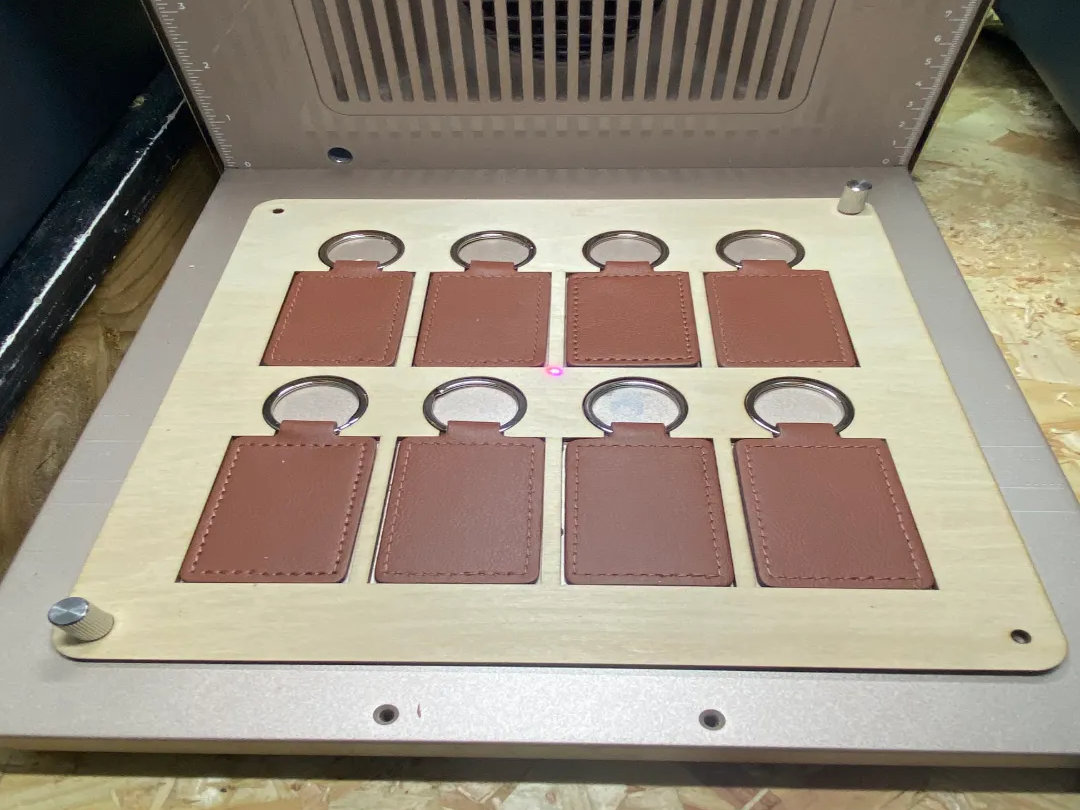
F2 Ultra UV - X8 Lederette / PU Leder-Schlüsselanhänger JIG


Schlüsselanhänger-Display


15 x 30 mm runde Stanz-Leervorrichtung

Dogtag-Multijob-Jig


Templete-Jig für abgerundetes Holzrechteck

Schablone für Lederschlüsselanhänger


S1-40w Rechteckige Schlüsselanhänger-Vorrichtung


1 x 3 Zoll Namensschild-Ausrichtungsvorlage


Schwarzer ovaler Metall-Tag-Jig


xTool F1 – 30x55mm Rechteck-Schlüsselring-Jig