รายงาน
![[Laser cut and engrave] Laser Cut Wooden Christmas Eve Ornament with Santa and Reindeer](https://storage-us.atomm.com/resource/xtool/community/attachment/xtool-community/2c6db75b-59dc-4e9d-9e73-900b347db6ca.jpg?x-oss-process=image/resize,w_1200,h_900,limit_0/interlace,1/format,webp/auto-orient,1)
![[Laser cut and engrave] Laser Cut Wooden Christmas Eve Ornament with Santa and Reindeer](data:image/png;base64,iVBORw0KGgoAAAANSUhEUgAAAAoAAAAKCAYAAACNMs+9AAAAAXNSR0IArs4c6QAAABdJREFUKFNjZCASMBKpjmFUId6QIjp4AAppAAuXjCs4AAAAAElFTkSuQmCC)
![[Laser cut and engrave] Laser Cut Wooden Christmas Eve Ornament with Santa and Reindeer](https://storage-us.atomm.com/resource/xtool/community/attachment/xtool-community/2c6db75b-59dc-4e9d-9e73-900b347db6ca.jpg?x-oss-process=image/resize,w_200,h_150,limit_0/interlace,1/format,webp/auto-orient,1)
![[Laser cut and engrave] Laser Cut Wooden Christmas Eve Ornament with Santa and Reindeer](https://storage-us.atomm.com/resource/xtool/community/attachment/xtool-community/eea2ff64-af3e-47dd-9069-d3bfb7a5da04.jpeg?x-oss-process=image/resize,w_200,h_150,limit_0/interlace,1/format,webp/auto-orient,1)
![[Laser cut and engrave] Laser Cut Wooden Christmas Eve Ornament with Santa and Reindeer](https://storage-us.atomm.com/resource/xtool/community/attachment/xtool-community/774af9ce-edb1-4181-bc6c-891a16edb3d6.jpeg?x-oss-process=image/resize,w_200,h_150,limit_0/interlace,1/format,webp/auto-orient,1)
เครื่องประดับคริสต์มาส
 คำแนะนำ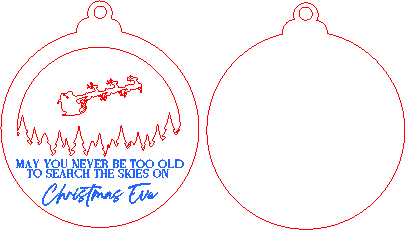
Christmas Ornament Christmas Eve
.xcs
แสดง 1 เพิ่มเติม
สถานการณ์การใช้งาน
การประมวลผลเลเซอร์
เครื่องจักรและโมดูล

xTool F1
2W, 10W
xTool F1 Ultra
20W
xTool F2
2W, 10W, 20W
xTool F2 Ultra
40Wเข้ากันได้ · 10
วัสดุที่ใช้

1/8"(3mm) Basswood Plywood
99
1281
คำแนะนำ
1
ขั้นตอน1
วิธีสร้างเครื่องประดับคริสต์มาสโดยใช้เครื่องเลเซอร์ xTool
1 การตัดและการแกะสลัก:
ตัดและแกะสลักเครื่องประดับทั้งหมดโดยใช้ xTool F1 บนแผ่นไม้เบสวูดขนาด 3 มม. ตรวจสอบให้แน่ใจว่าได้ใช้การตั้งค่าที่ถูกต้องสําหรับการตัดที่สะอาดและการแกะสลักโดยละเอียด
2. การทาสีชิ้นส่วน
หลังจากตัดแล้ว ให้ทาสีชิ้นส่วนพื้นหลังและชิ้นส่วนซานตาคลอสแยกกัน ปล่อยให้สีแห้งสนิทก่อนประกอบ
3. การประกอบ
เมื่อชิ้นส่วนที่ทาสีทั้งหมดแห้งแล้ว ให้ติดกาวชั้นต่างๆ เข้าด้วยกันอย่างระมัดระวังเพื่อสร้างเครื่องประดับขั้นสุดท้าย ตรวจสอบให้แน่ใจว่าแต่ละชิ้นอยู่ในแนวที่ถูกต้องก่อนที่กาวจะเซ็ตตัว
4. สัมผัส
สุดท้ายหากต้องการ ให้เพิ่มริบบิ้น เชือก หรือรายละเอียดการตกแต่งใดๆ เพื่อแขวนเครื่องประดับบนต้นคริสต์มาส
ความคิดเห็น