









































Zgłoś
![[Laser cut and engrave] Laser Cut Graduation Keychains Congrats Class of 2025](https://storage-us.atomm.com/resource/xart/result/12720/bf74b9af-e8fe-496f-91b7-58a10ca50115.png?x-oss-process=image/resize,w_1200,h_900,limit_0/interlace,1/format,webp/auto-orient,1)
![[Laser cut and engrave] Laser Cut Graduation Keychains Congrats Class of 2025](data:image/png;base64,iVBORw0KGgoAAAANSUhEUgAAAAoAAAAKCAYAAACNMs+9AAAAAXNSR0IArs4c6QAAABdJREFUKFNjZCASMBKpjmFUId6QIjp4AAppAAuXjCs4AAAAAElFTkSuQmCC)
![[Laser cut and engrave] Laser Cut Graduation Keychains Congrats Class of 2025](https://storage-us.atomm.com/resource/xart/result/12720/bf74b9af-e8fe-496f-91b7-58a10ca50115.png?x-oss-process=image/resize,w_200,h_150,limit_0/interlace,1/format,webp/auto-orient,1)
![[Laser cut and engrave] Laser Cut Graduation Keychains Congrats Class of 2025](https://storage-us.atomm.com/resource/xtool/community/attachment/xtool-community/5ac177eb-3bc1-47c0-8f07-95108973c03c.jpg?x-oss-process=image/resize,w_200,h_150,limit_0/interlace,1/format,webp/auto-orient,1)
![[Laser cut and engrave] Laser Cut Graduation Keychains Congrats Class of 2025](https://storage-us.atomm.com/resource/xtool/community/attachment/xtool-community/7c56498c-f737-4a17-8f48-f7d0b74ded55.jpg?x-oss-process=image/resize,w_200,h_150,limit_0/interlace,1/format,webp/auto-orient,1)
Breloczki do graduacji
 Instrukcja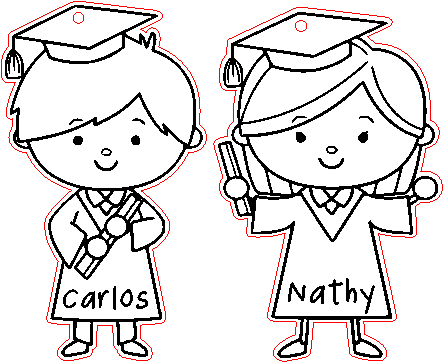
graduationkeychains-MQP
.xcs
Scenariusz zastosowania
Przetwarzanie laserowe (20min)
Maszyna i moduł

xTool M1
10WKompatybilne · 9
Materiał użyty

Płyta MDF 1/8" (3mm)
47
528
Informacja
by uczcić i pamiętać ważne osiągnięcie...
Instrukcja
1
Krok1: Projektowanie
Podgląd
Podgląd
Podgląd
5 More images
Pobierz darmowe wektory z internetu, obrysuj 2 obrazy
Dodajkontur 1
Usuń wektor kompozytowy mojego konturu, aby uwolnić części wewnętrzne
Usuń części wewnętrzne
Dodałem czerwony kolor do tego konturu, aby odróżnić grawer od cięcia.
Umieść dwa obrazki w obrycie, dodaj
dokażdego obrazka okrąg o średnicy 1,8 sekundy, aby zawiesić breloczek
2
Krok2: Grawerowane

Podgląd
materiału, który wybrałem jako MDF, wolę wybrać tylko grawerowanie, a potem sprawdzić, czy dodać kolejny przejście
3
Krok3: Cięcie i składanie

Podgląd

Podgląd
Po nagraniu, bez przesuwania projektu, wybieram cięcie.
Czyściłem go chusteczką i alkoholem izopropylowym i to wszystko, po czym przystąpiłem do położenia okucia na breloczku
Komentarze




