

As xTool keeps growing and evolving, some issues may occur and affect the user experience. To bring you better service, we will always identify the problems and solve them. Your feedback is always valued and welcome.
Now let’s get started!
Important Notice for D1 Pro users:
The software “Laserbox basic V1.3.0” can only support D1. Do not use this software to control your D1 Pro.
*Please go to the following links to download the software “xTool Creative Space”.
For Windows:
For Mac:
What we have solved
Project File Opening Error
In beta 4, if you tried to open a local XCS project file without XCS software opened, the canvas showed nothing. Now it can be opened correctly.
RA2 Pro for M1 Machine [Hardware]
Something good about M1 machine: Now it can support RA2 Pro.
What will be added
Personalized Parameters
Except the default materials, there’s no recommended parameter for other materials, and you can not save personalized parameters.
To improve user experience, we plan to add a new function that you can save personalized parameters.
Hot Keys
More hot keys will be added to XCS software. At that time, you can easily switch functions when designing.
Personalize Processing Sequence
Currently, the elements on canvas will be processed in the default order of the system. It may cause unexpected problems sometimes.
In the future, you can set the sequence of processing.
Vector Outline
Outline will be able to set for vector graphics.
Layer Mangement
Layer management function will be introduced to XCS.
What will be fixed/optimized
M1 Imaging Issue
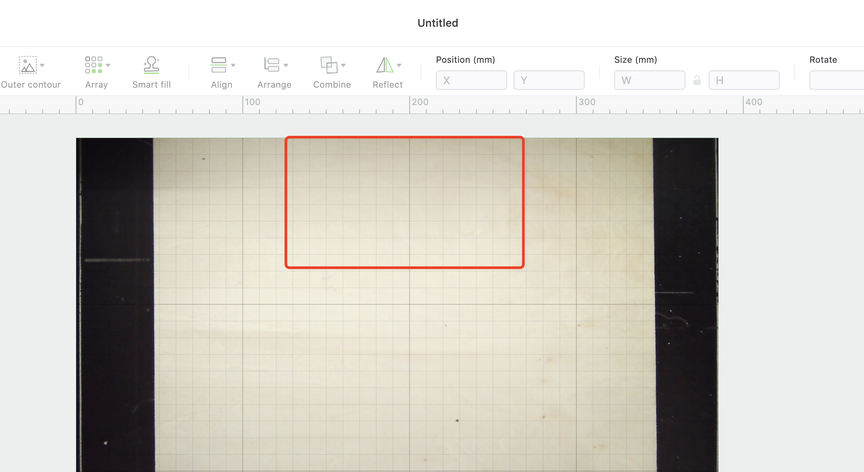
When using M1 machine to process, due to the placement of the camera, the imaging on XCS is not in accord with the actual position.
Currently, we suggest placing the materials on this coordinate(see the following picture) to minimize the deviation.
Function Ambiguity
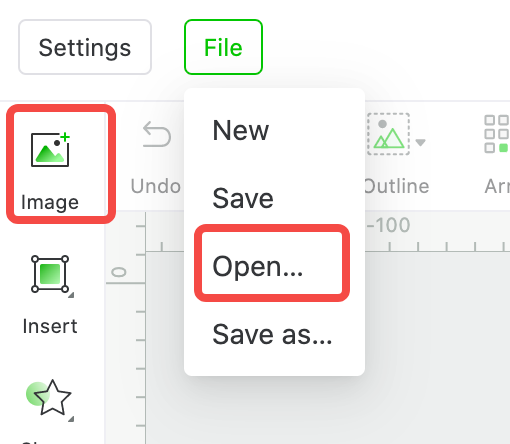
On the XCS software interface, the functions “Image” and “File-Open” are easy to confuse with each other. We will make them more understandable to use.
*Please note that they stand for the following usage.
Image: To add images on canvas.
Open…: To open a local project file.
Size Deviation When Engraving
In some cases, the actual size of an engraved item doesn’t accord with the design size.
SVG Format Graphics Importing Issue
When some SVG format graphics are imported to canvas, they will show incorrectly.
To be determined
LightBurn Support of M1
As we all know, camera related function is the selling point for M1, and we believe it’s more user friendly for beginners in laser engraving. So the transport protocol we chose to embed in our firmware allows faster photo transmission.
However, the transport protocol that LightBurn use will not support that. We will keep communicating with LightBurn to find the best solution to this issue.
In the meantime, we will keep improving XCS, so you can use XCS as an alternative.
That’s all for Vol.1. If you have any suggestions, please feel free to leave a comment.