
Ein Foto in ein Häkelmuster zu verwandeln, kann überraschend herausfordernd sein, besonders wenn das Bild detaillierte Gesichter, filigrane Hintergründe oder subtile Farbübergänge zeigt. Viele Schöpfer haben Schwierigkeiten, diese komplexen visuellen Elemente in ein Format zu übersetzen, das für Garn, Maschen und Raster funktioniert. Hier machen die heutigen Werkzeuge einen echten Unterschied. Mit dem Atomm Crochet Pattern Generator aus dem Bild kannst du sofort die Lücke zwischen Inspiration und einem funktionierenden Muster überbrücken. Die fortschrittliche KI kann dein Bild interpretieren, Formen vereinfachen und sie in nahtfertige Designs umwandeln, denen du mit Sicherheit folgen kannst. In diesem Leitfaden zeigen wir Ihnen genau, wie Sie ein Bild in ein Häkelmuster umwandeln können – egal, ob Sie individuelle Geschenke, Porträtdecken oder einzigartige Faserkunstprojekte anfertigen.
Wie man ein Häkelmuster aus einem Bild erstellt (Schritt-für-Schritt-Anleitung)Folgen
Sie dieser Schritt-für-Schritt-Anleitung, um Ihre Lieblingsbilder in wunderschöne, handgemachte Häkelprojekte zu verwandeln.
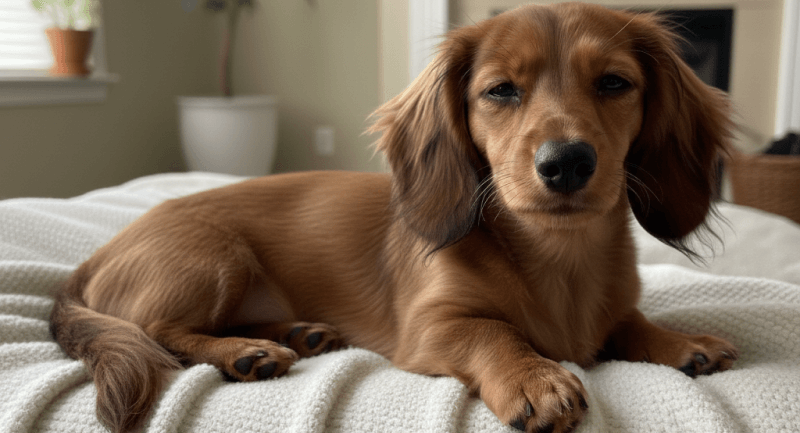
1. Wählen Sie das richtige Fotostart
,indem Sie ein klares, kontrastreiches Bild mit einfachen Formen und definierten Kanten auswählen. Fotos mit zu vielen Schatten oder überladenen Hintergründen können den Häkelmustergenerator mit dem Bild verwirren, was zu unklaren Maschenführern führt. Die Wahl des richtigen Fotos zu Beginn sorgt später für ein saubereres und genaueres Muster.
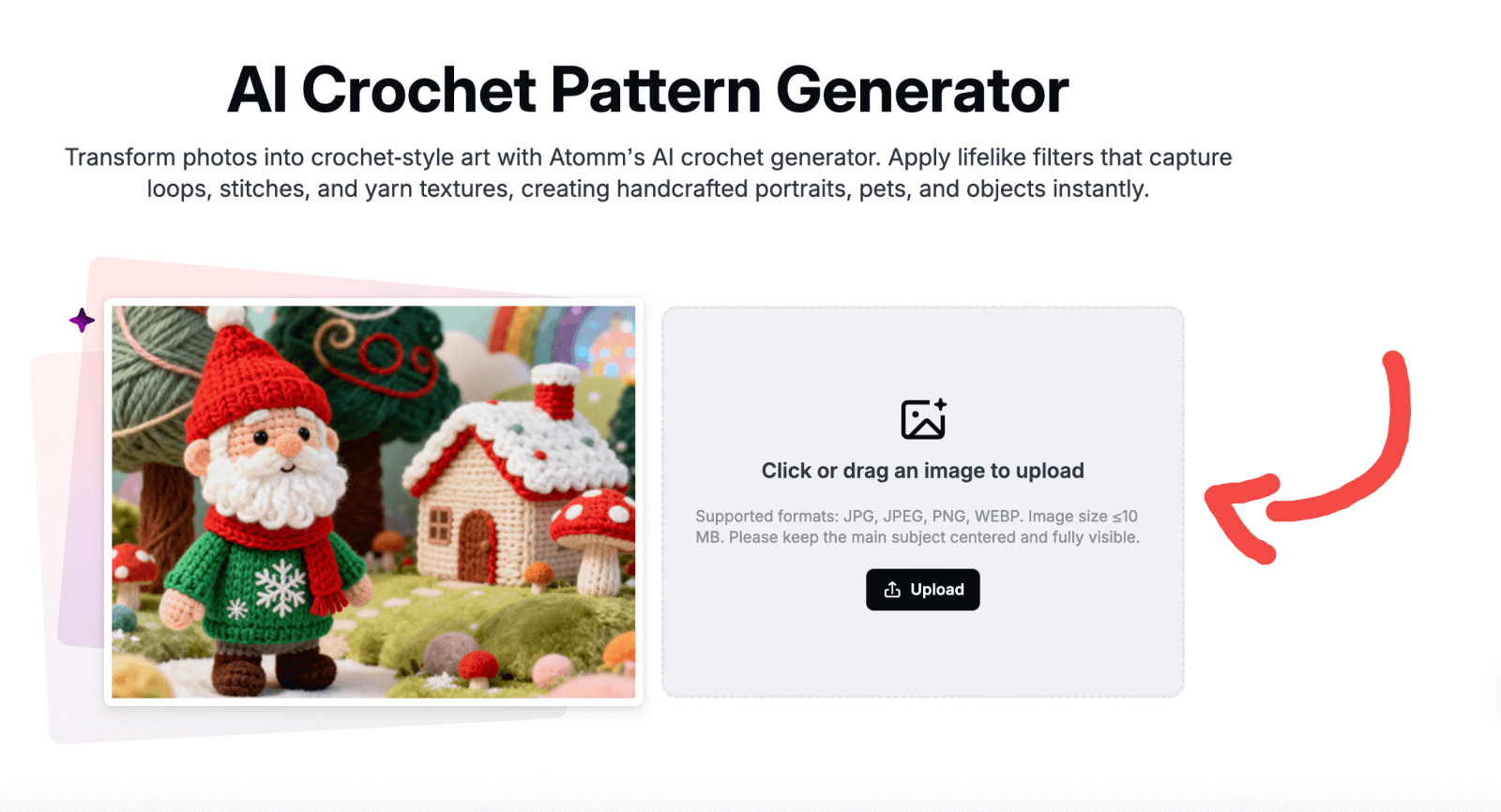
2. Laden Sie das Bild hoch Öffnen
Sie den Atom Crochet Pattern Generator hoch und laden Sie Ihr Bild im JPG- oder PNG-Format hoch. Achte darauf, dass die Datei nicht übermäßig groß ist – sehr hochauflösende Bilder können zu detaillierten Rastern führen, die als Häkelmuster schwerer zu folgen sind.
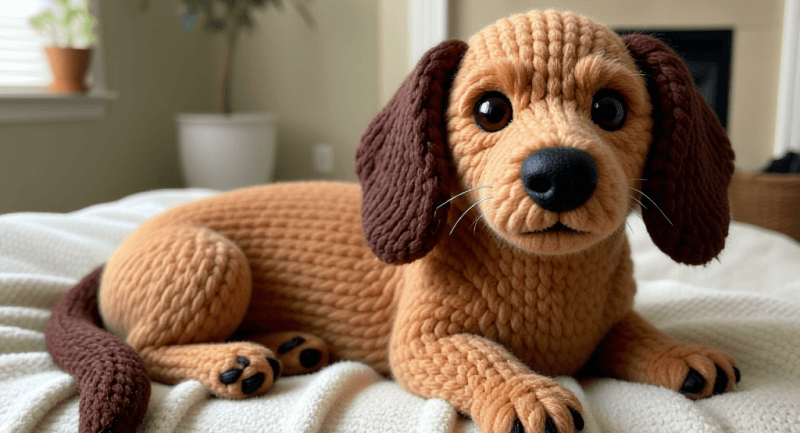
3. Erzeugen Sie das Muster
Nach dem Hochladen analysiert die KI das Bild automatisch und interpretiert Farben, Formen und Kontraste. Diese Elemente werden dann in ein häkelartiges Raster umgewandelt und das Bild in stickbare Abschnitte vereinfacht. Dieser automatisierte Schritt spart Stunden manueller Schnittzeichnung und sorgt für eine konsistente Maschenzuordnung.
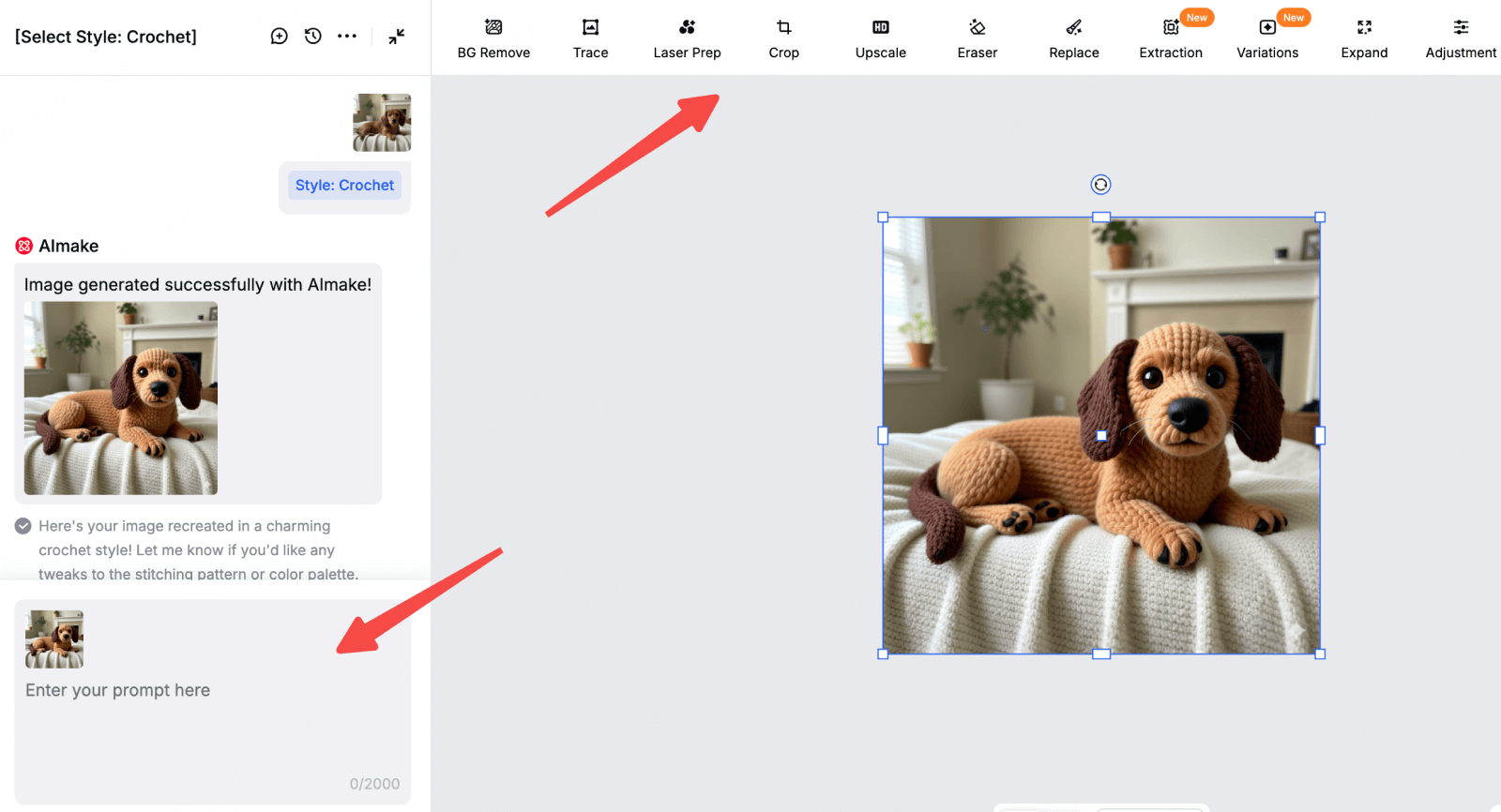
4. Überprüfen und verfeinern
Überprüfen Sie das generierte Muster sorgfältig zur Klarheit. Wenn bestimmte Bereiche, wie Gesichtszüge, Umrisse oder kleine Objekte, unklar erscheinen, können Sie das Bild vor der Regenerierung des Musters verfeinern. Werkzeuge wie die Bildverarbeitungsfunktionen von AImake helfen dabei, den Kontrast zu verbessern und Hintergründe zu reinigen oder Details zu schärfen, sodass das finale Häkeldiagramm leicht nachvollziehbar ist.
5. Herunterladen
Wenn Sie mit dem Muster zufrieden sind, laden Sie es als PNG-Datei herunter. Das Speichern einer digitalen Kopie stellt sicher, dass Sie hineinzoomen können, um Details zu überprüfen oder ein Backup zu machen, falls Sie das Design später ändern möchten.
6. Drucken oder mit dem Häkeln beginnen (plus andere Verwendungen)
Du kannst das Muster drucken und als traditionelle Maschanleitung verwenden oder das generierte Bild vorschauen, um zu visualisieren, wie das fertige Häkelstück aussehen wird – hilfreich für Decken, Porträts oder individuelle Designs. Manche Kreativen drucken das Muster auch auf Kleidung oder Accessoires als einzigartige Bastelvorlage. Wenn du mit dem Ergebnis zufrieden bist, kannst du das generierte Bild, dein Muster und deinen Prozess in den sozialen Medien teilen, um andere Designer zu inspirieren.
Beste Verwendungsmöglichkeiten für einen Mustermacher zum Häkeln:
Ein Bild-zu-Häkel-Schnittmacher ist nicht nur hilfreich, um Bilder in Maschendiagramme umzuwandeln, sondern eröffnet auch eine Vielzahl kreativer Möglichkeiten. Egal, ob Sie ein handgemachtes Projekt planen, Farbkombinationen testen oder vorschauen, wie ein Design in Garn aussehen wird – diese Werkzeuge bieten visuelle Anleitung, die den gesamten Bastelprozess vereinfacht.
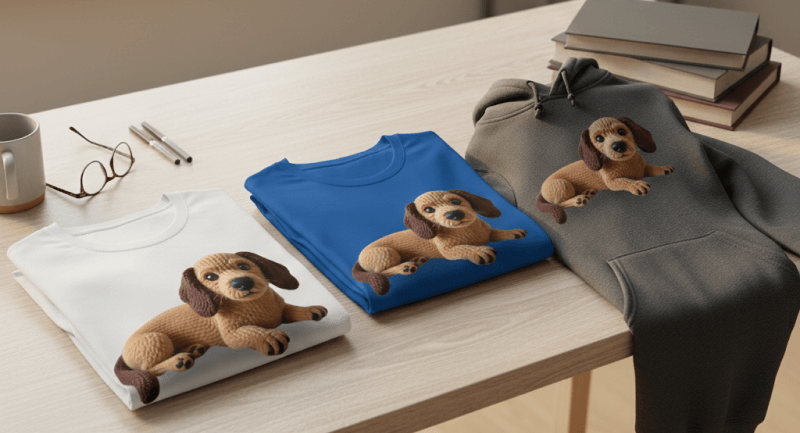
Gedruckt auf Kleidung oder Canvas-Taschen
Ihre generierten Häkelstil-Bilder können direkt auf Alltagsgegenstände gedruckt werden, von T-Shirts, Hoodies und Canvas-Tragetaschen bis hin zu dekorativen Aufnähern, die genähte Symbole wie Herzen oder Sterne nachahmen. Sie können sogar das Haustierfoto eines Kunden in ein dauerhaftes "für immer"-Häkelporträt auf Leinwand verwandeln und so ein stilvolles, hypoallergenes Geschenk anbieten. Entdecken Sie weitere Möglichkeiten, Ihre Designs in unserer Print Projects Kollektion zu präsentieren, in der Sie Inspiration für Kleidung, Accessoires und individuelle Andenken finden.
Farbplanung
Viele Hersteller verwenden das Werkzeug, um fertige Farbpaletten aus dem KI-generierten Muster zu extrahieren. Das hilft Ihnen, die Garntöne genauer abzustimmen, Farbüberschneidungen zu vermeiden und Ihr Häkelprojekt selbstbewusst zu planen.
Tapestry / Graphghan-Referenz
Für Tapestry-Häkel- und Graphghan-Projekte bietet der Pattern Maker eine klare, rasterbasierte visuelle Referenz. Jeder Block hilft Ihnen, Farbwechsel und Stichanzahl zu verfolgen, sodass Ihr fertiges Stück dem Originalbild so nah wie möglich bleibt.
Mockups für Amigurumi
Du kannst das generierte Bild auch als Mockup verwenden, um Formen, Proportionen und Farben vorzuschauen, bevor du Amigurumi häkelst. Das hilft, Designprobleme frühzeitig zu erkennen und gibt dir eine klarere Vorstellung davon, wie dein Plüschcharakter aussehen wird.
3 Tipps für das perfekte Häkelmuster aus Fotos
: Ein Foto in ein Häkelmuster zu verwandeln ist mit dem richtigen Ansatz einfach. Ein Häkelmustergenerator von Image macht den Prozess schnell und wirkungsvoll, und ein paar einfache Tipps helfen dabei, dass Ihr Design klar, detailliert und nahtfertig wird.
1. Wählen Sie hochwertige Bilder
Klare, hochauflösende Fotos mit starkem Kontrast funktionieren am besten. Vermeiden Sie verschwommene oder überladene Hintergründe, da die KI Details falsch interpretieren könnte. Einfache, gut beleuchtete Bilder helfen dem Häkelmuster-Generator aus dem Bild, Formen und Farben genauer einzufangen und den Bedarf an späteren Anpassungen zu verringern.
2. Vereinfachen vor der Erstellung
Wenn Ihr Bild komplex ist, sollten Sie vor dem Hochladen wichtige Bereiche beschneiden oder verbessern. Sich auf das Hauptthema zu konzentrieren und Ablenkungen zu beseitigen, kann ein saubereres, handhabbareres Muster erzeugen. Dieser Schritt macht es leichter, dem Maschenraster zu folgen, besonders bei Teppichhäkel- oder Graphghan-Projekten.
3. Iterieren Sie für Klarheit
Wenndas erste Ergebnis zu "unscharf" aussieht oder keine klare Nahtdefinition aufweist, versuchen Sie, das Bild mit kreativen Eingaben neu zu bearbeiten. Das Hinzufügen von Schlüsselwörtern wie "dickes Garn" oder "Makrofotografie" kann helfen, dass der Häkelmustergenerator aus dem Bild schärfere, definiertere Raster erzeugt, was ein klareres und leichter nachvollziehbares Muster ermöglicht.
FAQs zum Crochet Pattern Generator von Image
Erzeugt dieses Tool ein geschriebenes Reihen-für-Zeilen-Muster (PDF)?
Derzeit konzentriert sich das Tool darauf, visuelle Häkelkunst und "Musterstile" zu generieren, statt auf schriftliche Textanweisungen (wie "Reihe 1: SC 10, Inc"). Es eignet sich am besten für visuelle Inspiration, Farbkartierung und zur Erstellung druckfertiger Häkelästhetik.
Sind Häkelmuster-Generatoren aus dem Bild für Anfänger geeignet?
Absolut. Diese Werkzeuge vereinfachen die Erstellung von Mustern und erleichtern es Anfängern, Rastern zu folgen, ohne Bilder manuell in Stiche übersetzen zu müssen. Sogar komplexe Designs werden mit KI-Unterstützung zugänglich.
Kann ich generierte Häkelmuster kommerziell verwenden?
Ja, du kannst Muster verwenden, die mit einem Häkelmustergenerator aus dem Bild erstellt wurden, für kommerzielle Projekte, wie zum Beispiel den Verkauf fertiger Artikel oder Print-on-Demand-Produkte, solange du die Rechte am Originalbild hast. Die KI erzeugt das Muster, überträgt aber kein Urheberrecht für urheberrechtlich geschütztes Material, daher sollten Sie immer die richtigen Genehmigungen sicherstellen.
bereit, dein nächstes Projekt zu visualisieren?
Verschwende keine Stunden oder Wolle damit, zu raten, wie dein Foto in Maschen umgesetzt wird. Mit dem Atomm Häkelmustergenerator aus dem Bild kannst du jedes Bild sofort in ein klares, maschen-für-maschen-Muster verwandeln, das bereit ist, deine kreative Vision zum Leben zu erwecken.
Indem Sie genaue, gitterbasierte Häkelmuster direkt aus Ihren Bildern erstellen, können Sie mit Farben experimentieren, das endgültige Design vorschauen und sogar Muster drucken, um es einfach zu referenzieren. Das Werkzeug ist perfekt für Anfänger und erfahrene Häkeler gleichermaßen und hilft Ihnen, jedes Mal professionell aussehende Ergebnisse zu erzielen.
Fang an zu kreieren! Verwandle deine Lieblingsfotos noch heute mit dem Atomm Crochet Pattern Generator aus dem Bild in wunderschöne, greifbare Häkelkunst.